






Definition and Meaning
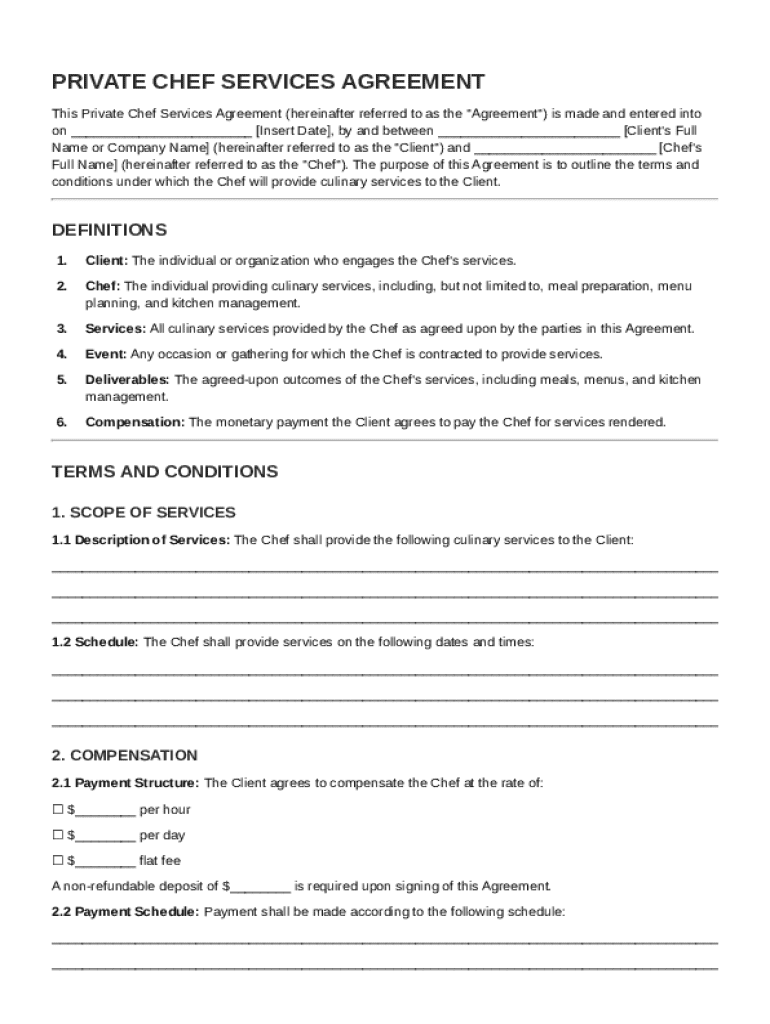
The "Private Chef Contract Template" is a formal document that outlines the terms and conditions under which a private chef will provide culinary services to a client. This agreement stipulates the various elements involved in the professional relationship, encompassing details such as services to be provided, payment arrangements, and responsibilities. It is essential for setting clear expectations and ensuring a mutual understanding between the chef and client. The template serves as a customizable framework, allowing modifications to suit specific client-chef agreements, ensuring that both parties are aligned on key commitments and deliverables.
Components of the Agreement
- Scope of Services: Specifies the type of services the chef will provide, such as meal prep, catering for events, or bespoke dietary plans.
- Compensation Structure: Details the payment terms, including hourly rates, flat fees, or per-project pricing. It may also cover provisions for overtime or additional services.
- Responsibilities: Outlines the duties of the chef, such as menu planning, ingredient sourcing, or kitchen maintenance, and what is expected from the client, like providing kitchen access or specific cooking equipment.
Practical Use
In practice, this contract template is employed by private chefs to formalize engagements with clients. It serves as an essential tool for preventing misunderstandings and protecting interests by clearly documenting each party's obligations.
How to Use the Private Chef Contract Template
Using the Private Chef Contract Template involves a few straightforward steps that facilitate the creation of a clear and comprehensive agreement. To maximize its effectiveness, it's important to follow the structured approach outlined below:
- Download the Template: Obtain the template from a reliable source that offers customizable contract documents.
- Review and Customize: Go through the document and adjust the language to fit the specifics of your agreement. This includes filling in personal details, service descriptions, and payment terms.
- Consult Legal Advice: Consider seeking legal advice to ensure that your customizations align with current laws and adequately protect your interests.
- Finalize the Agreement: Once reviewed and agreed upon by both parties, finalize the contract by making sure all provided information is correct and complete.
Modification Tips
- Tailor to Specific Needs: Use the blank fields and customizable sections to include particular terms or services unique to the client arrangement.
- Clarify Legal Obligations: Ensure compliance with local regulations and any specific industry requirements that apply to private culinary services.
Contextual Setup
Private chefs and clients can benefit from customizing the template to establish a shared understanding of how services will be delivered and accounted for, thereby promoting a harmonious professional relationship.
Key Elements of the Private Chef Contract Template
A well-structured Private Chef Contract Template should encompass several key elements to ensure clarity and coverage of all crucial aspects of the arrangement:
- Party Identification: Clearly identifies the client and the chef, including legal names and contact information.
- Duration of Service: Specifies the timeframe over which services will be rendered, possible scheduling, and conditions for renewal or termination.
- Confidentiality Obligations: Outlines any non-disclosure terms that protect sensitive information shared during the service.
- Liability and Insurance: Defines the responsibilities for insurance coverage and how liabilities are managed in case of accidents or damages.
- Governing Law: States the jurisdiction whose laws will govern the contract in case of a dispute.
Importance of These Elements
Including these components ensures that both parties have a comprehensive understanding of the legal and practical elements of their agreement, minimizing the risk of disputes and fostering trust.
Legal Use of the Private Chef Contract Template
Understanding the legal framework surrounding the Private Chef Contract Template is crucial. Compliance with legal standards ensures the contract serves as a protective measure for both parties involved:
- Adherence to U.S. Law: The contract must conform to applicable federal and state laws in the U.S., covering areas like employment standards and health regulations.
- Legally Binding Nature: Once signed, the contract becomes a legally enforceable document, so both parties must ensure they are capable and authorized to enter into such agreements.
- Amendment Procedures: Procedures for modifying the agreement should be detailed, specifying how changes can be mutually agreed upon and documented.
Real-World Application
A typical scenario might involve a private chef working with a high-profile client who requires discretion and specific culinary skills. By leveraging a legal framework, both parties can have confidence in their engagement.
Who Typically Uses the Private Chef Contract Template
The Private Chef Contract Template finds its application across various segments within the culinary and event management sector:
- Independent Chefs: Professionals who offer personal culinary services on a freelance basis.
- Event Planners: Coordinators who hire chefs for large scale catering at corporate or personal events.
- Culinary Agencies: Businesses that match chefs with clients and require a standardized contract to streamline engagements.
- High-Net-Worth Individuals: Clients who hire chefs for bespoke in-home dining experiences and require formal agreements to cover service details.


Use Case Scenarios
In each case, the contract serves as a crucial reference point that delineates roles, responsibilities, and expectations, ensuring smooth operational interaction and service delivery.
Steps to Complete the Private Chef Contract Template
Completing the Private Chef Contract Template involves a series of logical steps aimed at ensuring accuracy and completeness:
- Fill in Initial Details: Input contact details and personal information for both the chef and the client.
- Detail the Service Scope: Specifically describe the services to be provided, including any special requests or dietary considerations.
- Define Payment Terms: Clearly set out how and when payments will be made, including any deposit requirements or payment schedules.
- Set Terms and Conditions: Write out any terms such as confidentiality, liability, insurance requirements, and renewal or cancellation clauses.
- Review and Confirm: Both parties should carefully review the document to ensure understanding and agreement with all terms.
- Execute the Contract: Have both parties officially sign the document to execute the contract, making it enforceable.
Additional Considerations
Each step is essential for ensuring that the contract accurately reflects the terms agreed upon, thus preventing future conflicts. Always keep an open line of communication during the contract finalization process.
Important Terms Related to the Private Chef Contract Template
Grasping important terms within the contract ensures both parties understand the critical details involved:
- Indemnification: A provision in which one party agrees to compensate the other for any losses or damages incurred.
- Force Majeure: Refers to unforeseeable events that prevent contract fulfillment, such as natural disasters or other acts not in the control of either party.
- Breach of Contract: Occurs when either party fails to adhere to agreed terms, allowing for possible legal recourse by the other party.
- Notice Period: The time frame within which either party must give notice before terminating the contract.
Contextual Examples
For instance, a force majeure clause might protect a chef from being liable if a natural disaster impacts their ability to deliver services. Understanding such terms provides reassurance and clarity as services are rendered.
Software Compatibility
While the Private Chef Contract Template is primarily a physical document, knowing the compatible software can assist in drafting and sharing the contract digitally:
- DocHub: Facilitates direct editing, signing, and sharing of the template in various formats.
- Microsoft Word: Allows for comprehensive customization with user-friendly editing features.
- Google Docs: Ideal for collaborative efforts, enabling real-time edits and version tracking.
- Adobe PDF: Ensures compatibility and uniform appearance across platforms with secure, non-editable formats for final versions.
Advantages with DocHub
Utilizing DocHub in particular enables easy importing from cloud services, seamless updating, and signature collection, making it a preferred choice for professionals looking to streamline their contract processes.