






Key Elements of the Campaign Manager Contract Template
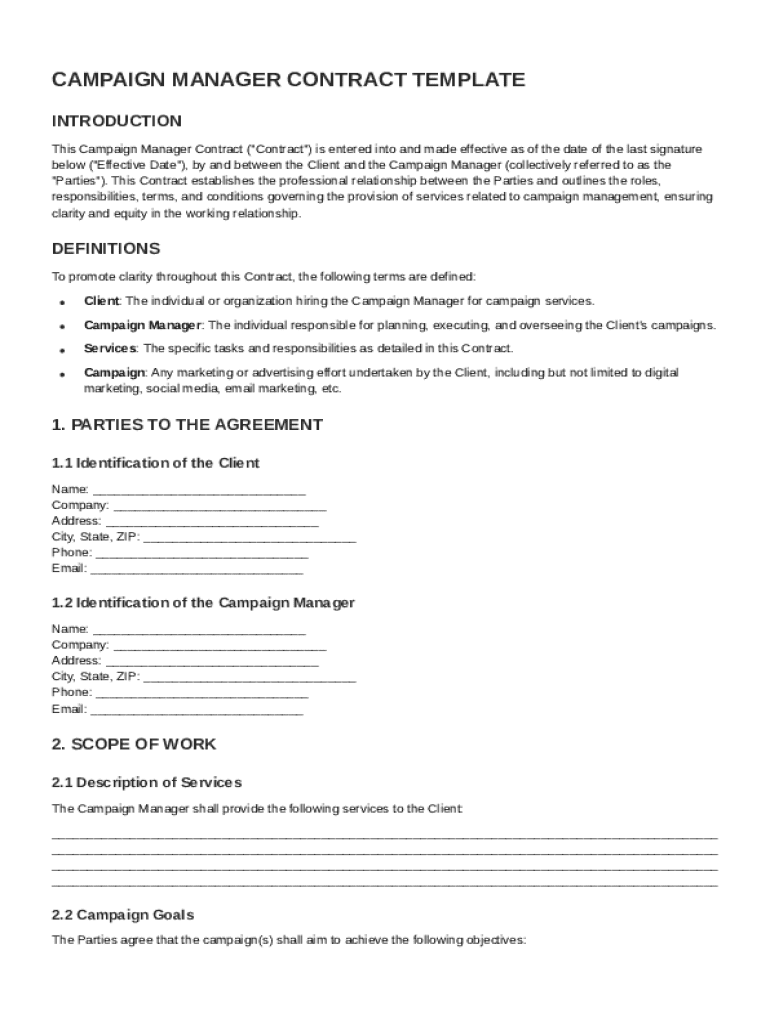
The Campaign Manager Contract Template is designed to establish a clear agreement between the client and the campaign manager. This document details the essential components, ensuring both parties understand their rights and responsibilities. Key elements typically found in this template include:
- Scope of Work: Clearly defines the tasks and responsibilities of the campaign manager. This includes managing advertising campaigns, coordinating with teams, analyzing performance, and any other duties specified by the client.
- Compensation Structure: Outlines how and when the campaign manager will be paid. This section includes details on the payment schedule, method of payment, and any performance bonuses or incentives.
- Confidentiality Obligations: Specifies the information that must be kept confidential by the campaign manager. This is crucial for protecting sensitive data and proprietary information.
- Intellectual Property Rights: Clarifies the ownership of creative works and intellectual property developed during the contract period. Typically, this ensures that all campaign materials belong to the client.
- Termination Conditions: Details the circumstances under which the contract may be terminated by either party. This includes notice periods and any penalties for early termination.
- Dispute Resolution Processes: Provides methods for resolving disputes, such as mediation or arbitration, to avoid litigation.
- Miscellaneous Provisions: Addresses any additional clauses that may be relevant, such as amendments, force majeure, and governing law.
Steps to Complete the Campaign Manager Contract Template
Filling out the Campaign Manager Contract Template involves several detailed steps to ensure all essential information is accurately captured.
- Review the Template: Begin by thoroughly reading the entire document to understand each section's requirements and implications.
- Customize the Scope of Work: Adapt the scope of work to reflect the specific tasks and responsibilities of the campaign manager.
- Negotiate Compensation: Discuss and agree upon the payment terms. This includes the base salary, bonuses, and any other financial arrangements.
- Define Confidentiality Terms: Clearly outline the type of information considered confidential and the obligations of the campaign manager to protect this information.
- Establish Intellectual Property Clauses: Ensure there is a mutual understanding regarding the ownership of content and materials produced.
- Agree on Termination Terms: Set clear conditions under which the contract can be ended, along with an agreed notice period.
- Implement Dispute Resolution: Choose a method for handling potential disputes effectively, ensuring both parties are satisfied with the approach.
- Finalize and Sign: After all sections are completed and agreed upon, both parties should sign the contract to formalize the agreement.
Who Typically Uses the Campaign Manager Contract Template
The Campaign Manager Contract Template is commonly used by businesses and individuals seeking to formalize agreements with campaign managers. It is particularly useful for:
- Advertising Agencies: To establish contractual terms with freelancers or contractors hired to manage specific campaigns.
- Corporations with Marketing Departments: For hiring campaign managers to handle ongoing or project-based marketing efforts.
- Independent Marketing Consultants: Who need to outline terms of engagement when working with multiple clients.
- Digital Marketing Firms: Requiring a standardized contract for campaign managers working on internet-based advertising efforts.
- Political Campaigns: To clarify the scope of responsibilities and expectations with campaign managers running electoral campaigns.


Importance of the Campaign Manager Contract Template
Utilizing the Campaign Manager Contract Template offers several advantages:
- Clarity and Transparency: Ensures that all parties fully understand their roles, responsibilities, and expectations, minimizing misunderstandings.
- Legal Protection: Provides a legally binding framework that protects both parties by outlining specific terms and conditions.
- Professional Relationships: Facilitates a professional basis for working relationships, promoting trust and cooperation.
- Risk Management: Helps manage risks by clearly delineating what happens in the event of disputes or contract terminations.
- Efficiency in Management: Streamlines the onboarding process for campaign managers by having a ready-made contract template.
Legal Use of the Campaign Manager Contract Template
The Campaign Manager Contract Template must comply with relevant laws and regulations to remain legally enforceable. Considerations include:
- Compliance with Labor Laws: Ensuring wages, working conditions, and hours comply with applicable federal and state labor laws.
- Inclusion of a Governing Law Clause: Specifying the jurisdiction under which the contract falls is critical for resolving legal disputes.
- Adherence to Confidentiality Regulations: This might include data protection laws relevant to the type of information handled.
- Incorporation of Non-Compete Clauses: If applicable, enforce non-compete agreements following local jurisdiction limitations.
- Consultation with Legal Experts: Before finalization, a legal professional should review the contract to ensure full compliance with U.S. law.
State-Specific Rules for the Campaign Manager Contract Template
While the Campaign Manager Contract Template serves as a universal guide, adjustments may be necessary based on state-specific regulations:
- Employment Classification Laws: Vary significantly between states, affecting how campaign managers are categorized as employees or independent contractors.
- Confidentiality Agreements: Different requirements for enforceability can influence how these clauses are structured in the contract.
- Mandatory Disclosures: Some states may require additional disclosures within the contract, such as those relating to wage conditions.
- Contract Termination Notices: State laws may dictate specific notice periods that must be included in the contract.
- Unique Campaign Regulations: Especially relevant in political campaigns, where additional state laws may impact how the contract can be structured.
Examples of Using the Campaign Manager Contract Template
Real-world scenarios where the Campaign Manager Contract Template plays a crucial role include:
- Marketing Campaign for New Products: A tech company hiring a campaign manager to oversee the launch of a new product line.
- Political Campaign Management: Contracting a campaign manager for strategizing and executing election campaign activities.
- Promotional Events Campaigns: A retail chain organizing a series of promotional events requiring a campaign manager to coordinate efforts across multiple locations.
- Brand Awareness Initiatives: A nonprofit engaging a campaign manager to increase brand visibility and manage donor outreach campaigns.
- Digital Marketing Launches: An e-commerce business hiring a specialist to manage digital ad campaigns across various platforms.
Versions or Alternatives to the Campaign Manager Contract Template
While the standard template serves many purposes, variations and alternatives exist to cater to different needs:
- Short-Term Engagement Contracts: Simplified for projects lasting only a few weeks or months.
- Freelancer Agreements: Tailored for campaign managers working on a freelance basis rather than as full-time employees.
- Non-Disclosure Agreements (NDAs): When additional confidentiality is required beyond the standard contract terms.
- Full-Service Marketing Contracts: Cover broader marketing roles beyond campaign management.
- Remote and International Contracts: Address specific considerations for campaign managers working remotely or in a global context.