



Here's how it works



How to use or fill out marriage license san bernardino ca with our platform

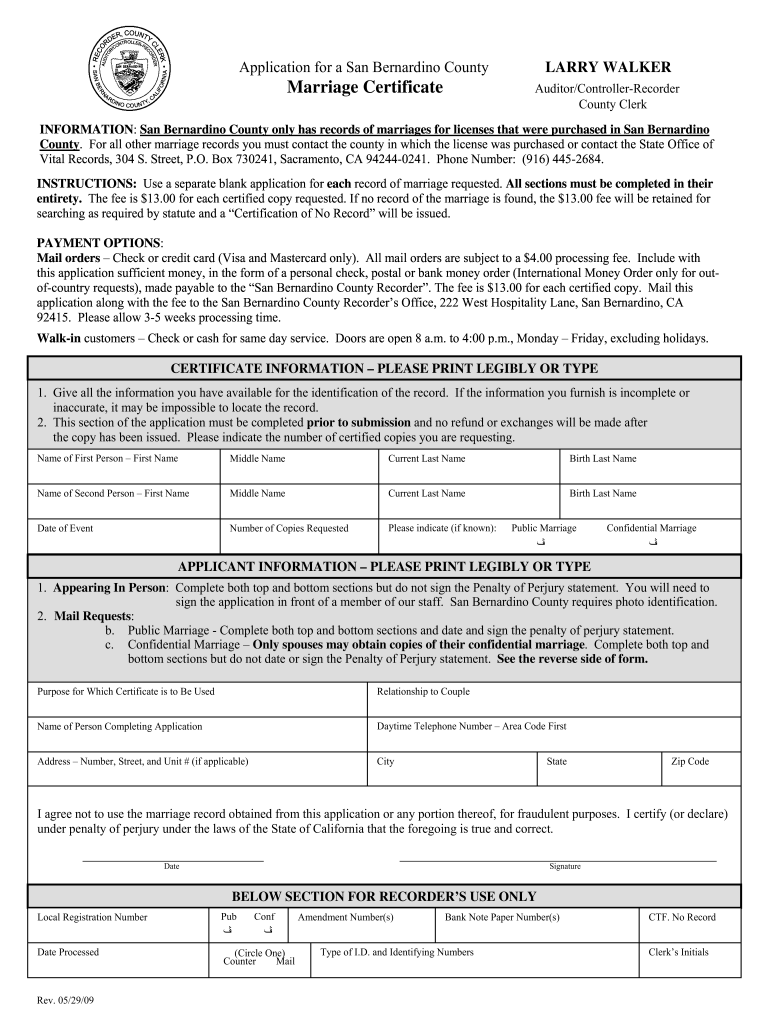
- Click ‘Get Form’ to open the marriage license application in the editor.
- Begin by filling out the 'Certificate Information' section. Provide all available details for both individuals, including first names, middle names, current last names, and birth last names. Ensure accuracy to avoid issues in locating the record.
- Indicate the date of the event and specify the number of copies requested. If applicable, check whether it is a public or confidential marriage.
- Next, complete the 'Applicant Information' section. If you are appearing in person, fill out both sections but do not sign until instructed by staff. For mail requests, ensure you sign and date the penalty of perjury statement.
- Provide your contact information including your name, daytime telephone number, and address. Confirm that you agree not to use the record for fraudulent purposes by signing at the bottom.
Start using our platform today to easily fill out your marriage license application for free!
It's free
See more marriage license san bernardino ca versions
| Versions | Form popularity | Fillable & printable |
|---|---|---|
| 2009 | 4.8 Satisfied (100 Votes) |
Got questions?
Can I sign my marriage license san bernardino county in electronic format?
According to eSignature laws, forms approved electronically have the same validity as those approved with pen and paper. You can eSign almost any business and private documentation. Four types of paperwork still demand handwritten signatures only - wills and testamentary trusts, court orders and other court forms, state statutes regulating divorce, adoption, or other family law, and notice of cancellation of utility services. If you follow the rules and utilize a secure and compliant software solution, like DocHub, you can eSign your marriage license san bernardino county without printing it.
Can I sign my san bernardino county marriage license while I edit it?
When you edit your san bernardino county marriage license with DocHub, you will not need to look for other software or services to eSign it. An electronic signature is a component of DocHub’s comprehensive editing toolset, which enables you to implement changes in your form without switching between platforms. Just complete your form, double-check the correctness of your data and place your electronic signature at the end to make it submission-ready in minutes.
Security and compliance
At DocHub, your data security is our priority. We follow HIPAA, SOC2, GDPR, and other standards, so you can work on your documents with confidence.
Learn more