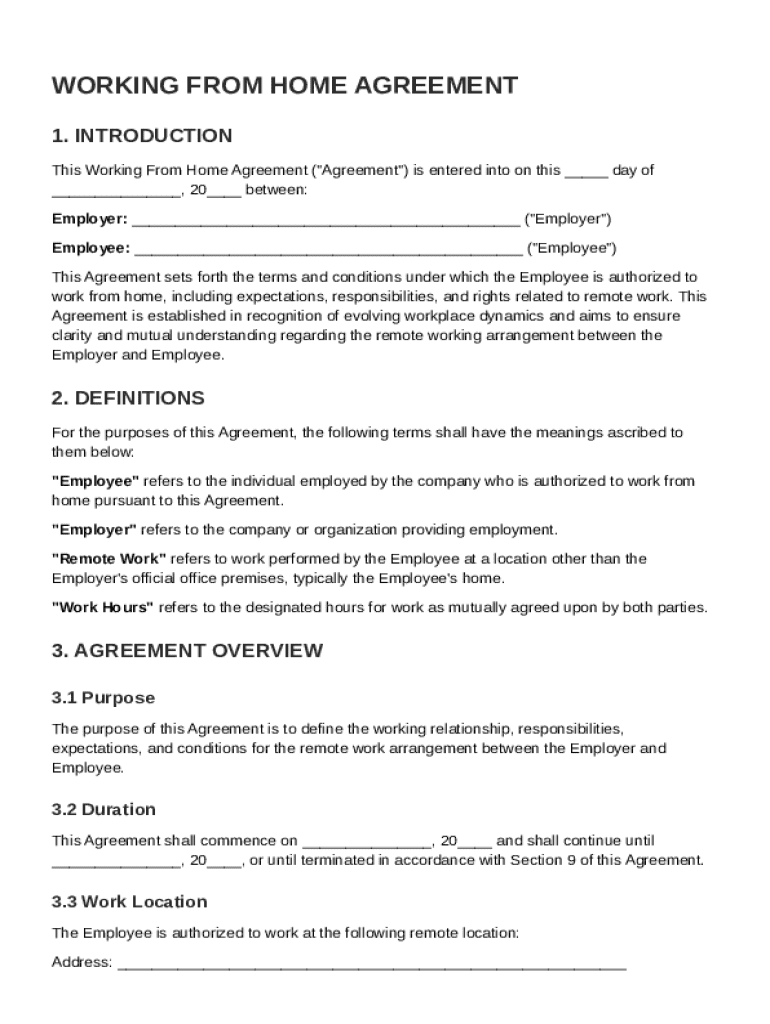







Definition and Meaning
A Working From Home Agreement Template is a formal document used to outline the terms and conditions of an employee’s remote work arrangement with their employer. The primary purpose is to create a mutual understanding of expectations and responsibilities for both parties, fostering a productive and compliant remote working environment. Essential elements include work performance metrics, communication protocols, and confidentiality requirements.
Essential Elements of the Agreement
- Work Performance: Clearly define productivity standards and evaluation criteria.
- Communication Protocols: Specify channels and frequency of communication to maintain effective collaboration.
- Confidentiality Requirements: Outline data protection measures and non-disclosure obligations to secure sensitive information.
Practical Overview
This template serves as a blueprint for establishing consistent and fair remote work policies, accommodating both full-time and part-time remote employees.
Steps to Complete the Working From Home Agreement Template
-
Identify Key Roles and Responsibilities: Clearly delineate who is responsible for different aspects of the work-from-home arrangement, ensuring both employer and employee have a shared understanding.
-
Define Equipment Provision: Specify which equipment and software the employer will provide to facilitate remote work, as well as any related maintenance or usage policies.
-
Establish Communication Guidelines: Agree upon the preferred communication tools and the expectations for response times to maintain efficient workflow.
-
Address Occupational Health and Safety: Ensure that the remote work environment complies with occupational health standards and that any risks are minimized.
-
Include Compliance with Company Policies: Reinforce that remote working does not exempt employees from adhering to company policies and procedures.
-
Review and Sign: Ensure both parties review all terms and affix their signatures to acknowledge agreement and understanding.
Additional Considerations
- Ensure templates are customizable to allow for specific job roles and departmental needs.
- Regularly review and update the agreement to reflect changing work conditions or new company policies.
Why You Should Use a Working From Home Agreement Template
Using a Working From Home Agreement Template ensures that all aspects of remote work are adequately addressed and documented, preventing misunderstandings and potential disputes.
Benefits
- Clarity: Provides a clear framework for responsibilities and expectations, enhancing communication.
- Legal Protection: Offers a documented reference that can provide legal protection for both parties.
- Consistency: Ensures uniformity across all remote working arrangements within the organization.
Real-world Scenarios
- In instances of dispute over work performance, the agreement can serve as a reference for resolving issues.
- Should there be any allegations of data breaches due to remote work, the agreement can help demonstrate predefined confidentiality measures.
Key Elements of the Working From Home Agreement Template
A comprehensive Working From Home Agreement Template comprises several key components essential for a detailed and precise arrangement:
Core Components
- Purpose of Agreement: Clearly state the objective and scope of the remote work arrangement.
- Eligibility Criteria: Define the criteria employees must meet to qualify for remote work, such as job role and performance history.
- Duration and Review: Set the duration of the agreement and establish regular review intervals to assess the arrangement's effectiveness.
Detailed Provisions
- Performance Metrics: Include quantifiable measures to assess productivity and output.
- Remote Work Schedule: Outline working hours, flexibility options, and any required availability times.
Legal Use of the Working From Home Agreement Template
The Working From Home Agreement serves a legal role in formalizing the remote work arrangement, ensuring compliance with labor laws and company policies.
Legal Considerations
- Compliance with Labor Laws: Ensure the agreement adheres to federal and state labor laws regarding remote work.
- Intellectual Property Rights: Address ownership rights of work produced during remote work, protecting both employer and employee interests.
Case Studies
- A tech company reduced disputes by integrating intellectual property clauses into their agreements, clearly defining rights related to creative work outputs from remote environments.
Who Typically Uses the Working From Home Agreement Template
The Working From Home Agreement Template is utilized by various stakeholders within an organization, from human resources departments to individual employees.


User Profiles
- Human Resources Professionals: Utilize the template to standardize remote work policies across the organization.
- Managers and Team Leaders: Use the template to set expectations and assess performance for remote team members.
- Employees: Reference the agreement to understand their rights and responsibilities when working remotely.
Software Compatibility and Integration with Digital Platforms
DocHub's Working From Home Agreement Template is designed to seamlessly integrate with various digital platforms, ensuring ease of use and accessibility.
Compatible Software
- Cloud Storage Services: Compatible with Google Drive, Dropbox, and OneDrive, enabling easy file sharing and collaboration.
- Document Editors: Works with popular formats, including PDFs, DOCs, and more, allowing for flexible document management.
Integration Benefits
- Enhances productivity by allowing direct import and export of documents from integrated platforms.
- Facilitates real-time collaboration, essential for dynamic remote work environments.
State-by-State Differences
Remote work agreements may have varying stipulations depending on the state in which the employee resides. Different jurisdictions might impose unique regulations affecting remote work.
Factors Influencing Differences
- State Labor Laws: Variations in labor regulations can impact acceptable work hours, mandated breaks, and overtime requirements.
- Tax Implications: State-specific tax obligations may differ for remote workers, affecting payroll handling within the agreement.
Considerations for Compliance
- Consult local regulations to ensure the agreement is in accordance with state-specific requirements.
- Stay updated on legal changes in different states to modify agreements as needed.
By addressing these elements comprehensively, the Working From Home Agreement Template can serve as a robust framework to ensure effective and compliant remote working arrangements tailored to diverse organizational needs.