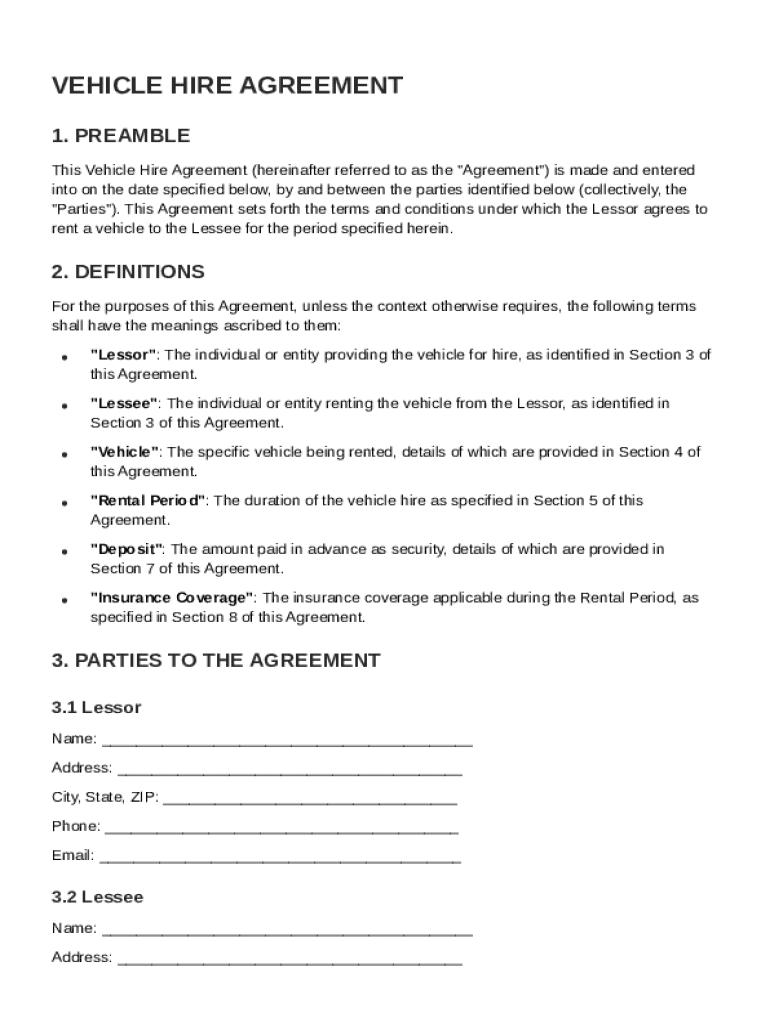







Definition & Meaning
The Vehicle Hire Agreement Template establishes the legal framework for renting a vehicle, detailing the responsibilities and rights of both the Lessor (owner) and Lessee (renter). By defining key terms and concepts, this agreement ensures a mutual understanding of the leasing conditions, including the vehicle's permitted usage, maintenance obligations, and termination policies. It provides a structured format to facilitate consistent and clear documentation of vehicle rentals.
Key Elements of the Vehicle Hire Agreement Template
- Parties Involved: Identifies the Lessor and Lessee, including contact information and any organizational details if companies are involved.
- Vehicle Details: Includes the make, model, year, and vehicle identification number (VIN) to precisely identify the vehicle being rented.
- Rental Period: Specifies the start and end dates of the rental agreement, outlining conditions for early termination or extensions.
- Fees and Payments: Details the rental cost, payment schedule, and any late payment penalties. This section may also include information on security deposits.
- Insurance Requirements: Outlines the insurance responsibility, indicating if the Lessor or Lessee provides coverage, including any required minimum coverage limits.
Steps to Complete the Vehicle Hire Agreement Template
- Review Definitions: Understand all terms and conditions specified in the agreement.
- Insert Contact Details: Fill in name, address, and contact information for both the Lessor and Lessee.
- Specify Vehicle Information: Enter the vehicle's make, model, year, and VIN.
- Set Rental Dates: Indicate the agreed-upon rental period, including start and end dates.
- Outline Financial Terms: Detail the rental fee, payment methods, and any additional costs or penalties.
- Define Insurance Obligations: Specify which party is responsible for insurance coverage and outline the coverage details.
- Sign the Agreement: Both parties must provide legally binding signatures to formalize the agreement.
Important Terms Related to Vehicle Hire Agreement Template
- Lessor: The party who owns the vehicle and leases it to another party.
- Lessee: The party who rents the vehicle from the Lessor.
- Security Deposit: An amount paid upfront by the Lessee to cover potential damages or unpaid fees.
- Permitted Use: Restrictions or conditions under which the Lessee may use the vehicle.
- Termination Clause: Procedures and conditions under which either party can terminate the agreement before the end date.
Legal Use of the Vehicle Hire Agreement Template
In the United States, the Vehicle Hire Agreement Template must comply with federal and state laws regarding contract formulation and execution. The agreement should be clearly written, with all terms expressly stated to protect both parties in case of disputes or legal issues. Electronic signatures on the agreement should comply with the ESIGN Act to ensure they are legally binding.
State-Specific Rules for the Vehicle Hire Agreement Template
Legal requirements for vehicle hire agreements can vary by state:
- California: Requires disclosure of specific consumer rights and restrictions on vehicle mileage overages.
- New York: Mandates clear disclosures about insurance requirements and any additional fees.
- Texas: Often requires less detailed agreements but still mandates disclosures about the rental terms and conditions.
Who Typically Uses the Vehicle Hire Agreement Template
This template is primarily used by:
- Car Rental Companies: Looking to provide short-term vehicle rentals to consumers.
- Businesses: Leasing vehicles for employee use on a temporary basis.
- Individuals: Renting vehicles for personal use over a defined period, such as during vacations or business trips.


Software Compatibility (TurboTax, QuickBooks, etc.)
While the Vehicle Hire Agreement Template is a legal document rather than a financial one, software that supports document handling and management, like QuickBooks or Google Workspace, can facilitate its storage and retrieval. DocHub's compatibility with various file formats ensures that the Vehicle Hire Agreement can be edited, shared, and signed across multiple platforms, increasing its usability in diverse digital environments.