
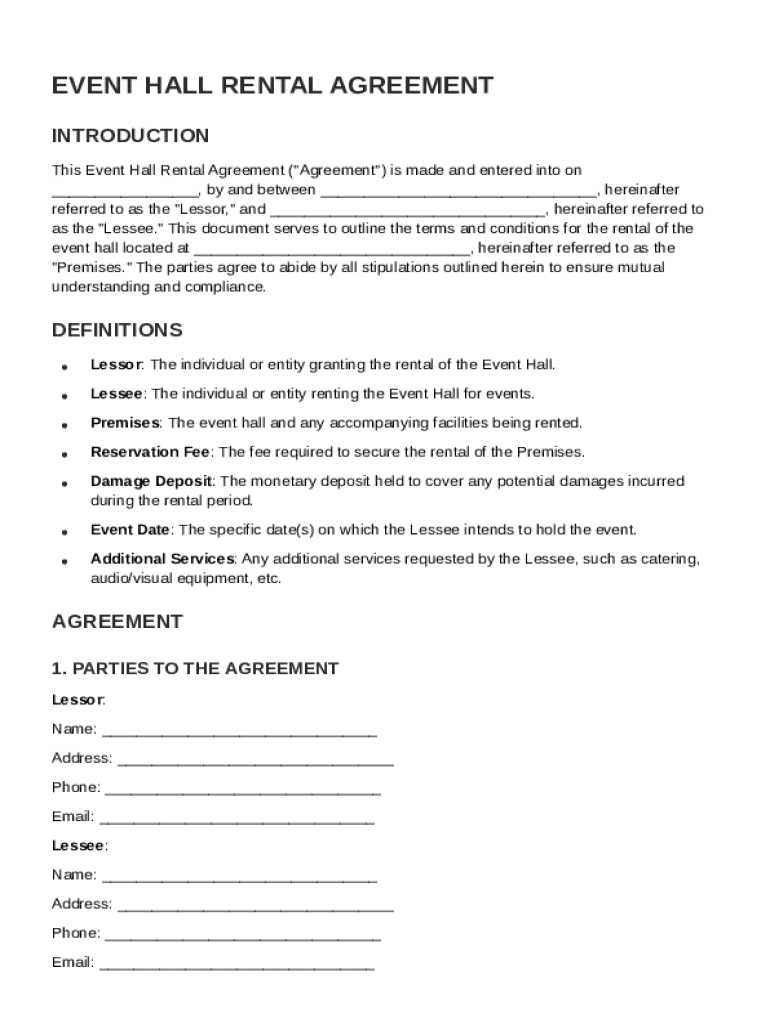







Definition & Meaning
The "Event Hall Rental Agreement Template" serves as a formal document outlining the terms and conditions involved in renting an event hall. This agreement establishes a legal relationship between the Lessor and Lessee, ensuring both parties understand their obligations and rights. The core aspects of this template include rental terms, cancellation policies, and liability clauses. It aims to prevent misunderstandings and disputes by providing a clear framework for the rental process, ensuring both parties are on the same legal page.
How to Use the Event Hall Rental Agreement Template
Using the Event Hall Rental Agreement Template efficiently requires understanding its components. First, customize the template to fit the specific needs of the rental situation by filling in relevant details such as the names of both parties, the rental period, and associated costs.
- Fill in Essential Information: Include details such as the event date, start and end times, and hall specifications.
- Specify Payment Terms: Clearly define the rental fee, deposit amount, and payment deadlines.
- Outline Responsibilities: List the duties of both the venue owner and the renter, covering setup, cleanup, and maintenance obligations.
Once completed, both parties should review the document thoroughly to ensure clarity and accuracy before signing.
Steps to Complete the Event Hall Rental Agreement Template
Completing the Event Hall Rental Agreement Template involves a series of methodical steps:
- Initiate with Basic Details: Start by inputting the names and contact information of the Lessor and Lessee.
- Define the Event Specifications: Specify the type of event, expected attendance, and any particular needs that must be addressed.
- Establish the Rental Duration: Clearly mention the date and hours for which the event hall will be needed.
- Set the Financial Agreement: Include rental cost, deposit details, and any extra charges for additional services.
- Address Cancellation Terms: Outline policies regarding cancellations, including any penalties or refund conditions.
- Agree on Responsibilities: Detail each party's duties, such as security arrangements, cleaning protocols, and equipment use.
- Finalize with Signatures: Ensure both parties sign and date the document after reviewing all terms.
Key Elements of the Event Hall Rental Agreement Template
The success of an Event Hall Rental Agreement hinges on several critical elements that must be clearly articulated:
- Identification of Parties: Both the Lessor and Lessee’s names, addresses, and contact information.
- Rental Terms: Duration of the rental, including access periods for setup and dismantling.
- Event Details: Nature of the event, guest count, and any services or amenities requested.
- Financial Obligations: Breakdown of rental fees, deposits, and timeline for payments.
- Cancellation Policy: Terms under which either party can cancel the agreement along with any financial repercussions.
- Liability and Indemnification: Clauses covering who is responsible for damages, accidents, or any other legal liabilities during the event.
Who Typically Uses the Event Hall Rental Agreement Template
This template is commonly utilized by a variety of entities and individuals involved in planning and hosting events. Typical users include:
- Event Planners: Utilize the form to secure venues for clients' events, ensuring all requirements are met.
- Venue Owners/Managers: Standardize agreements with clients, providing clarity and protecting their interests.
- Corporate Entities: Employ the template when organizing conferences, meetings, or social gatherings.
- Individuals Hosting Private Events: Such as weddings or parties, who want a formal agreement to ensure everything proceeds smoothly.
These users benefit by having a standardized process that mitigates risk and ensures transparency.


Legal Use of the Event Hall Rental Agreement Template
The legal standing of the Event Hall Rental Agreement Template makes it a valuable tool for formalizing the rental relationship. It is constructed to comply with U.S. laws, including the ESIGN Act's requirements when electronic signatures are involved. Key legal attributes include:
- Binding Contract: Once signed by both parties, the agreement becomes a legally enforceable contract.
- Terms Modifications: Any changes to the template should be mutually agreed upon and documented in writing.
- Dispute Resolution: Many templates include clauses addressing how disputes will be settled, often through mediation or arbitration.
Keeping accurate records of each signed agreement is crucial for maintaining legal protection.
State-Specific Rules for the Event Hall Rental Agreement Template
While the template provides a general framework, it is essential to consider state-specific regulations that might influence its content:
- Zoning Laws: Some states have particular zoning regulations that may affect the ability to rent spaces for certain events.
- Noise Ordinances: Specific noise regulations might differ by state or locality, impacting event timing or permissible noise levels.
- Alcohol Licensing: If an event involves alcohol, ensure compliance with state licensing laws, as requirements for permits can vary.
It’s advisable to consult a legal professional familiar with state-specific requirements to adapt the agreement appropriately.
Software Compatibility
DocHub ensures that the Event Hall Rental Agreement Template is compatible with various document formats and storage solutions, enhancing its utility:
- File Formats Supported: The template can be edited and saved in formats like PDF, DOCX, and more, allowing for flexibility in handling.
- Integration with Cloud Services: Users can work on the template directly from platforms like Google Drive, Dropbox, or OneDrive.
- Cross-Platform Accessibility: The template and editing tools are accessible on both desktop computers and mobile devices.
This compatibility not only streamlines the editing and signing process but also ensures the document’s integrity is maintained across multiple platforms and devices.




