Type text, add images, blackout confidential details, add comments, highlights and more.

02. Sign it in a few clicks
Draw your signature, type it, upload its image, or use your mobile device as a signature pad.

03. Share your form with others
Send free vics bol via email, link, or fax. You can also download it, export it or print it out.

How to use or fill out vics bol with our platform
Ease of Setup
DocHub User Ratings on G2
Ease of Use
DocHub User Ratings on G2
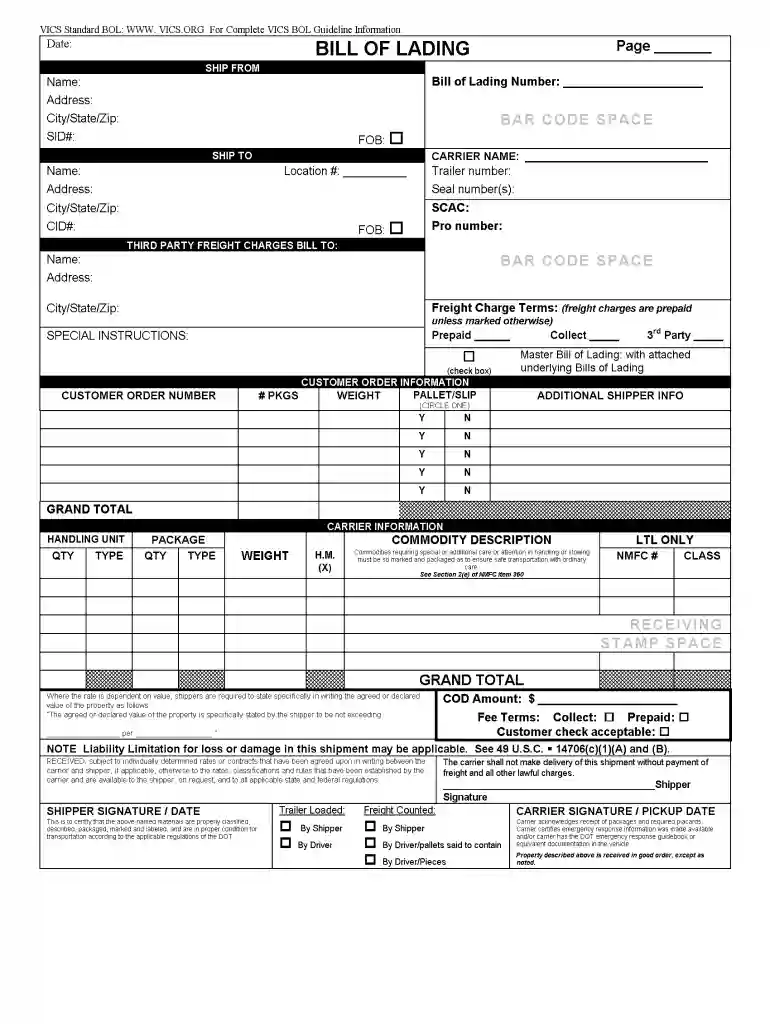
Click ‘Get Form’ to open the vics bol in the editor.
Begin by entering your personal information in the designated fields, including your name, address, and contact details. Ensure accuracy for seamless processing.
Next, navigate to the section that requires specific details about the transaction. Fill in all relevant fields carefully, as this information is crucial for documentation.
Review any additional sections that may require signatures or dates. Use our platform’s signature feature to sign electronically where indicated.
Once all fields are completed, take a moment to review the entire form for any errors or omissions before finalizing your submission.
Start using our platform today to fill out your vics bol quickly and efficiently!
The VICS BOL is in a standardized format and is usually required by larger retailers. The VICS BOL typically contains more detail than the Straight BOL, and you are therefore required to classify items (or group of items) by NMFC code, sub-code, and class.
vics bol
VICS BOL PDFVICS BOL templateVics BOL template excelVics bol appVICS BOL vs Straight BOLGS1 BOLBol deliveryBill of lading SHORT FORM PDF
vics bol template excel
FIS User Manual - Financial Affairs - UC Santa Cruz
Who needs an account? Staff, faculty and temporary staff who have a business need to query, process, review and/or approve financial transactions.
This site uses cookies to enhance site navigation and personalize your experience.
By using this site you agree to our use of cookies as described in our Privacy Notice.
You can modify your selections by visiting our Cookie and Advertising Notice.... Read more...Read less