






Definition and Purpose of CH-210 Summons Judicial Council Forms
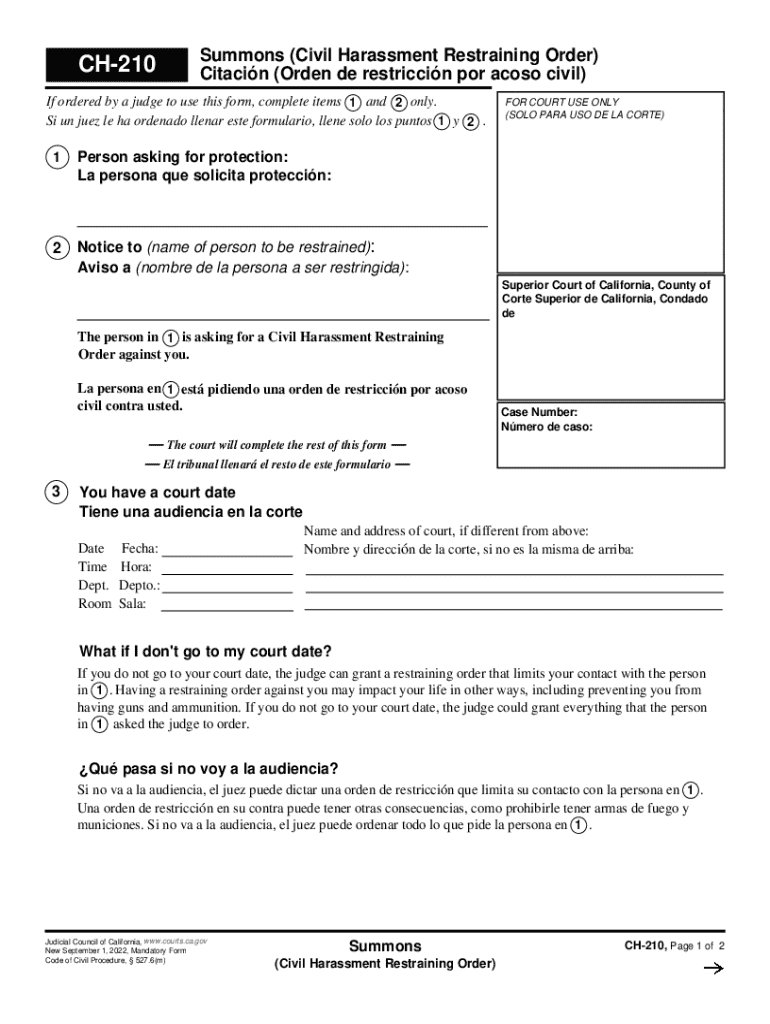
The CH-210 Summons Judicial Council forms serve a vital function in the legal framework of California, specifically designed for matters related to Civil Harassment Restraining Orders. Issued by the Superior Court of California, these forms are essential for individuals seeking protection from harassment. The form provides detailed instructions for both parties involved in the harassment complaint and outlines the legal process, ensuring that all participants understand their responsibilities and rights. The CH-210 form is an official document that initiates the legal proceedings for a restraining order, making it paramount for maintaining legal compliance and protection.
How to Obtain the CH-210 Summons Judicial Council Forms
Obtaining the CH-210 form is a straightforward process. This form is available through several channels to ensure accessibility:
-
Online Access: The California Courts website offers downloadable versions of the form. This provides the convenience of filling out the form electronically or printing it for manual completion.
-
Court Clerk’s Office: Individuals may visit their local courthouse to pick up a physical copy of the form. Court clerks can provide additional resources or guidance about the associated processes.
-
Legal Aid Organizations: Some non-profit legal aid organizations distribute these forms and can offer assistance in completing them when needed.
Ensuring you have the correct version of the form is crucial, as outdated forms might not be accepted by the court, potentially delaying the legal process.
Steps to Complete the CH-210 Summons Judicial Council Forms
Completing the CH-210 form involves several steps to ensure that all required information is accurately provided:
-
Personal Information: Start by filling out the personal details of both the petitioner and the respondent. This includes full names, contact information, and addresses.
-
Description of Harassment: Clearly describe the incidents of harassment that have led to the request for a restraining order. Include dates, locations, and any other relevant details that substantiate the claim.
-
Legal Counsel Involvement: If legal counsel has been obtained, provide their contact information and ensure they review the form before submission.
-
Supporting Documents: Attach any evidence or documentation that supports the allegations, such as police reports, photographs, or witness statements.
-
Filing Instructions: Follow the court's instructions for filing the completed form, which may include submitting the document in person or via an electronic filing system if available.
Submitting an accurately completed form is crucial to avoid delays and ensure the court processes the restraining order efficiently.
Key Elements of the CH-210 Summons Judicial Council Forms
The CH-210 form contains several critical components that must be carefully completed:
- Parties Involved: Complete and accurate identification of both the petitioner (person seeking protection) and the respondent (alleged harasser).
- Allegations of Harassment: Detailed accounts of harassment incidents with specific examples and evidence to back up claims.
- Legal Notices: Key sections informing the respondent of their right to a hearing and the potential consequences of non-compliance.
- Instructions for Court Appearance: Directions about attending court hearings, including the date, time, and location of the hearing.
Each section of the form must be filled out comprehensively to ensure that the court has all the necessary information to make an informed decision on the restraining order.
Legal Use of the CH-210 Summons Judicial Council Forms
The legal use of the CH-210 form is strictly for pursuing a Civil Harassment Restraining Order. It is crucial for individuals to use this form precisely as intended:
- Protection Orders: The form lays the groundwork for the court to issue a protection order if the allegations hold merit.
- Legal Proceedings Initiation: Initiate the legal process under California state law to address harassment issues.
- Court Compliance: Ensures compliance with legal requirements for both petitioner and respondent throughout the legal proceedings.
Improper use or falsification of this form can lead to penalties, including potential legal repercussions against the petitioner.
Who Typically Uses the CH-210 Summons Judicial Council Forms
The CH-210 form is commonly utilized by individuals within the state of California who require legal intervention against harassment. Typical users include:
- Victims of Harassment: Individuals experiencing harassment in personal or professional environments seeking legal protection.
- Legal Representatives: Attorneys and legal counsel who assist clients in preparing and submitting the form as part of broader legal action.
- Court Officials: Clerks and judges rely on the form for processing and adjudicating restraining order requests.
Understanding who uses this form helps provide context for the situations and environments where it is most applicable.


Important Terms Related to CH-210 Summons Judicial Council Forms
Understanding the terminology used in the CH-210 form is crucial:
- Petitioner: The individual who files the form seeking a restraining order.
- Respondent: The individual against whom the restraining order is sought.
- Restraining Order: A legal order issued by a court to protect individuals from harassment or harm.
- Hearing: The official court session where both parties may present their case regarding the restraining order.
Familiarity with these terms ensures clarity when completing the form and understanding legal correspondence related to the case.
Examples of Using the CH-210 Summons Judicial Council Forms
Real-world scenarios demonstrate the application of the CH-210 form:
- Workplace Harassment: An employee files a CH-210 form against a coworker who engages in threatening behavior, leading to a hearing where the court determines if a restraining order is warranted.
- Neighbor Disputes: A resident uses the form to address ongoing harassment from a neighbor, including verbal threats and property damage, seeking legal protection through the court.
- Domestic Situations: Individuals file this form against former partners in cases where previous intimate relationships have led to unwanted harassment, necessitating court intervention.
These examples underscore the form's versatility in providing legal recourse for various harassment situations.