




01. Edit your form online
Type text, add images, blackout confidential details, add comments, highlights and more.

Type text, add images, blackout confidential details, add comments, highlights and more.

Draw your signature, type it, upload its image, or use your mobile device as a signature pad.

Send it via email, link, or fax. You can also download it, export it or print it out.
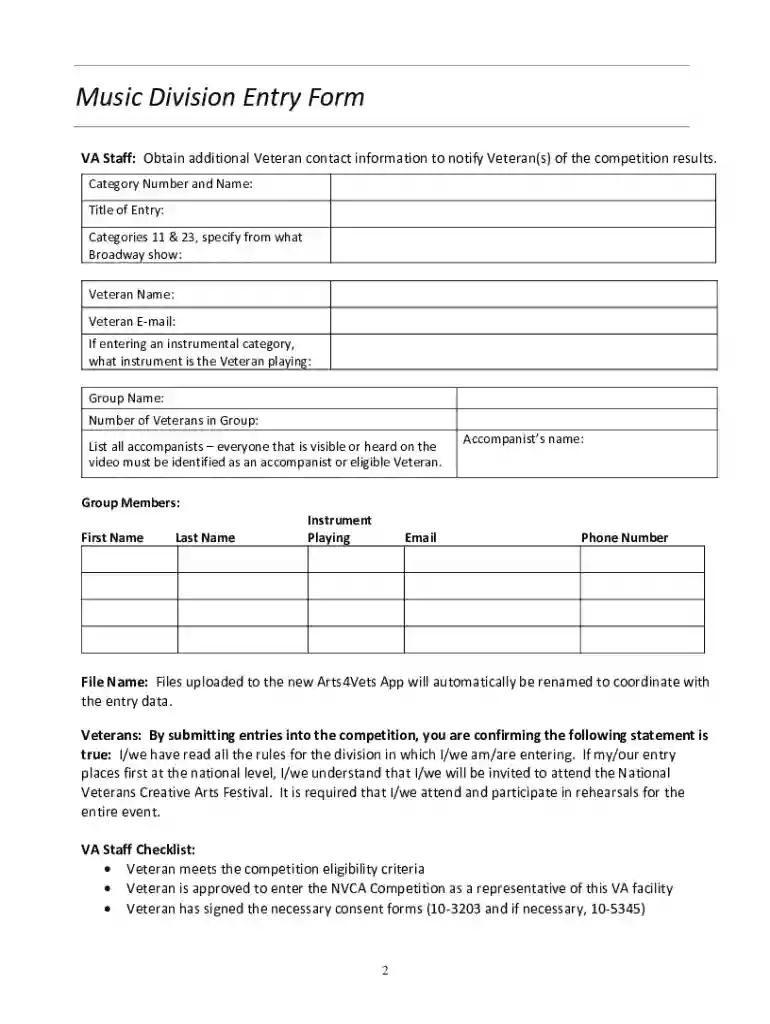
The Music Division Entry Form is a specialized document used primarily by veterans wishing to participate in music competitions. This form is essential for collecting participant information and ensuring compliance with competition requirements. The form captures various details, such as the veteran's contact information, the title of their music entry, and category specifics. Consent for the use of their likeness or statements by the Department of Veterans Affairs (VA) is also included, ensuring that all legal and privacy concerns are addressed.
Gather Required Information: Before filling out the form, gather all necessary details, such as personal identification, entry title, and category specifics. Ensure you have all supporting documents that may be required.
Fill Out Personal Details: Include your full name, contact information, and any identification numbers required by the form.
Provide Entry Specifics: Clearly specify the title of your music entry and the category in which it belongs. Be precise to avoid any issues during the submission process.
Consent to Terms: Carefully review the consent and authorization sections. Indicate your agreement by signing or checking the relevant boxes as instructed.
Review and Submit: Double-check the entire form for accuracy and completeness before submission. Submit the form via the designated method specified by the VA, such as online or mail.
Eligibility for using the Music Division Entry Form is based on specific criteria defined by the VA. Primarily, participants must be veterans who meet the requirements for the competition. This includes verification of service and adherence to any age or disability considerations outlined by the competition organizers.


The form comprises several critical components that ensure all necessary details are captured for a successful entry. These elements include:
The form adheres to all legal standards set by the VA. Its design ensures that all personal data is collected and used in compliance with relevant privacy laws, ensuring protection for all participants. Consent sections within the form are legally binding, requiring a clear understanding by the participant.
Various methods are available for obtaining the Music Division Entry Form. It can typically be accessed through VA platforms or specific competition websites hosting the forms. For those unable to access it electronically, physical copies might be available at VA offices or through mailing services upon request.
Participants have multiple avenues for submitting their competed forms, allowing for flexibility in how they choose to enter the competition.
Each method provides a way for different users to comply with submission requirements in a way that accommodates their preferences and physical access to submission platforms.
Understanding common terms and jargon associated with the Music Division Entry Form is crucial for proper completion. These terms include:
Having clarity on these terms ensures that participants can accurately engage with the form’s requirements and avoid misunderstandings.
We've got more versions of the Music Division Entry Form form. Select the right Music Division Entry Form version from the list and start editing it straight away!
| Versions | Form popularity | Fillable & printable |
|---|---|---|
| 2020 | 4.1 Satisfied (58 Votes) |
At DocHub, your data security is our priority. We follow HIPAA, SOC2, GDPR, and other standards, so you can work on your documents with confidence.



You may register up to 10 unpublished works on the same application, but YOU MUST SELECT the new application for a Group of Unpublished Works. If you needRead more
Division of all music entries instrument and vocal combined. A SIGNED Music Use Waiver Release Form is required at contest check-in. Registration Form Music
Nov 12, 2024 A triangular flag may denote proportions or a change in mensuration, typically to signify temporary ternary division of note values when binaryRead more


