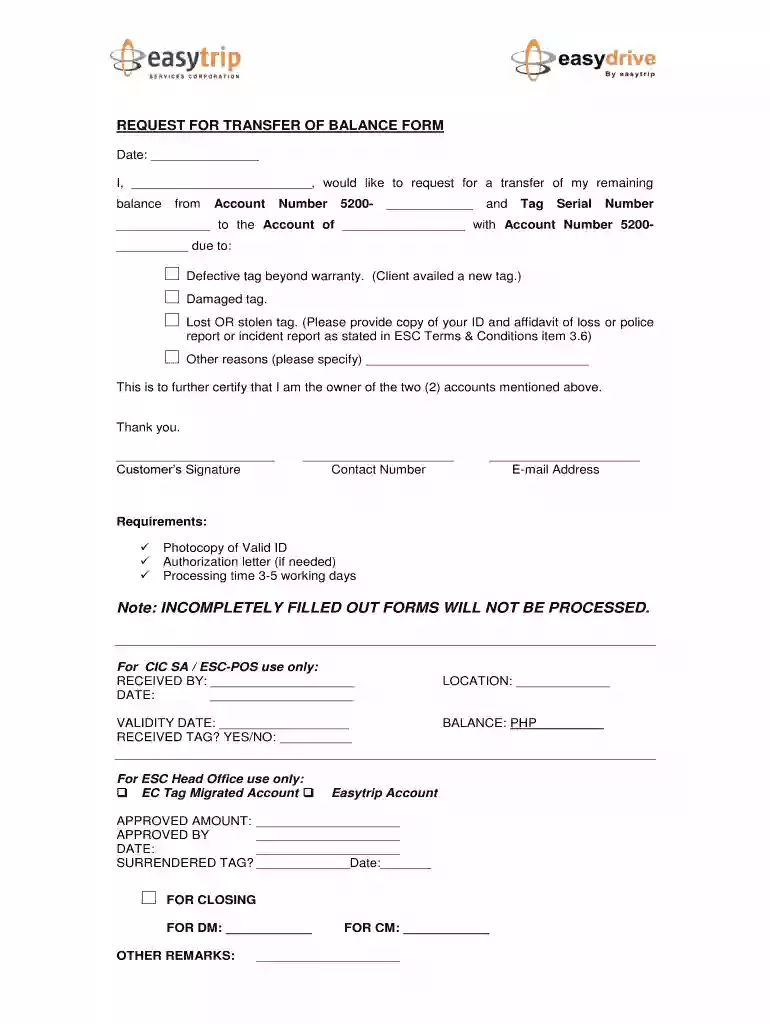
Easytrip balance transfer form 2026

Get Form
easytrip balance transfer form Preview on Page 1

Here's how it works

01. Edit your easytrip balance transfer form online
Type text, add images, blackout confidential details, add comments, highlights and more.

02. Sign it in a few clicks
Draw your signature, type it, upload its image, or use your mobile device as a signature pad.

03. Share your form with others
Send easytrip request for transfer of balance form via email, link, or fax. You can also download it, export it or print it out.

Definition & Meaning

The easytrip balance transfer form is designed for individuals who need to request the transfer of remaining balance from one account to another. This often occurs when a customer’s electronic toll collection device, commonly known as a tag, is defective, damaged, or has been lost. The form is an essential document that facilitates the balance transfer process, ensuring that funds can be seamlessly redirected according to the customer's wishes.

How to Use the Easytrip Balance Transfer Form

Using the easytrip balance transfer form involves several steps, each aimed at collecting the necessary information to process a balance transfer. First, customers should gather all relevant account and personal details required by the form. This typically includes the account number linked to the electronic toll collection system and personal identification information. Once this information is collected, the customer fills out the form, ensuring that all fields are completed accurately to avoid delays in processing. After completing the form, it must be submitted according to the issuing entity’s specified methods.

How to Obtain the Easytrip Balance Transfer Form

Obtaining the easytrip balance transfer form can typically be done through the official website of the entity managing the electronic toll collection system. Forms can also be requested via customer service channels, such as a dedicated hotline or email. In some cases, users may find the form available for direct download as a PDF or interactive form on the provider's website, enabling easy access and completion.

Steps to Complete the Easytrip Balance Transfer Form

  1. Download or Obtain the Form: Secure a copy of the form from the official website or through customer service.
  2. Gather Necessary Information: Collect personal identification, account details, and supporting documents.
  3. Fill Out the Form: Complete each section of the form, ensuring accuracy in all fields.
  4. Review for Completeness: Double-check that all sections are filled correctly and all required attachments are included.
  5. Submit the Form: Use the specified submission method, such as online upload, mail, or in-person delivery, to send the completed form to the appropriate office.

Important Terms Related to Easytrip Balance Transfer Form

  • Tag: An electronic device used for toll payments.
  • Balance Transfer: The process of moving funds from one account to another in the context of electronic toll systems.
  • Required Fields: Specific sections of the form that must be completed to avoid processing delays.

Required Documents

To successfully complete the easytrip balance transfer form, customers need to provide supporting documents such as:

  • A valid photo identification, like a driver’s license or passport.
  • Account details for both the original and receiving accounts.
  • An authorization letter, if applicable, which permits someone else to act on the customer's behalf.

Form Submission Methods (Online / Mail / In-Person)

Forms can be submitted in multiple ways, depending on the service provider:

  • Online Submission: Completing and submitting the form via the service provider’s online portal.
  • Mail Submission: Sending the completed form and required documents to the designated mailing address.
  • In-Person Submission: Visiting a service center to submit the form directly and receive immediate assistance.

Legal Use of the Easytrip Balance Transfer Form

The form is legally required to authorize the transfer of account balances between accounts within the toll collection system. It serves as an official record of the customer’s request and protects against unauthorized transactions. Proper completion and submission of the form ensure legal compliance and protect customer rights related to their toll accounts.

Key Elements of the Easytrip Balance Transfer Form

Several critical elements must be included in the form to validate the request:

  • Personal Identification Information: Name, contact details, and ID number.
  • Account Information: Original account number, receiving account details.
  • Reason for Transfer: Explanation for the transfer request, such as a defective tag.
  • Signatures: Customer’s signature to authorize the balance transfer.

Why Should You Use the Easytrip Balance Transfer Form

The form is essential for ensuring that the transfer of remaining toll balances is conducted efficiently and securely. It allows users to reclaim funds from lost or compromised tags, preventing financial loss and ensuring continued access to toll services without disruption. It is vital for maintaining accurate financial records and simplifying account management for users.

be ready to get more

Complete this form in 5 minutes or less

Get form

Got questions?

We have answers to the most popular questions from our customers. If you can't find an answer to your question, please contact us.
Contact us
Yes. you can transfer the remaining balance of your canceled RFID account to another existing account.
Addressing Can I withdraw my AutoSweep RFID balance?: AutoSweep balances are non-refundable but transferable between vehicles. For How to load AutoSweep in GCash?, use the GCash apps Toll Fees section and select AutoSweep as the provider. EasyTrip users should use the EasyTrip app for GCash integration.
If you opt for a new RFID account, we can transfer your load balance to the new one so you can use it immediately.
9.2 In cases where the RFID or Card is beyond warranty and the Subscriber wishes to terminate his/her account, the existing account load balance may be refunded within seven (7) business days upon Subscribers submission of termination letter addressed to Easytrip, through its Customer Service and is subject for
The Load in the RFID Subscribers Account will not expire or has no expiration date.

Security and compliance

At DocHub, your data security is our priority. We follow HIPAA, SOC2, GDPR, and other standards, so you can work on your documents with confidence.
Learn more
ccpa2
pci-dss
gdpr-compliance
hipaa
soc-compliance

People also ask

Change the ownership first to you, or have the Deed of sale docHubd, then you have to empty first the balance of the RFIDs you gave but not negative. Then proceed to balintawak toll entry for near NCR and san fernando exit for north for Easytrip, stage 3 for autosweep if south , and for north is tplex entry or exit.
No. The TNG RFID Tag is unique to the registered customer and vehicle. If you no longer wish to use the TNG RFID Tag or have sold off the vehicle, you are required to terminate the TNG RFID Tag by contacting Touch n Go Careline.

Related links