01. Edit your form online
Type text, add images, blackout confidential details, add comments, highlights and more.

Type text, add images, blackout confidential details, add comments, highlights and more.

Draw your signature, type it, upload its image, or use your mobile device as a signature pad.

Send it via email, link, or fax. You can also download it, export it or print it out.
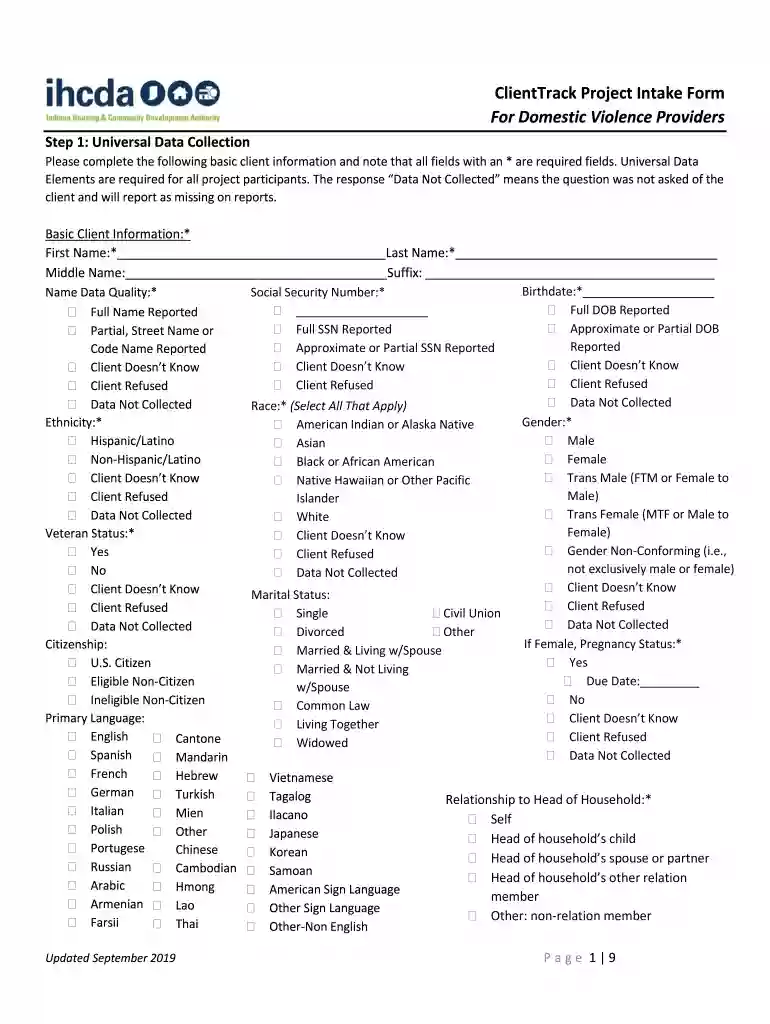
The Fillable Online in ClientTrack Project Intake Form - in Fax is a digital document specifically created for domestic violence providers to facilitate data collection, project enrollment, and client assessments. This form captures crucial client information, supporting various assessments related to demographic details, living situations, health insurance, legal issues, and barriers to accessing services. It plays a vital role in organizing and managing data related to clients experiencing domestic violence, making it an essential tool for service providers in this sector.
Using the Fillable Online in ClientTrack Project Intake Form involves several straightforward steps:
Accessing the Form: Begin by opening the form via the DocHub platform, which can be accessed from a desktop or mobile browser. This versatility ensures you can work on the document from anywhere.
Filling Out Required Fields: Navigate through sections to fill out essential information such as client demographics, living situations, and health insurance status. Ensure all mandatory fields are completed to facilitate accurate data collection.
Annotating and Editing: Utilize DocHub’s editing features to insert text, add comments, or highlight critical areas for further review. The user-friendly interface makes it easy to implement changes without needing extensive technical knowledge.
Collaboration and Submission: Share the document with colleagues for collaborative input or approval. Once finalized, the form can be submitted through the ClientTrack system for data integration and further analysis.
Completing the form efficiently involves a few systematic steps:
Preparation: Gather all necessary client information beforehand, including personal details, legal documentation, and health records, to streamline the input process.
Section Review: Begin by reviewing each section, understanding the requirements for each field to ensure no details are overlooked.
Data Entry: Input data accurately, paying special attention to critical fields such as demographics and legal issues, which require precise data for compliance and reporting.
Verification: Double-check all entered information for errors or omissions. This step is crucial to maintain the integrity of the data being recorded.
Save and Export: Save the completed form on the platform and export a copy for your records or further processing. DocHub allows easy saving and exporting to cloud services for convenience and security.
Several key elements form the backbone of the Fillable Online in ClientTrack Project Intake Form:
Demographic Information: Critical for understanding client backgrounds, which aids in tailoring services and support initiatives.
Living Situations: Details of clients’ prior living situations help assess the level of immediate risk and support required.
Legal Issues: Information on legal issues provides insights into potential barriers to accessing services and the necessary legal support clients may need.
Health Insurance Status: Understanding a client's insurance status helps in planning for medical and support services.
Assessment Outcomes: Capturing outcomes of various assessments helps track progress and tailor interventions effectively.
Using this form aligns with various legal and ethical guidelines:
Data Protection: The form complies with data protection regulations, ensuring sensitive client information is handled with care and confidentiality.
Consent: Prior to data collection, obtaining client consent forms ensures compliance with privacy laws and ethical standards.
Documentation and Evidence: Proper use of the form provides documented evidence of client interactions and assessments, which may be required in legal settings.
While the form serves a universal purpose, certain states in the U.S. might impose specific rules or additional requirements. Providers should be aware of local regulations that might affect how client data is recorded and reported. For instance, some states might have additional fields for reporting specific incidents of domestic violence or require certain types of information to be documented for legal proceedings.
The primary users of this form include:
Domestic Violence Support Centers: These establishments use the form to organize and manage client data comprehensively.
Social Workers: Professionals in the social services sector rely on the form for accurate data recording and client assessments.
Legal Professionals: Lawyers and legal aid providers may utilize the form to assess client cases and recommend appropriate interventions.
Healthcare Providers: Medical staff use the form to better understand the context of a client’s situation, facilitating holistic care.


Understanding key terms related to the form is crucial for effective usage:
Universal Data Collection: This refers to gathering standardized information to ensure consistent service provision across different cases.
Project Enrollment: The process of registering clients into various support programs aimed at addressing their specific needs.
Entry Assessments: Initial evaluations that determine a client’s immediate risk level and required support measures.
Recognizing these terms helps streamline workflow and enhances communication among professionals utilizing the form.
The form plays a role in multiple scenarios:
Case Study 1: A domestic violence support center uses the form to streamline intake processes, reducing client wait times and increasing service capacity.
Case Study 2: A legal aid organization utilizes the form to document and track case progress, ensuring timely intervention and client support.
Case Study 3: Social workers leverage the form to collect data across various demographics, aiding in resource allocation and advocacy efforts.
These examples outline the diverse applications and importance of the form in supporting vulnerable populations.
We've got more versions of the Fillable Online in ClientTrack Project Intake Form - in Fax form. Select the right Fillable Online in ClientTrack Project Intake Form - in Fax version from the list and start editing it straight away!
At DocHub, your data security is our priority. We follow HIPAA, SOC2, GDPR, and other standards, so you can work on your documents with confidence.