Full Name of Party Filing Document Mailing Address - DocHub 2026

Get Form
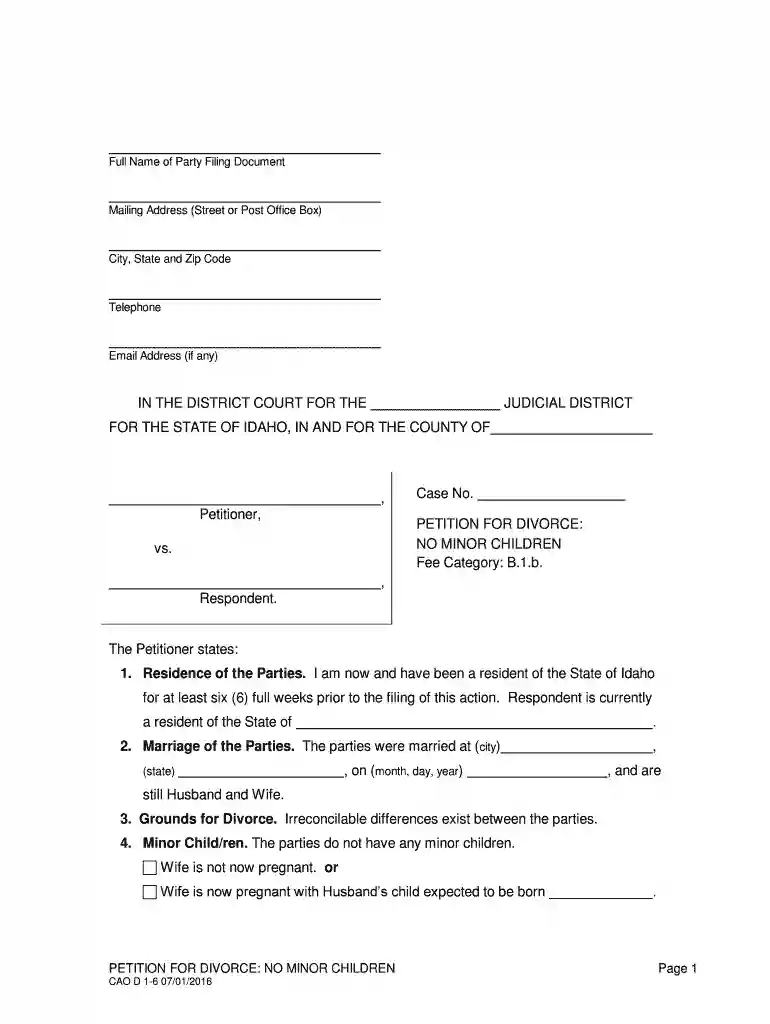
Full Name of Party Filing Document Mailing Address - DocHub Preview on Page 1

Here's how it works

01. Edit your form online
Type text, add images, blackout confidential details, add comments, highlights and more.

02. Sign it in a few clicks
Draw your signature, type it, upload its image, or use your mobile device as a signature pad.

03. Share your form with others
Send it via email, link, or fax. You can also download it, export it or print it out.

Definition and Meaning

The term "Full Name of Party Filing Document Mailing Address - DocHub" refers to the specific information required when submitting documents through DocHub. It typically includes the complete name of the individual or entity responsible for filing a document, as well as their mailing address. This information is crucial as it ensures that all communications and legal notifications are directed to the correct party. Moreover, accurately providing this information helps in maintaining procedural integrity and legal compliance.

How to Use the Full Name of Party Filing Document Mailing Address - DocHub

To correctly use the "Full Name of Party Filing Document Mailing Address - DocHub," ensure that the name and mailing address are accurately entered into the designated fields when filing a document. This section is often highlighted at the beginning or end of a form to capture essential data. It's important to verify all spellings and numerical data like ZIP codes, as inaccuracies could result in delays or misdirection of critical notifications. Utilizing built-in features such as auto-fill from cloud storage or pre-saved templates in DocHub can help streamline the process.

Steps to Complete the Full Name of Party Filing Document Mailing Address - DocHub

  1. Access the Form: Open the document within DocHub, either by uploading it from a cloud service or your device.
  2. Identify the Section: Locate the section labeled "Full Name of Party Filing Document Mailing Address."
  3. Enter Full Name: Input the complete name of the individual or entity filing the document.
  4. Provide Mailing Address: Fill in the mailing address, including street address, city, state, and ZIP code.
  5. Review for Accuracy: Double-check the details to ensure there are no typographical errors.
  6. Save Changes: Use DocHub's save function to ensure all information is recorded.
  7. Submit Document: Finalize the document for submission, ensuring the correct pathway (email, electronic submission, or print to mail).

Why You Should Use the Full Name of Party Filing Document Mailing Address - DocHub

Accurately completing the "Full Name of Party Filing Document Mailing Address" section in DocHub is imperative as it ensures proper legal identification and correspondence delivery. This information allows for documentation to be efficiently processed and ensures that any response or required follow-up can be managed without unnecessary complication. Consistently using this feature simplifies ongoing document management and compliance with legal standards, reducing the risk of oversight or miscommunication.

Who Typically Uses the Full Name of Party Filing Document Mailing Address - DocHub

Legal professionals, business entities, and individuals engaging in official or formal document transactions typically use the "Full Name of Party Filing Document Mailing Address - DocHub." This feature is essential for attorneys managing client paperwork, businesses filing corporate documents, and individuals involved in legal proceedings or administrative tasks. Ensuring that this information is accurately and consistently utilized is critical for all parties relying on the structured organization and swift handling of documents.


decoration image ratings of Dochub

Key Elements of the Full Name of Party Filing Document Mailing Address - DocHub

  • Full Legal Name: Ensures identification matches other legal documents.
  • Street Address: Acts as a primary contact location for physical correspondence.
  • City, State, ZIP Code: Facilitates correct geographic sorting and postal delivery.
  • Country (if applicable): Essential for international correspondence recognition.
  • Contact Verification Methods: Optional fields for phone or email to provide alternative methods of contact for urgent matters.

State-Specific Rules for the Full Name of Party Filing Document Mailing Address - DocHub

Each state in the United States may have particular requirements regarding how document identifiers like the "Full Name of Party Filing Document Mailing Address" should be formatted or submitted. For example, certain states might require additional documentation or notarization for specific filings. Understanding and adhering to these state-specific rules is crucial for ensuring that documents are not rejected or delayed due to non-compliance.

Examples of Using the Full Name of Party Filing Document Mailing Address - DocHub

  • In a divorce filing in Idaho, providing a complete name and accurate address ensures each party receives necessary court communications.
  • When filing corporate amendments, the business entity's legal name and registered office address are crucial for records update.
  • For an individual renewing a professional license, the precise mailing address guarantees that the renewed license is mailed to the correct location.

Form Submission Methods (Online/Mail/In-Person)

Documents containing the "Full Name of Party Filing Document Mailing Address" can be submitted through various channels. Online submission via platforms like DocHub offers efficiency and security, while traditional mail or in-person submission may be required for particular legal circumstances. Each method has unique considerations regarding speed, tracking, confirmation, and accessibility.

Penalties for Non-Compliance

Failure to accurately provide the "Full Name of Party Filing Document Mailing Address" can lead to serious implications, including delays in document processing, legal repercussions, and financial penalties. Non-compliance with official documentation standards can also compromise legal standing or invalidate filed documents, underscoring the importance of meticulous attention to detail when completing this information.

be ready to get more

Complete this form in 5 minutes or less

Get form

Got questions?

We have answers to the most popular questions from our customers. If you can't find an answer to your question, please contact us.
Contact us
How to collaboratively edit PDF documents Open your PDF in Acrobat and select Share With Others from the top toolbar. Enter an email address for each recipient. Select Allow Comments. You can also set a deadline if necessary. Select send.
The Electronic Signatures in Global and National Commerce Act, otherwise known as the E-Sign Act, states that electronic signatures shouldnt be considered invalid simply because theyre electronic. In other words, e-signatures are completely legal and binding.
Creating a shareable link makes it simple to share a document in an email, document, or IM. Select Share. Select Link settings if you want to change permissions. Select Copy Link and share the link however you want, like in an email, document, or IM.
Heres how: Open your document. Click on the Share or Send. button in the upper right corner. Choose Send as Attachment. Fill out the To: field and use commas to separate multiple email addresses. Customize the email text or PDF options as needed. Choose between the following two options. Send via DocHub.
offers advanced security features including ID verification, knowledge-based authentication, and ISO 27001 compliance - features not available in DocHub. This makes particularly suitable for businesses in regulated industries or those requiring high-security document handling.

Security and compliance

At DocHub, your data security is our priority. We follow HIPAA, SOC2, GDPR, and other standards, so you can work on your documents with confidence.

Learn more
ccpa2
pci-dss
gdpr-compliance
hipaa
soc-compliance

People also ask

Are s electronic signatures legally binding? eSignatures are valid and legally binding across the globe and in use in 188 countries around the world.
Share settings can be accessed from your DocHub dashboard by right-clicking any document, then selecting Share or Send. Share settings can be accessed while viewing a document by either clicking the button or Menu Share or Send
With both Lumin and DocHub, your eSigned document is safe. Both offer the tools above and more, glitch free and with cost effective options for those looking for the big guns of PDF editing.
Electronic signatures are legally binding and create enforceable legal contracts that are widely accepted. They are more secure than a traditional paper-based signature as they are less susceptible to forgery. Its very simple to use Google Docs to create, and send agreements for signing using a integration.
Whether you sign a document online or collect signatures through DocHub, they will all be legally binding and admissible in court in ance with the ESIGN Act.

Related links