01. Edit your form online
Type text, add images, blackout confidential details, add comments, highlights and more.

Type text, add images, blackout confidential details, add comments, highlights and more.

Draw your signature, type it, upload its image, or use your mobile device as a signature pad.

Send it via email, link, or fax. You can also download it, export it or print it out.
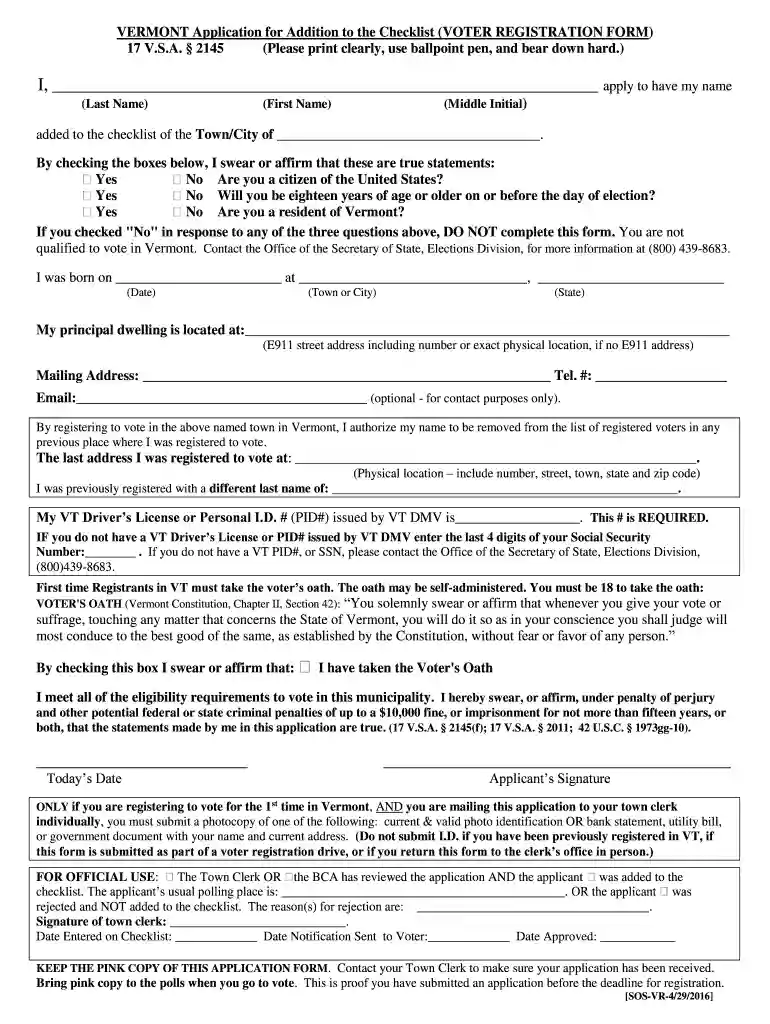
The "Voter Registration Application - Vermont Secretary of State" serves as a formal document through which residents of Vermont can register to vote. This application signifies an individual's intent to participate in elections, reflecting their involvement in the democratic process. Primarily, the application requires users to furnish essential personal information and affirm their citizenship and residency. Completing and submitting this form is crucial for eligible Vermonters to ensure their voices are counted in local and national elections.
Utilizing the Voter Registration Application involves several key steps. Firstly, prospective voters must obtain the form, either by downloading it from official state websites or by visiting a local Town or City Clerk's office. Once acquired, individuals need to fill out the form with accurate details, including name, address, and birthdate. Ensuring eligibility by affirming U.S. citizenship and Vermont residency is essential. The form also requires an assurance of eligibility to vote. Upon completion, submit the application either online, by mail, or in person, following the local guidelines and deadlines.
Accessing the Voter Registration Application is convenient for Vermont residents. The application can be downloaded directly from the Vermont Secretary of State's official website, ensuring prospective voters have easy and secure access to the form. Alternatively, the form can be picked up at local government offices, such as the Town or City Clerk’s office, where staff can also provide guidance. For those preferring a digital format, online registration is often available, allowing users to fill out and submit the form electronically.
Completing the Voter Registration Application requires meticulous attention to detail. Here’s a step-by-step guide:
The legal usage of the Vermont Voter Registration Application is governed by state and federal laws. This application ensures compliance with the National Voter Registration Act, facilitating the democratic process by enabling eligible citizens to vote. The form’s completion and submission process ensures that voter registration is conducted legally, preventing any fraudulent activities. Providing false information on this application can result in serious legal penalties, including fines or imprisonment, emphasizing the importance of honesty and accuracy.
Several critical components must be included when filling out the Voter Registration Application to ensure its validity:
Vermont’s procedures for voter registration have unique attributes that reflect the state’s commitment to facilitating voter participation:
Applicants may need to provide specific documents to successfully register using the Voter Registration Application:
The submission process for the Voter Registration Application offers flexibility to accommodate various preferences and ensure accessibility for all eligible voters:
Non-compliance with voter registration requirements can incur significant penalties. Providing false information on the Voter Registration Application is a legal offense that may result in fines, imprisonment, or both, depending on the severity of the infraction. It is imperative to provide truthful and accurate information to ensure legal compliance and uphold the integrity of the electoral process in Vermont.
The application process for the Voter Registration Application typically requires verification and processing time:
We've got more versions of the Voter Registration Application - Vermont Secretary of State form. Select the right Voter Registration Application - Vermont Secretary of State version from the list and start editing it straight away!
At DocHub, your data security is our priority. We follow HIPAA, SOC2, GDPR, and other standards, so you can work on your documents with confidence.