Definition and Purpose of the Residence Application for Study
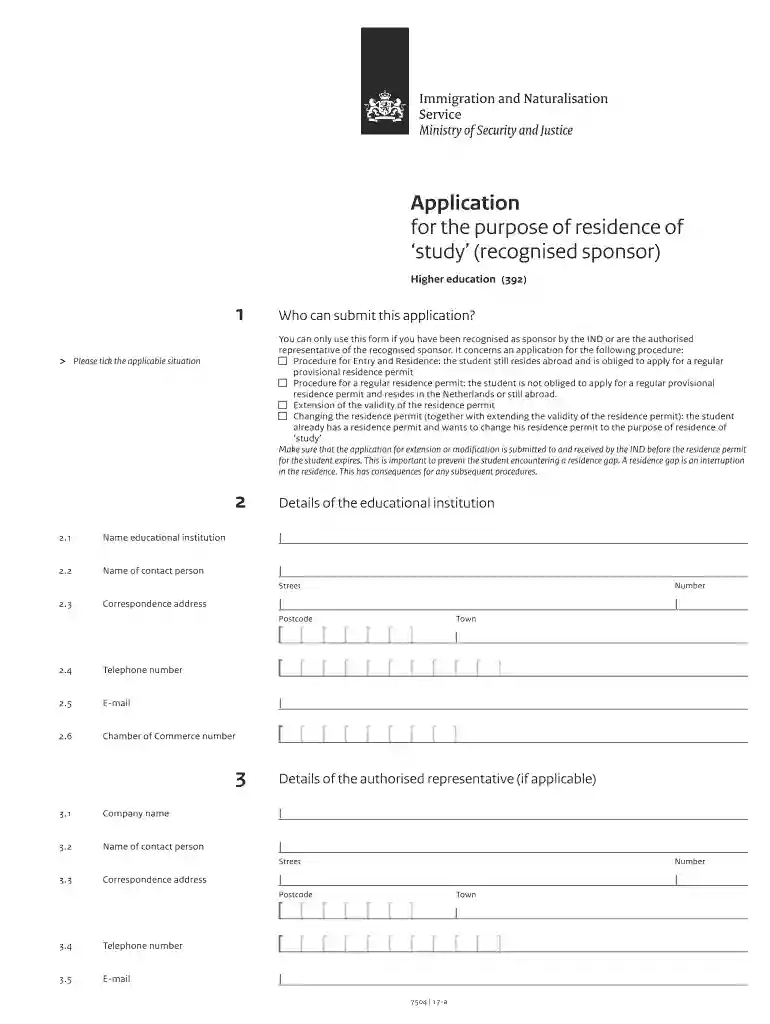
The "Application for the purpose of residence of 'study'" is a crucial document for international students aiming to study in the Netherlands. Issued by the Immigratie en Naturalisatiedienst (IND), it serves as a legal instrument allowing students from non-EU or non-EEA countries to reside in the Netherlands for study purposes. This form demonstrates a student’s eligibility and intent to engage in educational activities in a recognized institution in the Netherlands. It is mandatory for those planning to pursue a higher education program and must align with the immigration policies set by the Dutch government.
Key Elements of the Application
This application encompasses several essential elements that applicants must consider:
- Personal Information: Applicants must provide accurate personal details, including full name, date of birth, nationality, and passport information.
- Educational Institution Details: Identification of the recognized educational institution that the applicant will attend. The institution must be registered with the IND.
- Study Program Information: Specifics of the study program, including start date, duration, and field of study.
- Sponsorship Details: Information about sponsors if applicable, which might include guardians or financial sponsors responsible for supporting the student's stay.
Steps to Complete the Application
- Gather Required Documents: Collect necessary documents, including a valid passport, proof of enrollment, financial statements, health insurance proof, and a recent photograph.
- Complete Application Form: Fill out the application form accurately, ensuring all sections are detailed and legible.
- Submit the Form: Submit the completed application along with the required documents to the IND.
- Biometric Data Collection: Visit an IND desk to provide biometric data, such as fingerprinting and a photograph.
- Pay Required Fees: Ensure the application fee is paid, as incomplete payments may delay processing.
Required Documents for Submission
The application process requires several documents that validate the applicant’s eligibility:
- Passport: Must be valid for at least six months from the date of application.
- Letter of Acceptance: Provided by the recognized educational institution.
- Financial Proof: Statements showing sufficient funds to cover the study period.
- Insurance Proof: Coverage details that extend throughout the duration of the study.
Application Process and Expected Approval Time
Once submitted, the IND reviews the application for compliance with their requirements:
- Review Period: Typically, it takes about 90 days for the IND to process the application.
- Notifications: Applicants receive notifications regarding the application's status and any additional documentation required.
- Approval or Denial: Successful applicants receive a residence permit, while others may appeal a denial within a stipulated period.
Legal Implications and Compliance
Carrying out the process correctly is critical for:
- Legal Residency: Having the permit allows international students to legally reside in the Netherlands for their studies.
- Access to Student Services: With a legal residence permit, students have access to resources at the institution.
- Compliance with Immigration Laws: Adherence to the process ensures compliance with Dutch immigration policies, preventing unlawful residence and legal penalties.
Form Submission Methods
Applicants have various options to submit their forms:
- Online Submission: Through the IND’s dedicated portal, offering convenience and immediate submission acknowledgment.
- Mail Submission: Traditional method for those who prefer physical documentation.
- In-Person Submission: At an IND office, which provides personal confirmation and assistance if needed.
Examples of Application Use
Consider the following scenarios:
- Undergraduate Student: An undergraduate from China applying for a bachelor’s degree in Engineering at Delft University of Technology would use this application to secure a residence permit for the program’s duration.
- Research Scholar: Graduate students from India planning to engage in a research project at the University of Amsterdam submit this form to gain legal entry and residence tenure.
The above aspects provide comprehensive guidelines and insights into the residence application process for studying in the Netherlands, aligning with both procedural needs and the aspirations of prospective students.