Zaxby's Menu 2026

Get Form
Zaxby's Menu Preview on Page 1

Here's how it works

01. Edit your form online
Type text, add images, blackout confidential details, add comments, highlights and more.

02. Sign it in a few clicks
Draw your signature, type it, upload its image, or use your mobile device as a signature pad.

03. Share your form with others
Send it via email, link, or fax. You can also download it, export it or print it out.

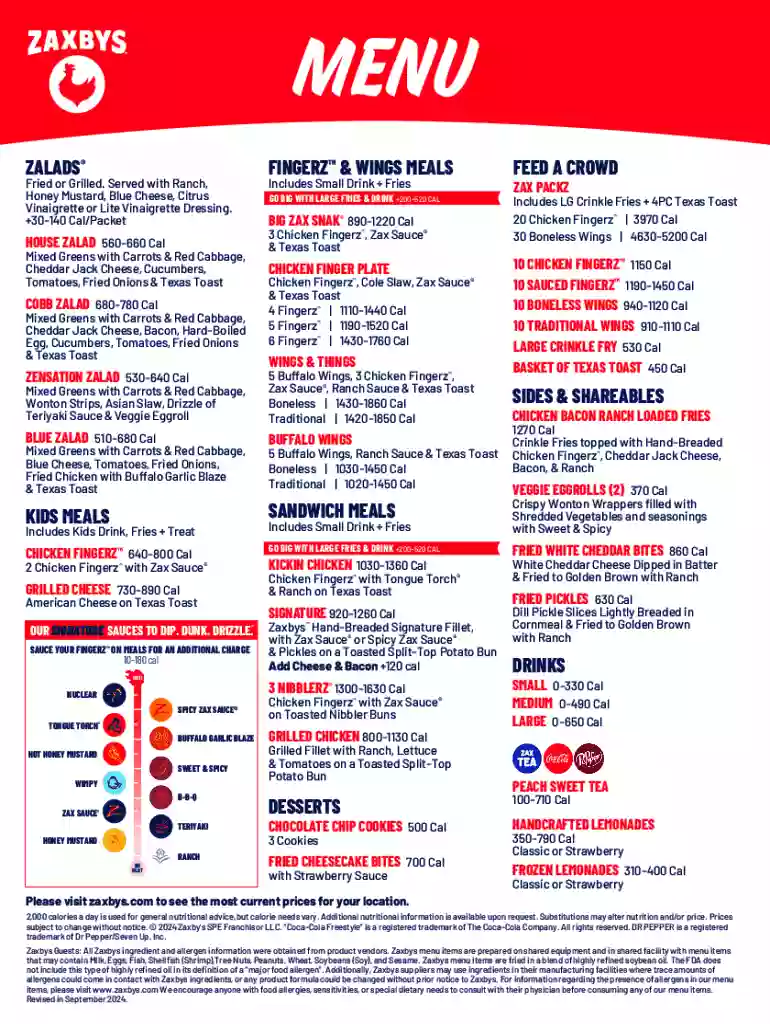
Definition & Overview of Zaxby's Menu

The Zaxby's menu offers a diverse range of food items characterized by signature sauces and unique flavor combinations. It features various categories, including salads, chicken finger meals, wings, sandwiches, kids' meals, desserts, sides, and drinks. The menu provides detailed nutritional information, enabling customers to make informed choices based on their dietary preferences. Additionally, the menu highlights options for larger groups, catering to parties and gatherings. Each item is typically accompanied by caloric content, allowing for easy assessment of nutritional intake.

Key Components of Zaxby's Menu

  • Salads: Fresh, hearty options often featuring grilled or fried chicken toppings.
  • Chicken Finger Meals: A Zaxby's staple, featuring tender, breaded chicken fingers.
  • Wings: Available in multiple flavors with signature sauces.
  • Sandwiches: Ranging from classic chicken offerings to unique creations.
  • Kids' Meals: Smaller portion sizes tailored to younger diners.
  • Desserts: Sweet treats to complement the savory items.
  • Sides: Traditional sides like fries and coleslaw.
  • Drinks: A variety of beverage options to suit different tastes.

How to Use Zaxby's Menu

Using the Zaxby's menu effectively involves identifying personal tastes and dietary goals. Customers start by browsing through categories based on their preferences. Each menu item has descriptions, including key ingredients and potential allergens. It's beneficial for those with dietary restrictions to review the provided allergen information.

Selecting the Right Meal

  1. Identify Preferences: Choose between salads, sandwiches, or wings based on hunger level and flavor craving.
  2. Consider Allergies and Dietary Needs: Review allergen information carefully; select appropriate items to avoid allergens.
  3. Look at Nutritional Information: Evaluate calories, fat content, and other nutritional data to align with dietary needs.

How to Obtain Zaxby's Menu

There are several ways customers can access the Zaxby's menu. The most convenient is visiting the official Zaxby's website, where the full menu is often presented digitally. Printed menus are available at restaurant locations, and customers can use the mobile app for on-the-go access.

Digital Access Points

  • Website: Official Zaxby's website features the complete and up-to-date menu.
  • Mobile App: Download the Zaxby's app for order placement and menu browsing.
  • In-Store: Physical menu copies are available in Zaxby's restaurants.

Steps to Navigate Zaxby's Menu Online

Navigating the online version of Zaxby's menu is a straightforward process designed for user-friendly access:

  1. Open the Official Website or App: Ensure a stable internet connection.
  2. Browse Categories: Use the digital interface to view menu categories, such as "chicken," "sandwiches," or "kids' meals."
  3. Select Desired Items: Click on each item for detailed descriptions and nutritional data.
  4. Customize Orders: Some platforms offer options to customize meals, such as removing certain ingredients or adding extras.
  5. Order and Checkout: Finalize selections and proceed with the purchase process if ordering directly.

Important Terms Related to Zaxby's Menu

Understanding specific terms on the Zaxby's menu enhances the customer experience:

  • Caloric Intake: The number of calories present in each menu item.
  • Signature Sauces: Unique sauces offered, such as Zax Sauce or Ranch.
  • Allergen Information: Details regarding potential allergens in menu items.
  • Combo Meals: Pre-selected staples that offer a main dish with sides and a drink.

Legal Use of the Zaxby's Menu

Utilizing the Zaxby's menu also involves understanding its legal context. Businesses like Zaxby's provide detailed nutritional and allergen information to align with health regulations and offer informed choices to customers.

Compliance and Guidelines

  • Nutritional Labeling: Adheres to guidelines requiring clear display of calorie counts and key ingredients.
  • Allergen Notices: Mandatory indications of common allergens in compliance with health regulations.

Examples of Using the Zaxby's Menu

Customers utilize the Zaxby's menu in various scenarios:

  • Families Picking Kid-Friendly Meals: Requesting kids' meals tailored to youthful appetites.
  • Large Group Orders: Selecting bulk meals to cater to parties or gatherings.
  • Health-Conscious Diners: Focusing on salads and grilled items to maintain caloric goals.
  • Individual Preferences: Tailoring orders by choosing from a range of signature sauces.

Digital vs. Paper Version of Zaxby's Menu

Each menu version offers its advantages, depending on the customer's needs:

Digital Version

  • Flexibility: Access anywhere with internet connectivity.
  • Interactivity: Potential for real-time updates and customization features.

Paper Version

  • Tangible: Familiar and straightforward for those who prefer physical menus.
  • No Tech Needed: Ideal for individuals without digital access or proficiency.

Understanding these elements allows customers to maximize their dining experience by leveraging the resources and information provided by Zaxby's.

be ready to get more

Complete this form in 5 minutes or less

Get form

Security and compliance

At DocHub, your data security is our priority. We follow HIPAA, SOC2, GDPR, and other standards, so you can work on your documents with confidence.

Learn more
ccpa2
pci-dss
gdpr-compliance
hipaa
soc-compliance