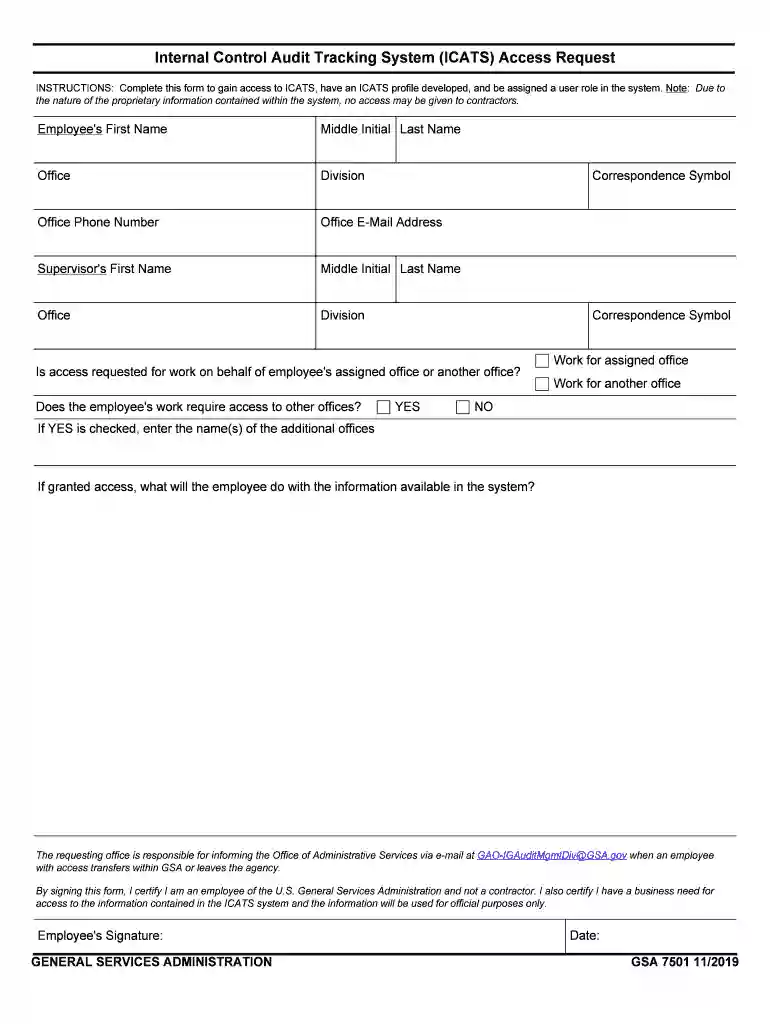
INSTRUCTIONS: Complete this form to gain access to ICATS, have an ICATS profile developed, and be as 2026

Get Form
INSTRUCTIONS: Complete this form to gain access to ICATS, have an ICATS profile developed, and be as Preview on Page 1

Here's how it works

01. Edit your form online
Type text, add images, blackout confidential details, add comments, highlights and more.

02. Sign it in a few clicks
Draw your signature, type it, upload its image, or use your mobile device as a signature pad.

03. Share your form with others
Send it via email, link, or fax. You can also download it, export it or print it out.

Definition & Purpose of the ICATS Access Form

The ICATS Access Form is designed for employees of the U.S. General Services Administration (GSA) to request access to the Internal Control Audit Tracking System (ICATS). This system is crucial for auditing purposes and managing internal controls. The form collects essential information, such as employee personal details, supervisor information, and specific access requirements. It is important to note that the form explicitly states contractors are ineligible for access, ensuring only authorized personnel can utilize ICATS resources effectively.

Key Elements of the ICATS Access Form

  • Personal Information: Collects essential details such as full name, job title, department, and employee ID.
  • Supervisor Information: Requires details of the immediate supervisor, including name, contact information, and approval signature.
  • Purpose of Access: Describes the specific need for access to ensure it aligns with GSA’s operational goals.
  • Eligibility Criteria: Specifies that only current GSA employees can apply for access, excluding contractors.

How to Complete the ICATS Access Form

Filling out the ICATS Access Form involves several key steps to ensure accurate and complete submission:

  1. Gather Required Information: Before you begin, collect all necessary details, including personal and supervisor information.
  2. Fill Out Personal Details: Enter your full name, job title, and other personal details as requested.
  3. Provide Supervisor Details: Input your supervisor’s information, ensuring they agree to the access request.
  4. Specify Access Purpose: Clearly articulate why access is needed and how it will be used.
  5. Review & Submit: Double-check all entered information for accuracy, then follow the submission instructions.

Submission Methods

  • Online Submission: Submit the completed form through the designated online portal for faster processing.
  • In-Person Delivery: Alternatively, forms can be submitted physically at designated GSA offices.
  • Mail Option: If neither method is feasible, a postal submission is acceptable, though processing may take longer.

Legal Use and Compliance

The use of the ICATS Access Form complies with internal GSA policies and relevant federal regulations. Access to ICATS is strictly monitored to prevent unauthorized use, and any misuse of access may result in disciplinary action.

Consequences of Non-Compliance

  • Unauthorized Access: Submitting false information or accessing ICATS without permission can lead to penalties.
  • Misuse of Information: Using ICATS data outside its intended scope is a serious violation.

Important Terms and Definitions

Understanding the terminology related to the ICATS Access Form helps ensure proper completion and compliance:

  • ICATS (Internal Control Audit Tracking System): A system used for managing and auditing internal controls within the GSA.
  • GSA (General Services Administration): A federal agency responsible for supporting the basic functioning of other federal agencies.
  • Access Purpose: The specific reason and intended use for accessing the ICATS system.

Examples of Use Scenarios

Real-world applications of the ICATS Access Form highlight its practical utility within the GSA:

  • Internal Audit Preparations: Employees use ICATS access to prepare for upcoming audits, ensuring compliance and readiness.
  • Control Management: Staff members managing internal controls rely on ICATS data to maintain accurate and up-to-date records.

Supervisor’s Role and Responsibilities

The supervisor plays a crucial role in the ICATS access request process, ensuring that access is granted only when necessary and in line with departmental needs.

Responsibilities Include

  • Reviewing Access Justifications: Ensuring that the employee’s reasoning for access is valid and aligns with job responsibilities.
  • Approval and Signature: Providing necessary signatures to endorse the access request.

Application Process & Approval Time

Securing approval for ICATS access is a structured process managed by the GSA’s administrative team.

  • Application Review: Submission is reviewed to ensure all information is complete and accurate.
  • Approval Time: Typically, access requests are processed within one to two weeks, depending on workload and completeness of the application.

Software Compatibility and Integration

ICATS integrates with various software platforms to streamline access and data management, particularly for those already using GSA-approved digital tools.

Compatible Platforms

  • Google Workspace: Documents can be imported and exported between ICATS and Google applications, facilitating efficient workflow.
  • Cloud Storage Services: Supports integration with services like Dropbox and OneDrive for easy document management.

In providing comprehensive detailing, this content covers all necessary aspects of the ICATS Access Form, ensuring GSA employees can utilize it effectively while maintaining compliance and operational integrity.

be ready to get more

Complete this form in 5 minutes or less

Get form

Security and compliance

At DocHub, your data security is our priority. We follow HIPAA, SOC2, GDPR, and other standards, so you can work on your documents with confidence.
Learn more
ccpa2
pci-dss
gdpr-compliance
hipaa
soc-compliance
be ready to get more

Complete this form in 5 minutes or less

Get form