






Definition & Meaning
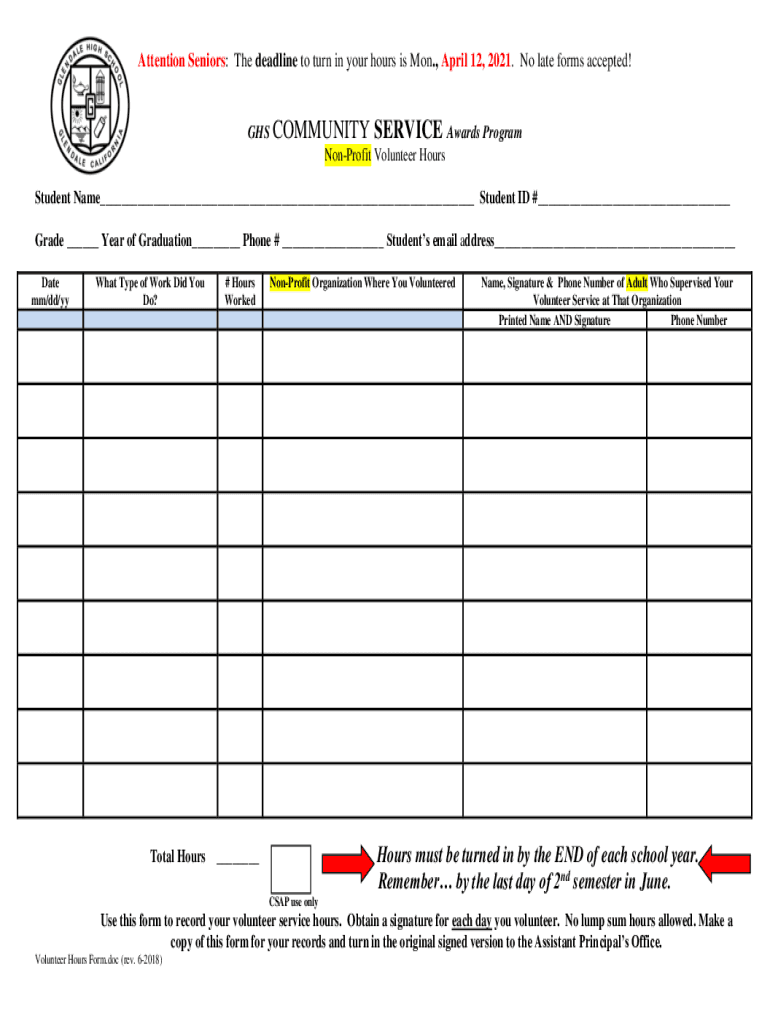
The form "Attention Seniors: The deadline to turn in your hours is Monday, April 12" is an official notice directed at senior students, signaling the requirement to submit their recorded community service hours by the specified deadline. This document is part of the GHS Community Service Awards Program, which recognizes students for their voluntary contributions to the community. The form serves the dual purpose of recording crucial information such as student details, the type of work performed, and the total number of hours alongside supervisor verification. It is essential to submit this form on time to qualify for the awards program.
Key Elements of the Form
The form requires several key pieces of information:
- Student Information: Full name, contact details, and possibly student ID to ensure accurate identification.
- Service Details: Description of the voluntary work conducted, including the organizations served.
- Hours Worked: Total hours committed to each activity, requiring precise calculation.
- Supervisor Verification: Signature and contact information of the supervisor or organization head who oversaw the service activity. This section confirms the hours and authenticity of work reported.
Steps to Complete the Form
Completing the form involves several steps:
- Gather Required Information: Compile personal details, list of community service activities, and corresponding supervisor contacts.
- Log Service Hours: Accurately record the date, hours, and nature of each volunteer activity – often best done incrementally over time.
- Supervisor Signature: Obtain written verification from each activity's supervisor before submitting.
- Review: Double-check all entered information for accuracy and completeness.
- Submit Before Deadline: Ensure the completed form reaches the designated authority by the deadline (Monday, April 12) either in person or by an authorized submission method.
How to Use the Form
To use the form effectively:
- Plan Ahead: Start compiling volunteer hours well in advance to avoid last-minute rushes.
- Keep Copies: Preserve copies of the filled form and supervisor verifications for personal records.
- Seek Assistance: Utilize school resources, such as counselors or community service coordinators, for guidance on form requirements and submission.
Filing Deadlines / Important Dates
The critical deadline for submitting the completed form is Monday, April 12. Missing this deadline means disqualification from the Community Service Awards Program. Students should mark this date on calendars and schedule reminders leading up to it.
Penalties for Non-Compliance
Failure to submit the form by the deadline results in forfeiture of eligibility for the Community Service Awards. There may be no allowance for late submissions, thus emphasizing the importance of timeliness and preparation.
Who Typically Uses the Form
This document is mainly used by senior students involved in the GHS Community Service Awards Program. Participation is often part of graduation requirements or scholarship opportunities, encouraging students to engage deeply with community service.


How to Obtain the Form
Acquire the form through:
- School Administration: Available at the school's main office or counseling department.
- Online Portals: If offered, download from the school's website or student portal – this aids in immediate access and printing at home.
- Community Coordinators: In some programs, coordinators distribute the forms during orientation sessions or community meetings.
Form Submission Methods
Students may submit the form through:
- In-Person Delivery: To the designated school office or program advisor.
- Mail: If permitted, send via postal services ensuring timely delivery before the deadline.
- Online Submission: Available in some school systems, allowing for electronic uploads to student platforms or email to program coordinators.
Software Compatibility
While the physical form is standard, digital versions may be compatible with document management software like DocHub. This integration enables:
- Direct Editing: Fill out form fields, add signatures, and store copies digitally.
- Secure Sharing: Email the filled form directly to designated recipients or supervisors with added encryption for privacy.
- Accessibility: Access and complete forms on various devices, syncing across platforms for ease of use.