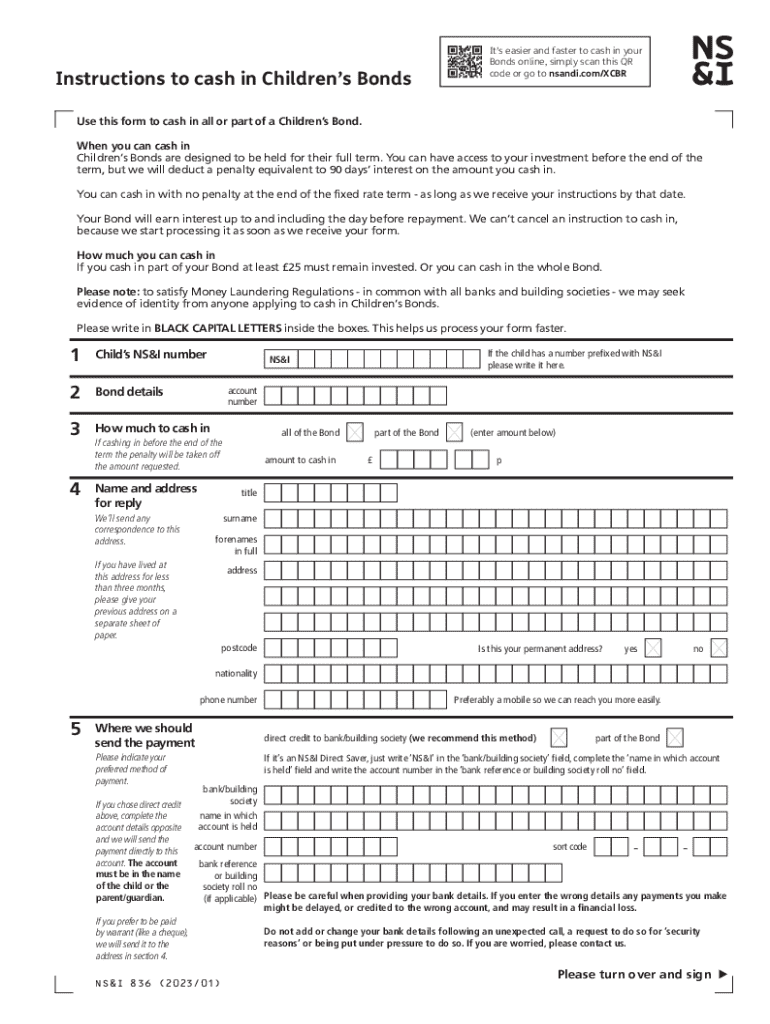







Steps to Complete the Instructions to Cash In Children's Bonds
-
Gather Required Information: Before you start, ensure you have all necessary personal details, including the bondholder's name, address, and social security number. You'll also need bond information, such as the bond serial number and issue date.
-
Personal Details Form: Complete the section regarding your personal details in the instructions. This includes providing any joint holders' information if applicable.
-
Bond Information Section: Fill out the information about the bonds you're cashing in. Include the types of bonds, serial numbers, and issue dates to ensure accuracy and prevent processing delays.
-
Payment Preferences: Indicate your preferences for receiving the payment. You may choose between direct deposit to a verified account or receiving a check in the mail.
-
Identity Verification: Prepare to verify your identity. You'll need an official ID, such as a driver's license or passport, to satisfy identity verification requirements. This can be done through a digital upload or an in-person verification if required.
-
Submit the Form: Once completed, submit your form via the preferred channel, whether online, by mail, or in person. Each method has specific instructions which need to be followed precisely.
-
Await Confirmation: After submission, wait for confirmation of receipt from the Treasury or your financial institution. They might send an acknowledgment of receipt via email or regular mail.
Important Terms Related to Cashing In Children's Bonds
- Maturity Date: The date when the bond is fully matured, and no more interest is earned.
- Redemption Value: Amount paid to the bondholder when cashed, including interest accrued.
- Beneficiary: A person designated to receive bond payment if the primary holder is unable.
- Interest Rate: The percentage at which the bond accrues interest over time.
Who Typically Uses the Instructions to Cash In Children's Bonds
- Parents or Guardians: Typically manage Children's Bonds saved in the names of minors.
- Investing Individuals: People holding these bonds as part of long-term investment strategies.
- Educational Fund Planners: Those using bonds to save for educational expenses.
- Financial Advisors: Professionals assisting clients in managing and cashing their bonds effectively.
- Executors of Estates: Responsible for handling the bonds of a deceased person.

Penalties for Early Withdrawal
- Cashing bonds before their maturity date can result in penalties, often amounting to several months' worth of interest.
- Early redemption might lead to forfeiting interest income, significantly reducing financial benefits.
- Always compare the financial gains against potential penalties before proceeding with early cash-in.
Legal Use of the Instructions to Cash In Children's Bonds
- Comply with all applicable federal and state laws when using these instructions.
- Ensure authenticity and accuracy in the submission of information to avoid fraud allegations.
- Heed rules related to identity documentation and rightful ownership before redeeming bonds.
Digital vs. Paper Version
- Digital Version: Offers convenience and speed in accessing information, submitting forms, and receiving payment.
- Paper Version: Suitable for those less comfortable with technology or with unreliable access to digital services.
- Provides a history record but typically slower processing times.
Form Submission Methods: Online, Mail, In-Person
- Online: Fastest method; involves digital forms and submission via official websites.
- Mail: Requires printing forms, completing them manually, and mailing them to designated offices.
- In-Person: Direct submission at financial institutions that support bond redemptions.
Required Documents
- Identification Proof: Valid driver’s license, passport, or birth certificate for minors.
- Bond Documentation: Original or electronic records of bonds, with details such as serial numbers.
- Bank Account Details: If opting for direct deposit, accurate bank information is required.
Key Elements of the Instructions to Cash In Children's Bonds
- Comprehensive Guidelines: Provide detailed steps for successfully cashing bonds.
- Security Measures: Encryption and identity verification to protect sensitive data.
- Support Channels: Availability of customer support for assistance during the process.
- User-Friendly Design: Simplifies completion with straightforward, accessible language.