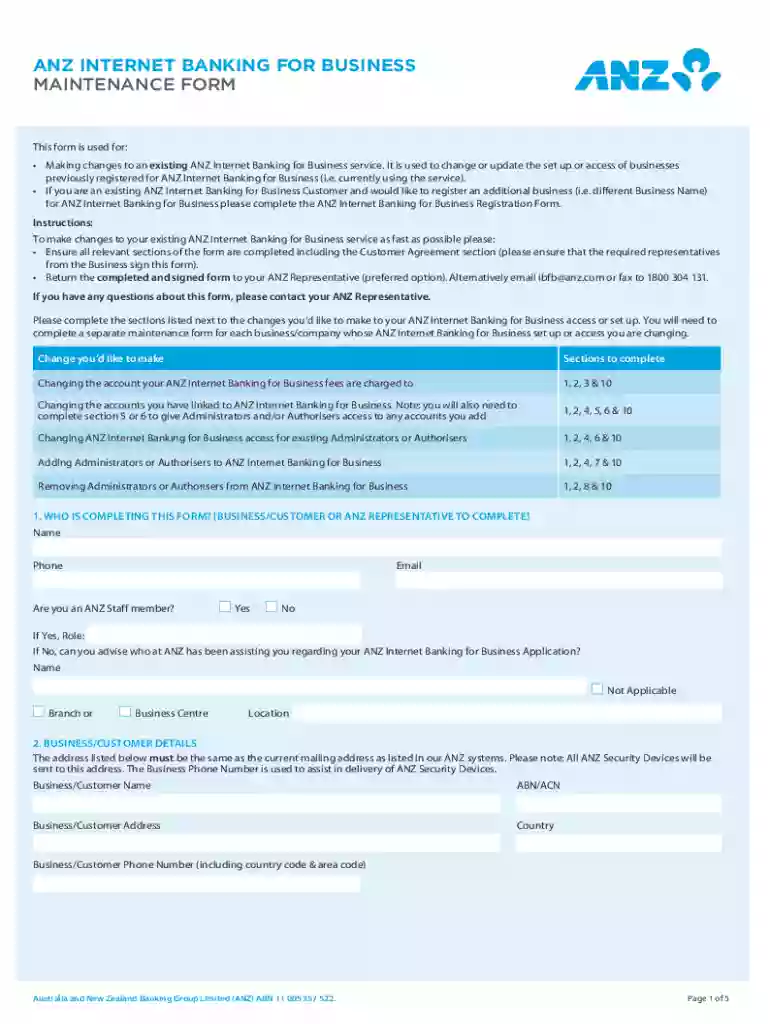
Anz Internet Banking for Business Maintenance Form 2026

Get Form
Anz Internet Banking for Business Maintenance Form Preview on Page 1

Here's how it works

01. Edit your form online
Type text, add images, blackout confidential details, add comments, highlights and more.

02. Sign it in a few clicks
Draw your signature, type it, upload its image, or use your mobile device as a signature pad.

03. Share your form with others
Send it via email, link, or fax. You can also download it, export it or print it out.

Definition and Purpose of the ANZ Internet Banking for Business Maintenance Form

The ANZ Internet Banking for Business Maintenance Form is a specialized document utilized by existing customers to modify their internet banking services with ANZ, specifically tailored for business accounts. This form is instrumental in managing a variety of changes, including the update of account access permissions, the addition or removal of administrative users, and alterations to linked accounts. By completing this form, businesses can ensure that their banking services align with current operational needs and security protocols.

Key Elements

The form comprises several critical sections that need to be filled out accurately based on the desired account changes. These sections include:

  • Administrative Details: Captures information about authorized representatives.
  • Service Changes: Allows for selection of specific modifications, such as account access levels or user roles.
  • Security Settings: Provides options for updating security measures, including authentication preferences and linked account protocols.
  • Signature Section: Requires signatures from authorized personnel to validate changes.

Each section must be completed with precise information to ensure that the form is processed efficiently and accurately by ANZ.

How to Obtain the ANZ Internet Banking for Business Maintenance Form

To acquire the ANZ Internet Banking for Business Maintenance Form, businesses can:

  1. Visit an ANZ Branch: Request the form directly from in-person representatives.
  2. Online Access: Log into the ANZ online banking portal and navigate to the forms section for download.
  3. Customer Support: Contact ANZ customer support to request a form via post or email.

Practical Considerations

  • Ensure Access: Confirm you have the necessary permissions to request and fill out the form.
  • Secure Connection: When accessing online, use a secure and private internet connection to maintain confidentiality.

Steps to Complete the ANZ Internet Banking for Business Maintenance Form

Successfully completing the form requires a methodical approach to ensure all necessary information is provided. Here are the primary steps:

  1. Gather Information: Collect details on the current account setup, desired changes, and authorized signatories.
  2. Fill Out Administrative Details: Enter information for the primary business contacts and any new administrators.
  3. Specify Service Changes: Clearly outline the changes needed in access levels or account settings.
  4. Update Security Preferences: Adjust security options according to current business needs and risk assessments.
  5. Review and Sign: Double-check all entries for accuracy and completeness before obtaining required signatures.

Example Scenario

A company wanting to add a new finance manager as an account administrator would complete the form by adding the individual's information in the appropriate administrative section and updating the access permissions accordingly.

Who Typically Uses the ANZ Internet Banking for Business Maintenance Form

This form is predominantly used by business entities ranging from small enterprises to large corporations. Typical users include:


  • Business Owners: Implement changes to access and security protocols.
  • Finance Managers: Manage administrative changes and access permissions.
  • IT Departments: Oversee integration of new digital security measures.
decoration image ratings of Dochub

Business Types

  • Limited Liability Companies (LLCs)
  • Corporations
  • Partnerships and Small Enterprises

Legal Use and Compliance

Ensuring legal compliance when using the ANZ Internet Banking for Business Maintenance Form is crucial. The form must be:

  • Completed by Authorized Personnel: Only individuals with the legal authority to make changes to the account should fill out and sign the form.
  • Submitted in Accordance with ANZ Guidelines: Follow submission protocols outlined by ANZ to prevent processing delays and ensure security.
  • Adhered to Privacy Laws: Maintain compliance with relevant data protection regulations such as GDPR in applicable regions.

Penalties for Non-Compliance

Failure to accurately complete or properly authorize the form can lead to unauthorized changes, disruptions in banking services, or potential security breaches, all of which may have legal consequences for the business.

Required Documents for Submission

To facilitate the processing of the maintenance form, ensure the inclusion of necessary documentation such as:

  • Identification for Authorized Signatories: Valid ID for individuals signing the form.
  • Business Registration Records: To verify legal standing and authorization capabilities.

Additional Requirements

  • Evidence of Change Reason: Any supporting documents justifying the requested changes, such as a change in management or operational directives.

Form Submission Methods

There are several ways to submit the completed ANZ Internet Banking for Business Maintenance Form:

  1. Online Submission: Securely upload the form through ANZ's online banking portal.
  2. Mail-In Option: Physical submission via postal service to designated ANZ addresses.
  3. In-Person Drop-Off: Direct submission at an ANZ branch.

Considerations for Submission

  • Submission Deadline Compliance: Ensure timely submission to avoid lapses in service or security settings.
  • Confirmation of Receipt: Obtain confirmation from ANZ that the form has been received and is being processed.

These options provide flexibility depending on business preferences and available resources.

be ready to get more

Complete this form in 5 minutes or less

Get form

Security and compliance

At DocHub, your data security is our priority. We follow HIPAA, SOC2, GDPR, and other standards, so you can work on your documents with confidence.

Learn more
ccpa2
pci-dss
gdpr-compliance
hipaa
soc-compliance
be ready to get more

Complete this form in 5 minutes or less

Get form