01. Edit your form online
Type text, add images, blackout confidential details, add comments, highlights and more.

Type text, add images, blackout confidential details, add comments, highlights and more.

Draw your signature, type it, upload its image, or use your mobile device as a signature pad.

Send it via email, link, or fax. You can also download it, export it or print it out.
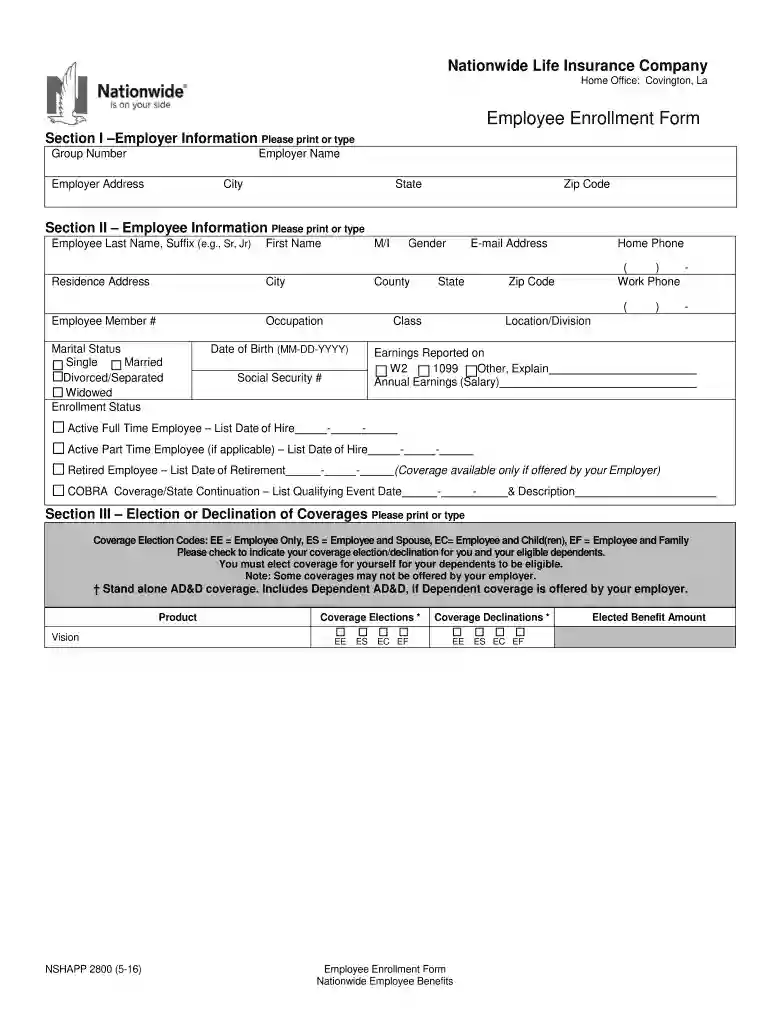
The NSHAPP 2800, commonly referred to as the Employee Enrollment Form, is a document used by the Nationwide Life Insurance Company for enrolling employees in insurance coverage. This form is particularly for businesses with group sizes ranging from two to nine employees. The form collects essential personal and employment information necessary for employees to access insurance benefits. This includes sections that capture employer and employee details, offering a streamlined method for recording coverage selections, beneficiary designations, and understanding critical notices pertaining to late enrollment and potential fraud. The form ensures that all enrolling employees and their employers certify the accuracy of the shared information through signatures from both the employee and an authorized employer representative.
When utilizing the NSHAPP 2800 form, it’s crucial to follow a structured approach to ensure all necessary information is accurately completed. Here is how to effectively use the form:
Gather Required Information: Prior to beginning, collect all necessary personal information such as social security number, employment details, and intended coverage options.
Employer Section Completion: Start with the employer section, providing the company's name, address, and contact information. The employer is also responsible for detailing the available insurance plans.
Employee Details Entry: Fill in the employee section with accurate data including name, contact details, and employment specifics.
Choose Coverage Options: Specify the desired insurance coverage by marking the appropriate options directly on the form. Ensure these align with available offerings provided by the employer.
Designate Beneficiaries: Complete the beneficiary section by listing one or more recipients for the insurance benefits. Ensure that names and details are correct to avoid issues in benefit disbursement.
Important Notices Acknowledgment: Carefully review and acknowledge the important notices regarding late enrollment and fraud. This is vital for understanding rights and responsibilities.
Final Review and Signature: After completing all necessary sections, both the employee and the authorized employer representative must review the form. Signatures certify the form's completion and accuracy.
There are multiple methods to secure a copy of the NSHAPP 2800 form, ensuring ease of access for businesses:
From Nationwide Life Insurance: Directly request a copy through the company's customer service or via their official website.
Employer Distribution: Often, employers will distribute these forms during the onboarding or enrollment period for new or existing employees.
Online Resources: Certain authorized platforms and document management services, like DocHub, may offer access to these forms for straightforward downloading and filling.
Completing the NSHAPP 2800 form requires attention to accuracy and detail:
Understanding the components of the NSHAPP 2800 Employee Enrollment Form is vital for a smooth enrollment process. Key sections include:
Failing to complete or submit the NSHAPP 2800 form accurately can lead to several issues, including:
The form's modern incarnation allows for both digital and paper submission, each with distinct advantages:
Eligibility to use the NSHAPP 2800 form is determined by specific criteria that cater to small businesses and their employees:
Utilizing this comprehensive approach ensures thorough coverage and understanding of the NSHAPP 2800 form, facilitating a seamless insurance enrollment for employees.


We've got more versions of the NSHAPP 2800(Employee Enrollment Form) 2-9 group form. Select the right NSHAPP 2800(Employee Enrollment Form) 2-9 group version from the list and start editing it straight away!
At DocHub, your data security is our priority. We follow HIPAA, SOC2, GDPR, and other standards, so you can work on your documents with confidence.