
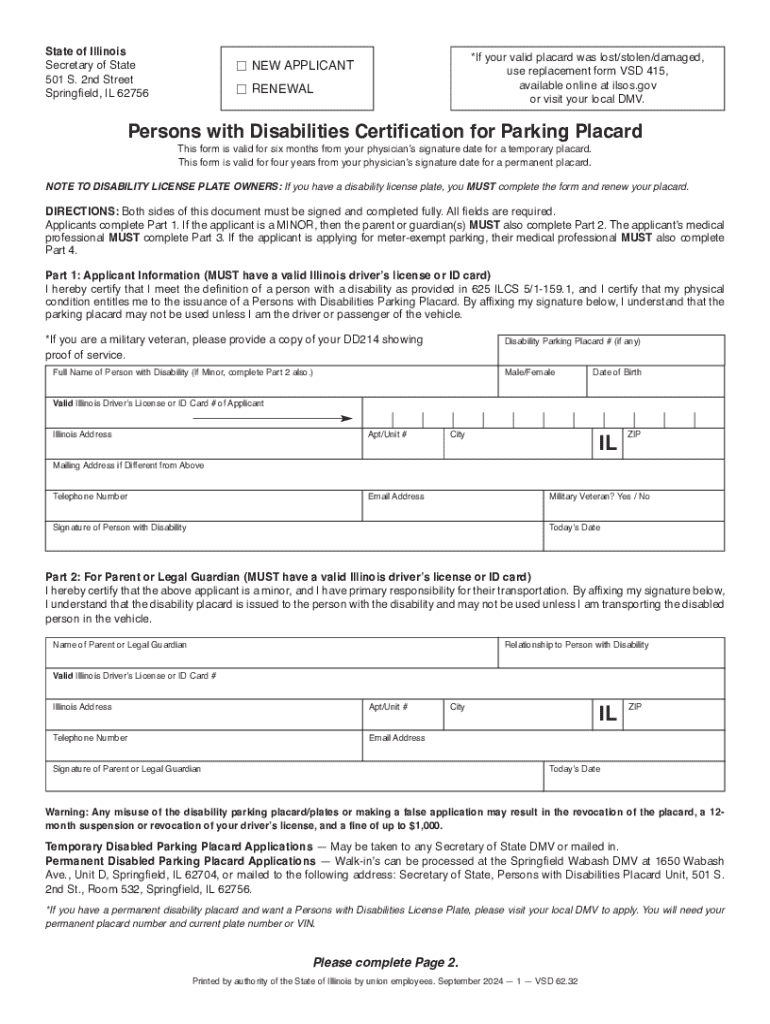







Definition & Meaning
The Persons With Disabilities Certification for Parking Placard is an essential document that allows individuals with qualifying disabilities to obtain a special parking placard. This placard provides easier access to parking spaces reserved for people with disabilities, increasing mobility and accessibility. Such certifications acknowledge the importance of accommodating those with different physical needs, enhancing their ability to participate in daily activities independently.
Types of Disabilities
- Physical disabilities: This includes individuals with mobility impairments who require the use of wheelchairs, walkers, or other assistive devices.
- Visual impairments: People with significant vision impairments or blindness may qualify.
- Chronic illnesses: Conditions that impair mobility or endurance, such as heart and lung diseases, may be eligible.
How to Obtain the Certification
Acquiring the Persons With Disabilities Certification for a Parking Placard involves a structured process aimed at verifying eligibility and ensuring the placard is used appropriately.
Application Requirements
- Medical certification: A licensed medical professional must certify the individual’s disability. This may include doctors, chiropractors, or advanced practice nurses.
- Application form: The applicant must complete a detailed form, often available on the state's Department of Motor Vehicles (DMV) website.
- Identification: A copy of the applicant's government-issued ID is usually required to verify identity.
Approval Time
- The processing time can vary by state but typically takes between two to four weeks. Delays might occur if additional verification is required.
Steps to Complete the Certification
Completing the Persons With Disabilities Certification for a Parking Placard is a detailed, multi-step process aimed at ensuring each applicant meets the necessary criteria.
- Consultation with Healthcare Provider: Discuss your need for a parking placard with your healthcare provider, who will assess your eligibility.
- Form Acquisition: Obtain the official application form, either online or at a physical DMV location.
- Form Completion: Fill out personal information and have your healthcare provider complete their certification section.
- Submission: Submit the completed application and any additional documents as required by your state’s regulations.
Tips for Accuracy
- Double-check all form fields for accuracy to avoid processing delays.
- Ensure that medical certifications are current and signed.
Eligibility Criteria
Eligibility for the Persons With Disabilities Certification varies by state but generally includes individuals with significant impairments that hinder mobility.


Common Criteria
- Inability to walk 200 feet without rest
- Use of portable oxygen
- Severe cardiac conditions
- Limited ability to walk due to an arthritic, neurological, or orthopedic condition
Key Elements of the Certification
Understanding the key elements of the certification process assists in efficient completion and reduces the chances of rejection or delays.
Core Components
- Applicant Information: Essential details including name, address, and contact information.
- Medical Certification: A section where a licensed healthcare provider confirms the nature and extent of the applicant's disability.
- Usage Terms: Guidelines on how the placard should be used to maintain legal compliance.
State-Specific Rules
Each state in the U.S. has unique rules and regulations surrounding the issuance and use of disabled parking placards, which may influence the application process and eligibility requirements.
Examples of Variations
- California: Requires a doctor's certification for both temporary and permanent placards.
- Illinois: Provides a two-tier system with temporary and permanent placards.
- New York: Allows placard renewals to be done online, offering convenience for recurring needs.
Penalties for Non-Compliance
Non-compliance with the rules governing the Persons With Disabilities Certification for Parking Placard can result in penalties both for the holder and others misusing the placard.
Common Penalties
- Fines for misuse, which can range from $100 to $500 depending on the state.
- Possible suspension or revocation of the parking placard.
- Legal action in cases of fraudulent applications or certifications.




