Definition and Purpose of the Diagnosis Attestation Form
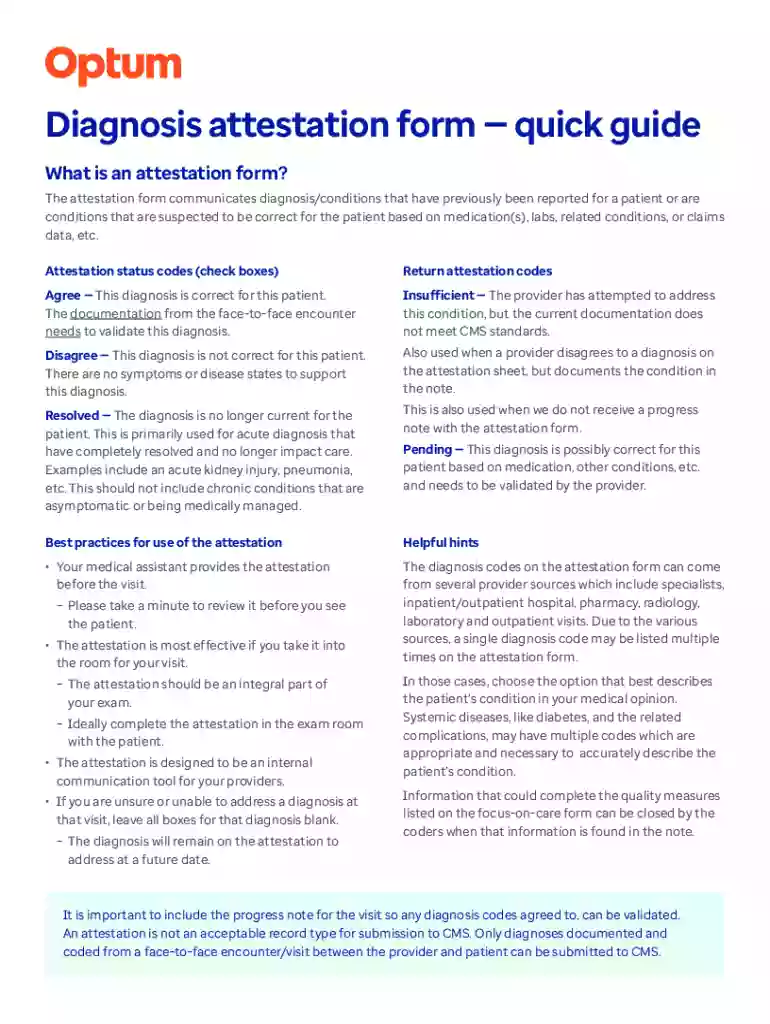
The Diagnosis Attestation Form is a critical document within the Optum Care Network of Kansas City. It serves to communicate and validate patient diagnoses gathered from various data sources such as medication, lab results, and claims. The primary purpose of this form is to ensure the accurate representation of a patient's health status. Health care providers utilize attestation status codes — Agree, Insufficient, Disagree, Resolved, Pending — to confirm the accuracy of reported diagnoses, providing a consistent method for healthcare validation.
How to Use the Diagnosis Attestation Form
Using the Diagnosis Attestation Form involves a meticulous process:
- Review Patient Information: Before a patient visit, examine the form to understand current and past diagnoses.
- Select Attestation Codes: Choose the appropriate status code to reflect the accuracy of each diagnosis.
- Document Changes: Make notes of discrepancies or updates.
- Submit: Forward the completed form for inclusion in CMS submissions.
Obtaining the Diagnosis Attestation Form
The Diagnosis Attestation Form for the Optum Care Network of Kansas City can typically be obtained through:
- Healthcare Provider Networks: Forms are often distributed directly to providers.
- Optum Care Network's Portal: Access digital copies through their online systems.
- In-Person at Practice Locations: Physical copies may be available during healthcare facility visits.
Steps to Complete the Diagnosis Attestation Form
Completing the form requires attention to detail:
- Gather Patient Data: Ensure all information aligns with existing records.
- Accurately Fill Attestation Codes: Use clear and correct codes for each diagnosis area.
- Review for Completeness: Double-check all entries before submission.
- Submit Form: Use the preferred method — online submission, mail, or in-person delivery.
Key Elements of the Diagnosis Attestation Form
Essential components include:
- Patient Information: Name, ID number, and other identifiers.
- Diagnosis List: Current and historical data.
- Attestation Codes: Indicate verification of each diagnosis.
- Provider Signature: Essential for legal accountability.
Legal Use of the Diagnosis Attestation Form
Legally, the form is governed under healthcare compliance:
- CMS Regulations: Ensures conformity with federal healthcare standards.
- Confidentiality Obligations: Must comply with HIPAA requirements to protect patient data.
- Document Retention: Providers must maintain accurate records for reference and legal accountability.
Examples of Using the Diagnosis Attestation Form
Practical scenarios illustrate common usage:
- Routine Patient Review: Prior to visits, forms verify ongoing conditions and affirm treatment plans.
- Audit Preparations: Ensures readiness for insurance or CMS audits, streamlining the review process.
- Interdisciplinary Collaboration: Facilitates sharing accurate information among varied healthcare teams.
Software Compatibility and Document Workflow
Compatibility with digital tools enhances workflow:
- DocHub Integration: Easily edit and sign forms digitally with DocHub's online platform.
- Cloud Services: Collaborate using storage services like Google Drive for real-time updates.
- Secure Transmission: Utilize encryption standards to safeguard patient information during digital handling.
Important Terms Related to the Form
Key terminology includes:
- CMS Submissions: Reporting patient data for Medicare and Medicaid Services.
- Attestation Codes: Specific codes indicating diagnosis accuracy (Agree, Insufficient, etc.).
- HIPAA: Standards for protecting sensitive patient information.
Digital Versus Paper Version
Choosing a format depends on practice needs:
- Digital Forms: Offer flexibility and ease of distribution.
- Paper Forms: Useful where electronic systems are limited; require manual handling and storage.
Penalties for Non-Compliance
Failure to adhere to form use can result in:
- Fines: Monetary penalties for incorrect submissions.
- Audit Failures: Increased scrutiny and potential operational impacts.
- Legal Liability: Risks associated with improper data handling or patient data breaches.
This broad overview provides a comprehensive understanding of the "Diagnosis Attestation Form Quick Guide for Optum Care Network of Kansas City," focusing on critical aspects needed for effective use in healthcare settings.