U S Bank ReliaCard Enrollment Authorization Form (CSF 080700B) 2026

Get Form
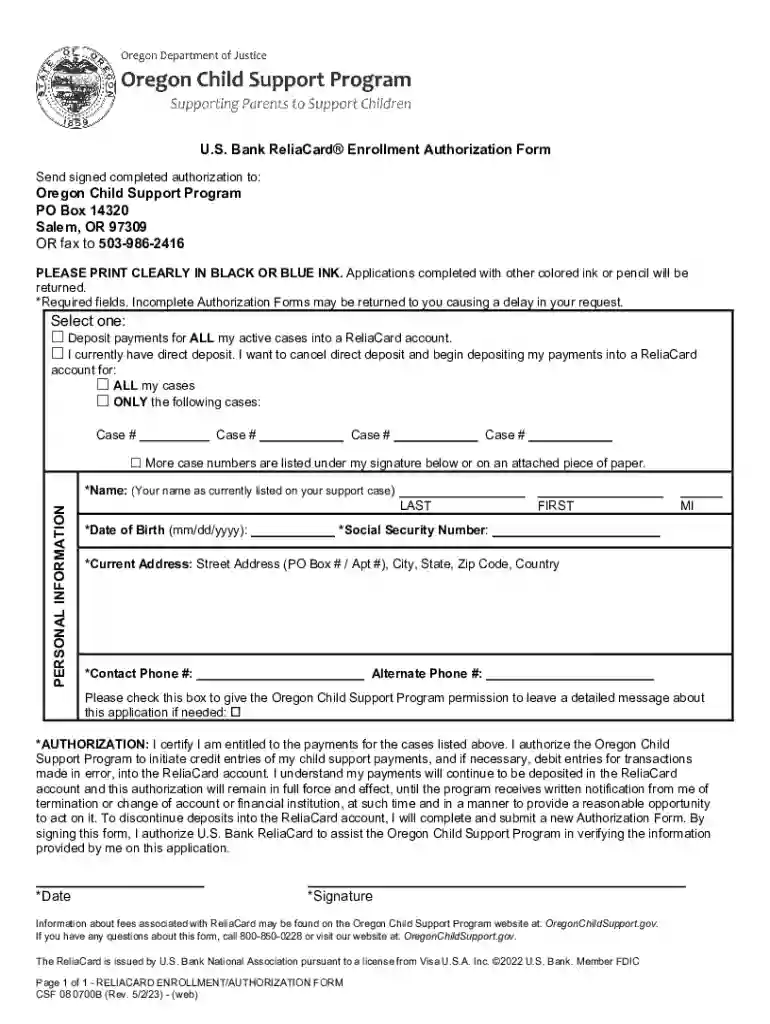
U S Bank ReliaCard Enrollment Authorization Form (CSF 080700B) Preview on Page 1

Here's how it works

01. Edit your form online
Type text, add images, blackout confidential details, add comments, highlights and more.

02. Sign it in a few clicks
Draw your signature, type it, upload its image, or use your mobile device as a signature pad.

03. Share your form with others
Send it via email, link, or fax. You can also download it, export it or print it out.

Definition & Meaning

The U.S. Bank ReliaCard Enrollment Authorization Form (CSF 080700B), often used in the Oregon Child Support Program, is a document that allows individuals to direct their child support payments into a U.S. Bank ReliaCard account. This form ensures a seamless transfer of funds by authorizing the automated deposit of payments into a secure financial account, which simplifies the management of received support funds.

How to Use the U.S. Bank ReliaCard Enrollment Authorization Form (CSF 080700B)

Using this form involves several key steps. Individuals must accurately fill in their personal details, such as name and contact information, as well as provide specific case numbers related to their child support. Consistent accuracy is crucial to prevent delays in processing. Once completed, the form must be submitted in either black or blue ink to ensure it meets processing standards, thus preventing rejections due to non-compliance with submission requirements.

Steps to Complete the U.S. Bank ReliaCard Enrollment Authorization Form (CSF 080700B)

  1. Gather Information: Collect all necessary personal and case information, including your child support case number and ReliaCard account details.
  2. Fill Out Personal Information: Enter your full name, address, and any additional personal identifiers.
  3. Enter Case Details: Document your child support case number and any related identifiers essential for processing.
  4. Consent to Authorization: Read the consent section carefully before signing in the designated area to authorize payments.
  5. Review and Verify: Double-check all entered information for accuracy to avoid processing delays.
  6. Submit the Form: Send the completed form to the specified address or fax number, ensuring it reaches the processing center promptly.

Important Terms Related to U.S. Bank ReliaCard Enrollment Authorization Form (CSF 080700B)

  • ReliaCard: A prepaid debit card issued by U.S. Bank for receiving recurring government or child support payments.
  • Enrollment Authorization: A formal agreement allowing the automatic deposit of funds into a specified account.
  • Case Number: A unique identifier for an individual's child support case, necessary for tracking and processing payments.

Key Elements of the U.S. Bank ReliaCard Enrollment Authorization Form (CSF 080700B)

  • Personal Information Section: Includes fields for your name, address, and contact information.
  • Case Details: Requires the child's support case number and any related parties involved.
  • Authorization Signature: A signature line confirming your consent to authorize deposits.

Legal Use of the U.S. Bank ReliaCard Enrollment Authorization Form (CSF 080700B)

This form is used within the legal context of child support payment processing in the U.S. Specifically, its function is to streamline the automatic deposit of child support payments, adhering to state and federal regulations. The legal basis for using this form is to ensure that payments are correctly and securely allocated to the designated recipient within the boundaries of established child support laws.

Required Documents

To complete the U.S. Bank ReliaCard Enrollment Authorization Form, you may need:

  • A valid ID to verify your identity.
  • Child support case documentation to provide accurate case numbers.
  • Proof of address may be required if not already on file with the program.

Form Submission Methods (Online / Mail / In-Person)

  • Online: Some jurisdictions may offer an online submission portal, providing a convenient option to submit the form digitally.
  • Mail: Forms may be mailed to the specified address provided by the child support agency.
  • Fax: A traditional method, fax submission requires sending the form to a designated number as instructed.

Who Issues the Form

The U.S. Bank ReliaCard Enrollment Authorization Form is typically issued by state child support agencies, such as the Oregon Department of Justice in its Child Support Program. These agencies are responsible for managing the distribution of child support payments and providing necessary documentation to recipients for enrollment in services like the U.S. Bank ReliaCard.

be ready to get more

Complete this form in 5 minutes or less

Get form

Got questions?

We have answers to the most popular questions from our customers. If you can't find an answer to your question, please contact us.
Contact us
There are multiple ways in which you can activate your Debit Card. It can be done by either visiting your nearest bank ATM or even online through phone banking.
You can activate your card on the ReliaCard website or on the mobile app Scan the QR code to activate your card on the ReliaCard website and click Activate Card From the mobile app, click Setup Online Access/Activate New Card. You will be prompted to create a password.
Activate your U.S. Bank Visa Debit Card and create your PIN today. To activate using the U.S. Bank Mobile App: Select Manage Cards and choose your card. Then, select Activate and Create PIN.
In-Network ATMs: Withdraw cash for free at any U.S. Bank or MoneyPass ATM. For the nearest fee-free ATM locations visit: .usbank.com/locate or .moneypass.com. You can check your balance for free using any or all of the following methods: Online View account online at .usbankreliacard.com.

Security and compliance

At DocHub, your data security is our priority. We follow HIPAA, SOC2, GDPR, and other standards, so you can work on your documents with confidence.

Learn more
ccpa2
pci-dss
gdpr-compliance
hipaa
soc-compliance