




01. Edit your form online
Type text, add images, blackout confidential details, add comments, highlights and more.

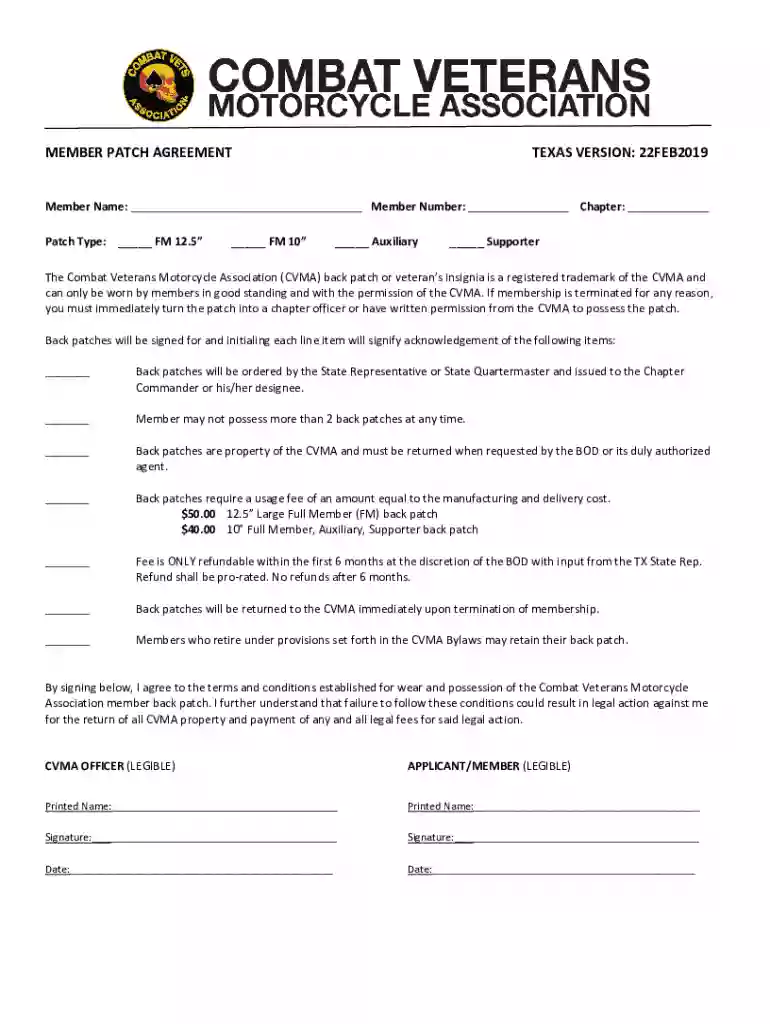
Type text, add images, blackout confidential details, add comments, highlights and more.

Draw your signature, type it, upload its image, or use your mobile device as a signature pad.

Send it via email, link, or fax. You can also download it, export it or print it out.
The Member Patch Agreement Texas Version is a legally binding document used by the Combat Veterans Motorcycle Association (CVMA) to govern the use and possession of their back patches by members within Texas. This agreement outlines the specific terms and conditions under which members can wear and possess these patches, emphasizing their status as a trademark of the CVMA.
The agreement includes several critical components that members must adhere to, ensuring compliance and proper use of the patches.
Understanding the process to successfully complete and submit the agreement is crucial for all prospective members.
Compliance with the tasks outlined in the Member Patch Agreement Texas Version is essential, as it creates legal obligations for both the members and the organization.
Using the agreement is straightforward, but it requires attention to detail and adherence to instructions.
Texas laws and CVMA policies may have unique stipulations for members within the state regarding the possession and display of patches.
Acquiring the agreement is the first step for new members wishing to join the CVMA and receive their official patches.
Understanding specific terminology used within the agreement helps in fully grasping the obligations and rights of CVMA members.
We've got more versions of the MEMBER PATCH AGREEMENT TEXAS VERSION form. Select the right MEMBER PATCH AGREEMENT TEXAS VERSION version from the list and start editing it straight away!
At DocHub, your data security is our priority. We follow HIPAA, SOC2, GDPR, and other standards, so you can work on your documents with confidence.
Your continued use of the Services after the Subscription fee change comes into effect constitutes your agreement to pay the modified Subscription fee amount.Read more
Dec 10, 2025 This NON-EXCLUSIVE VENDOR SERVICES AGREEMENT. Vendor shall provide asphalt hot and cold lay for street projects and repairs. (817) 392-8654
In the event that MEMBER terminates this Agreement for cause, MEMBER shall receive a pro-rata refund of any pre-paid amounts. 4. PAYMENT TERMS. A. In full


