Definition and Meaning of Form 5506-NAR
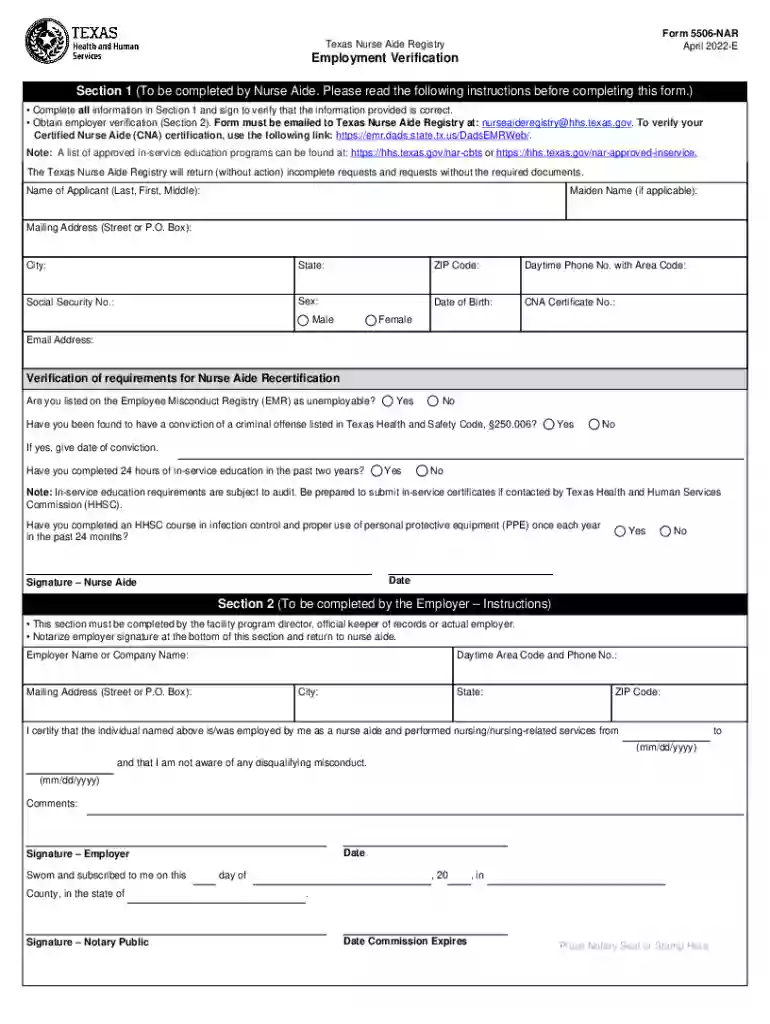
Form 5506-NAR serves a crucial role in the verification process for employment within the healthcare sector in Texas, specifically for Nurse Aides. It is primarily used to confirm the employment status and personal credentials of the healthcare workers known as Nurse Aides. This form ensures that these individuals meet all the regulatory requirements, including certification status, in-service education completion, and clean criminal background checks.
- Certification Verification: Key to the form's purpose is the verification of the Nurse Aide’s credible certification status.
- Employment Verification: Employers confirm that the Nurse Aide is actively employed and their skills are being adequately utilized.
Steps to Complete the Form 5506-NAR
Completing Form 5506-NAR involves several detailed steps, each focusing on specific requirements to ensure accuracy and compliance.
- Personal Information: The Nurse Aide must accurately fill in all personal details including their full name, certification number, and contact information.
- Certification Status: Provide details on certification status, covering initial certification date and any relevant updates or renewals.
- Education and Background Check: Document any in-service education completed, as well as affirm a clear criminal background.
- Employer's Section: The employer must verify employment status, complete necessary sections, and include company details.
- Notarization: Ensure the employer’s section is notarized to validate authenticity.
Legal Use of Form 5506-NAR
This form is under the jurisdiction of Texas regulations, mandating strict compliance from all parties involved.
- Compliance Check: Ensures legal compliance by verifying employment details and professional status.
- Protection: Holds legal significance in maintaining standards within the healthcare industry.
- Tampering Penalty: Any form of tampering or misrepresentation can lead to legal consequences, emphasizing the importance of accuracy.
Important Terms Related to Form 5506-NAR
Understanding specific terms used in the Form 5506-NAR is essential for accurate documentation.
- In-Service Education: Ongoing training required for professional development of Nurse Aides.
- Certification Number: A unique identifier that ensures the authenticity of the Nurse Aide’s certification.
- Notarization: A formal verification process confirming the document’s legality and truthfulness.
Key Elements of Form 5506-NAR
Form 5506-NAR contains several critical elements that must be completed accurately.
- Personal Information Block: Ensures correct identification of the Nurse Aide.
- Certification and Employment Details: Verifies the professional and working status of the aide.
- Employer Details: Provides essential information about the certifying health facility or agency.
State-Specific Rules for Form 5506-NAR
In Texas, specific rules apply when dealing with employment verification forms for healthcare workers.
- State Regulations: These rules govern the educational requirements and criminal background checks.
- Reporting Obligations: Employers and Nurse Aides must comply with mandatory reporting requirements dictated by state law.
- Verification Standards: Establishes benchmarks for what constitutes acceptable professional practice.
Examples of Using Form 5506-NAR
Practical scenarios illustrate the implementation and importance of Form 5506-NAR.
- Hiring Process: During hiring, employers use this form to validate an applicant’s qualification and background.
- Audits: Regulatory audits might require submission of Form 5506-NAR for compliance validation.
- Career Advancement: Nurse Aides may need to submit this form when applying for roles requiring higher responsibilities or certifications.
Penalties for Non-Compliance
Non-compliance with Form 5506-NAR regulations leads to significant legal ramifications.
- Fines and Sanctions: Employers or Nurse Aides can face fines or professional sanctions.
- Employment Restriction: Failure to comply may restrict future employment opportunities within the healthcare sector.
- Legal Action: Persistent non-compliance could result in legal proceedings initiated by the state.
Form Submission Methods
There are multiple ways to submit Form 5506-NAR, providing flexibility and convenience.
- Online Submission: Allows for direct electronic submission through the relevant state department’s website.
- Mail: Traditional method involving mailing the completed form to the designated address.
- In-Person: Direct submission at a designated office for greater assurance of receipt.