




01. Edit your form online
Type text, add images, blackout confidential details, add comments, highlights and more.

Type text, add images, blackout confidential details, add comments, highlights and more.

Draw your signature, type it, upload its image, or use your mobile device as a signature pad.

Send it via email, link, or fax. You can also download it, export it or print it out.
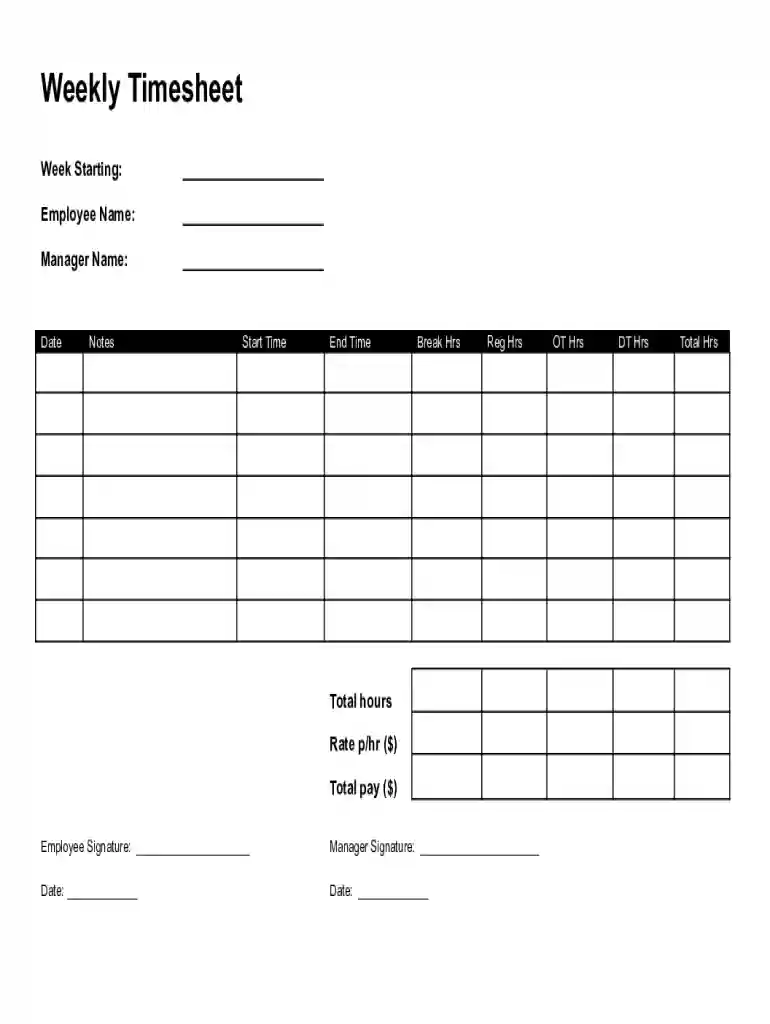
Employee timesheet templates are structured documents used to track and record employees' work hours. They serve as an essential tool in payroll management, ensuring accurate calculation of wages for regular, overtime, and double-time hours. These templates typically include sections for employee and manager names, work dates, start and end times, break durations, total hours worked, pay rate, and total earnings. Both employees and managers are required to sign off on the recorded hours, making the documents not only tools for payroll but also instruments for accountability and verification.
A well-designed employee timesheet template incorporates specific elements that facilitate comprehensive tracking of work hours and ensure compliance with labor regulations. Key components include:
Completing these templates entails a series of systematic actions to ensure precision and compliance:
Utilizing employee timesheet templates provides numerous advantages, particularly in enhancing efficiency and accuracy in payroll processing:
Real-world applications of timesheet templates are vast; they are indispensable across different sectors, regardless of the business size. Examples include:
Understanding the terminology associated with timesheet templates is crucial for effectively utilizing them. Key terms include:
Organizations must choose between digital and paper versions of timesheet templates, each having distinct advantages:
Digital Timesheets:
Paper Timesheets:
Choosing between digital and paper formats hinges on organizational preferences and logistical considerations.
For businesses leveraging digital timesheets, software compatibility is a priority. Many systems integrate seamlessly with software such as TurboTax and QuickBooks, ensuring smooth data transfer for payroll processing. Timesheets compatible with these platforms offer features such as:
By ensuring software compatibility, businesses can streamline operations and reduce administrative burdens associated with time-tracking.
At DocHub, your data security is our priority. We follow HIPAA, SOC2, GDPR, and other standards, so you can work on your documents with confidence.



Assign Schedules: Assign schedules or schedule cycles to employees. Manage Group Schedules: Enables the adding and editing of schedules for an entire group of.Read more
Below is the SOA Standard Timesheet Template that is available to all state employees. be used by all State of Alaska employees. Join Our Team! HR


