



Here's how it works



How to use or fill out rockdale water with our platform

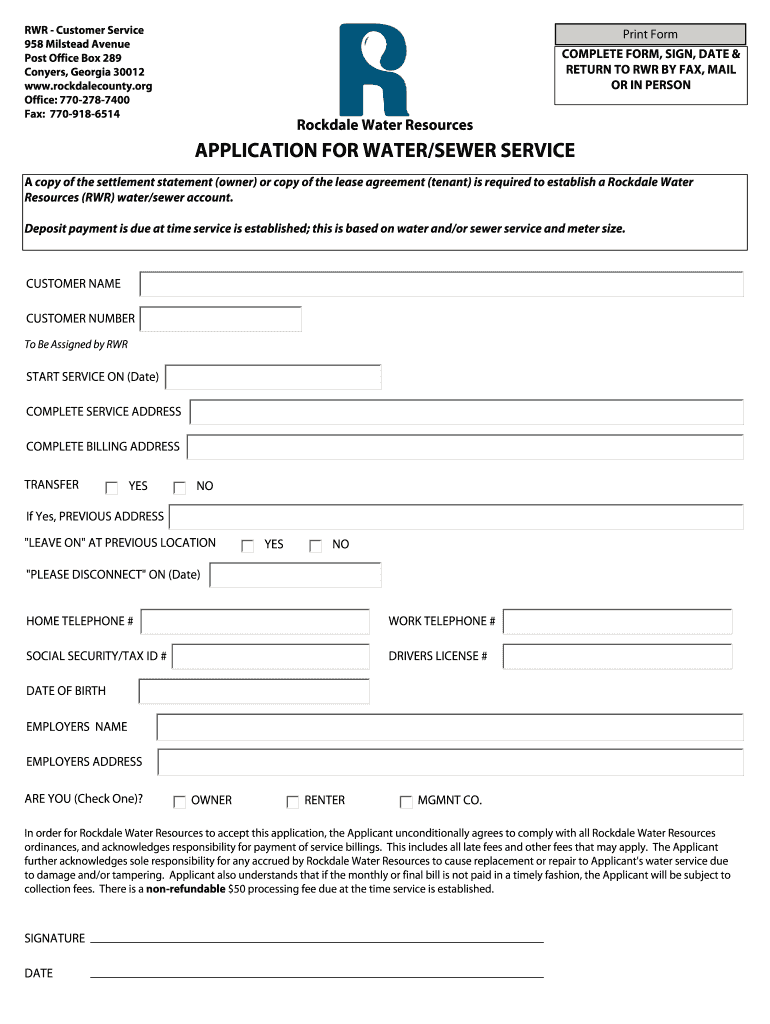
- Click ‘Get Form’ to open the rockdale water application in the editor.
- Begin by entering your customer name and wait for your customer number to be assigned by RWR.
- Specify the start service date and provide both the complete service address and billing address.
- Indicate if this is a transfer of service by selecting 'Yes' or 'No'. If 'Yes', include your previous address.
- Choose whether to leave the service on at the previous location or request disconnection, specifying the disconnection date if applicable.
- Fill in your home and work telephone numbers, social security/tax ID number, driver's license number, and date of birth.
- Provide your employer's name and address, then select your status as owner, renter, or management company.
- Review the agreement section carefully before signing and dating the form to acknowledge compliance with RWR ordinances.
Start filling out your rockdale water application today for free using our platform!
It's free
See more rockdale water versions
| Versions | Form popularity | Fillable & printable |
|---|---|---|
| 2009 | 4.9 Satisfied (56 Votes) |
Got questions?
Can I draw my electronic signature to sign my rockdale water new service?
Sure, electronically drawing your signature is appropriate, but only if you utilize a tool that complies with industry laws and regulations. Try DocHub, which guarantees eSignature validity under ESIGN and UETA requirements. All you need to eSign your rockdale water new service is an account with DocHub and an internet connection. After you open your file in our editor, click Sign and choose the Draw tool.
How do you create an e-signature for the rockdale county water application on iOS?
Apart from a comprehensive toolset for editing PDFs on mobile devices, DocHub enables you to sign your rockdale county water application along the way. Open our editor in your browser, make changes using DocHub’s toolset, and complete your editing by eSigning the finished form.
What are the potential contaminants in Rockdale water?
How can I improve the taste of Rockdale water?
Are there any famous people from Rockdale County?
Security and compliance
At DocHub, your data security is our priority. We follow HIPAA, SOC2, GDPR, and other standards, so you can work on your documents with confidence.
Learn more