
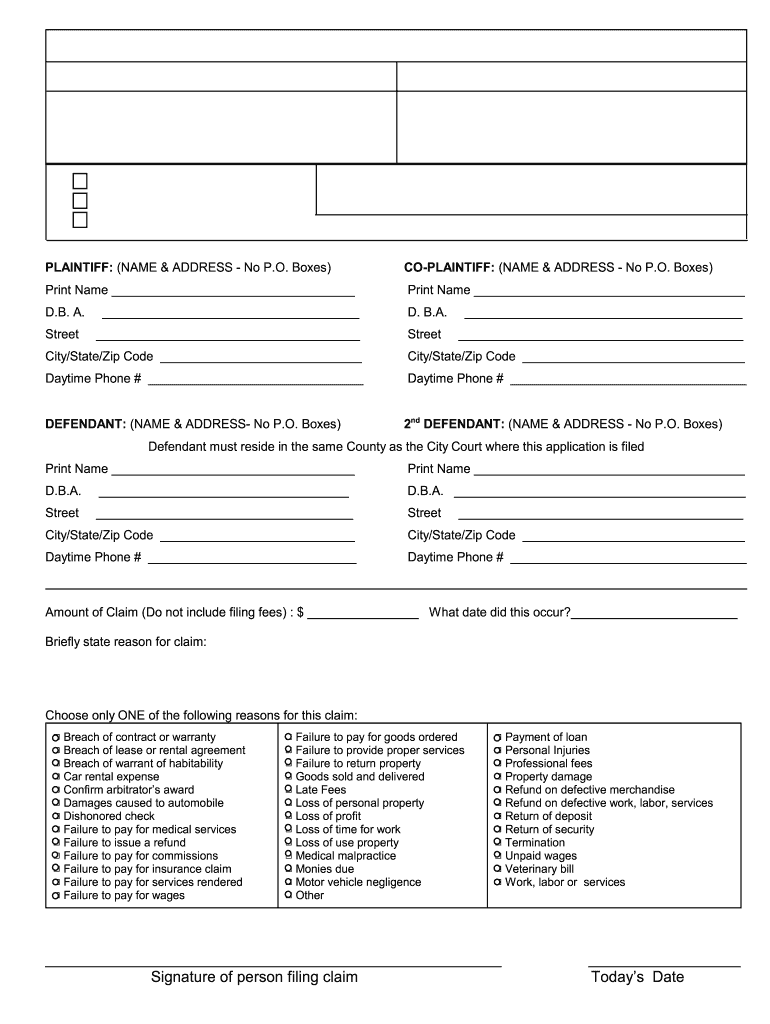







Definition and Meaning
The "Fillable Online Application to File Commercial Claims Fax Email" is a digital document designed to streamline the filing of commercial claims in an efficient and accessible manner. It serves as an interactive template that individuals and businesses can complete and submit through various methods like fax or email. This form is particularly valuable for managing small claims related to business transactions, disputes, and financial claims that require a formalized submission process.
Steps to Complete the Fillable Online Application
To correctly complete the fillable online application, follow these detailed steps:
- Access the Form: Locate the form on a trusted platform or directly from the issuing court's website to ensure you are using the latest version.
- Personal Information: Input the claimant's and defendant's full names, addresses, and contact information. Ensure accuracy to avoid delays.
- Claim Details: Clearly describe the nature of the claim, including the amount being claimed and the basis for the claim. This section is crucial for the court to understand the context.
- Supporting Documents: Attach any necessary documentation that supports the claim, such as contracts, invoices, or correspondence.
- Review and Edit: Double-check all entered information for errors or omissions. Utilize the interactive features to correct any mistakes easily.
- Submit the Form: Choose your submission method—fax, email, or mail. Follow the specific instructions for each method to ensure successful delivery.
Important Terms Related to the Fillable Online Application
A clear understanding of specific terms related to this application is essential:
- Claimant: The person or entity initiating the claim.
- Defendant: The individual or business against whom the claim is filed.
- Commercial Claim: A claim related to a business transaction or financial dispute.
- Filing Fee: A fee required to submit the application, which may vary based on the claim amount.
- Jurisdiction: The legal authority where the claim is filed, typically determined by the location of the transactions or the business involved.
Legal Use of the Fillable Online Application
Using the fillable online application legally involves:
- Ensuring that all information provided is accurate and truthful.
- Filing the application within the legal time limits specified by the relevant court.
- Understanding that submission of false claims or information can result in legal consequences, including penalties or case dismissal.
Software Compatibility
DocHub, a versatile document management platform, ensures compatibility with various software formats, enhancing the user experience for this application form:
- File Formats: Supports DOC, PPT, XLS, PDF, and TXT to accommodate diverse document needs.
- Integration: Seamlessly integrates with major cloud storage and software like Google Drive and Microsoft Office, facilitating easy import and export of forms.
- Cross-Platform Accessibility: Functions well on both desktop and mobile browsers, ensuring users can complete the form anywhere, anytime.
State-Specific Rules for Filing
When filing the Fillable Online Application, one must be aware of state-specific regulations and requirements:
- Variation in Filing Fees: Fees can differ by state or even by court jurisdictions within states. Confirm the correct amount when preparing your submission.
- Submission Deadlines: Some states impose strict deadlines for filing claims, which can differ significantly. Verify these timelines to avoid missing critical dates.
- Required Documentation: States may require additional documents or verifications, such as identification or proof of residency, prior to accepting a claim.
Penalties for Non-Compliance
Failure to adhere to filing guidelines and requirements can lead to various penalties:
- Dismissal of Claim: Inaccurate or incomplete submissions may result in claim dismissal without consideration.
- Legal Penalties: Submitting falsified information can lead to fines and legal repercussions.
- Extension Delays: Non-compliance may require excessive corrections or resubmissions, delaying the entire process.
Submission Methods (Online / Mail / In-Person)
Applicants have multiple options for submitting their completed forms:
- Online Submission: Via email or statutory electronic filing systems where available, providing the quickest and most efficient method.
- Fax Submission: Useful when direct electronic submission is not possible, though confirmation of receipt is advisable.
- In-Person or Mail: Submitting via mail or delivering in person to the court office, which can serve as a reliable backup if digital means are unavailable.
Choosing the appropriate method should align with personal convenience, court capabilities, and urgency of the filing.




