Type text, add images, blackout confidential details, add comments, highlights and more.
02. Sign it in a few clicks
Draw your signature, type it, upload its image, or use your mobile device as a signature pad.
03. Share your form with others
Send nh turbocourt login via email, link, or fax. You can also download it, export it or print it out.
How to use or fill out nh guardianship forms with our platform
Ease of Setup
DocHub User Ratings on G2
Ease of Use
DocHub User Ratings on G2
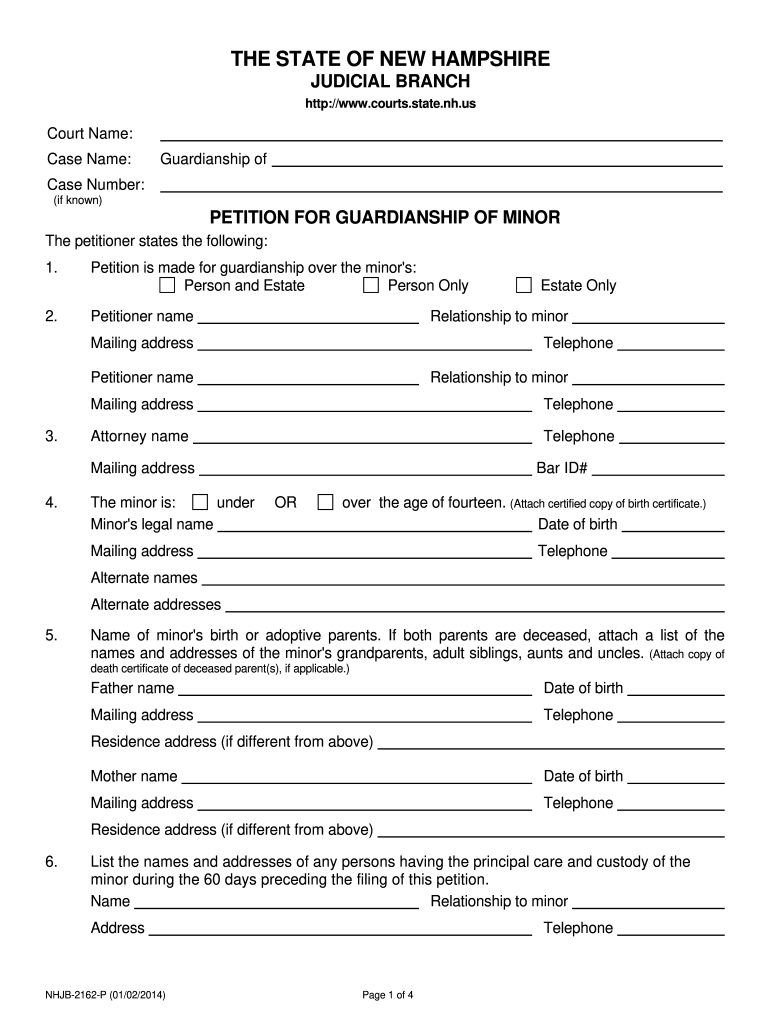
Click ‘Get Form’ to open the nh guardianship form in the editor.
Begin by filling in the court name and case name at the top of the form. If you have a case number, include it as well.
In section 1, clearly state your reasons for seeking guardianship over the minor's person and/or estate. Be concise yet thorough.
Complete the petitioner information fields, including your name, relationship to the minor, mailing address, and telephone number.
Provide details about the minor, including their legal name, date of birth, and any alternate names or addresses they may have.
List any individuals who have had principal care of the minor in the past 60 days. Include their names, relationships to the minor, and contact information.
Fill out sections regarding proposed guardians and any existing legal proceedings affecting the minor. Ensure all relevant documents are attached as needed.
Start using our platform today to complete your nh guardianship forms online for free!
We've got more versions of the nh guardianship forms form. Select the right nh guardianship forms version from the list and start editing it straight away!
NH guardianship of Incapacitated personGuardianship of adults in NHNH guardianship of Minor statuteGuardianship NHHow to become a Public Guardian in NHNh guardianship annual reportTemporary guardianship NHOffice of Public Guardian NH
Security and compliance
At DocHub, your data security is our priority. We follow HIPAA, SOC2, GDPR, and other standards, so you can work on your documents with confidence.
(b) The Guardianship Patient Application form shall be a combined application for both the patient applicant and the designated caregiver applicant(s). (c)Read more
Cookie consent notice
This site uses cookies to enhance site navigation and personalize your experience.
By using this site you agree to our use of cookies as described in our Privacy Notice.
You can modify your selections by visiting our Cookie and Advertising Notice.