Get Preview on Page 1

Get 2026

Here's how it works

  • 01. Edit your form online

    Type text, add images, blackout confidential details, add comments, highlights and more.

  • 02. Sign it in a few clicks

    Draw your signature, type it, upload its image, or use your mobile device as a signature pad.

  • 03. Share your form with others

    Send it via email, link, or fax. You can also download it, export it or print it out.

How to use or fill out Get with our platform

Form edit decoration
9.5
Ease of Setup
DocHub User Ratings on G2
9.0
Ease of Use
DocHub User Ratings on G2
  1. Click ‘Get Form’ to open it in the editor.
  2. Begin by entering the patient's name and Social Security number in the designated fields at the top of the form.
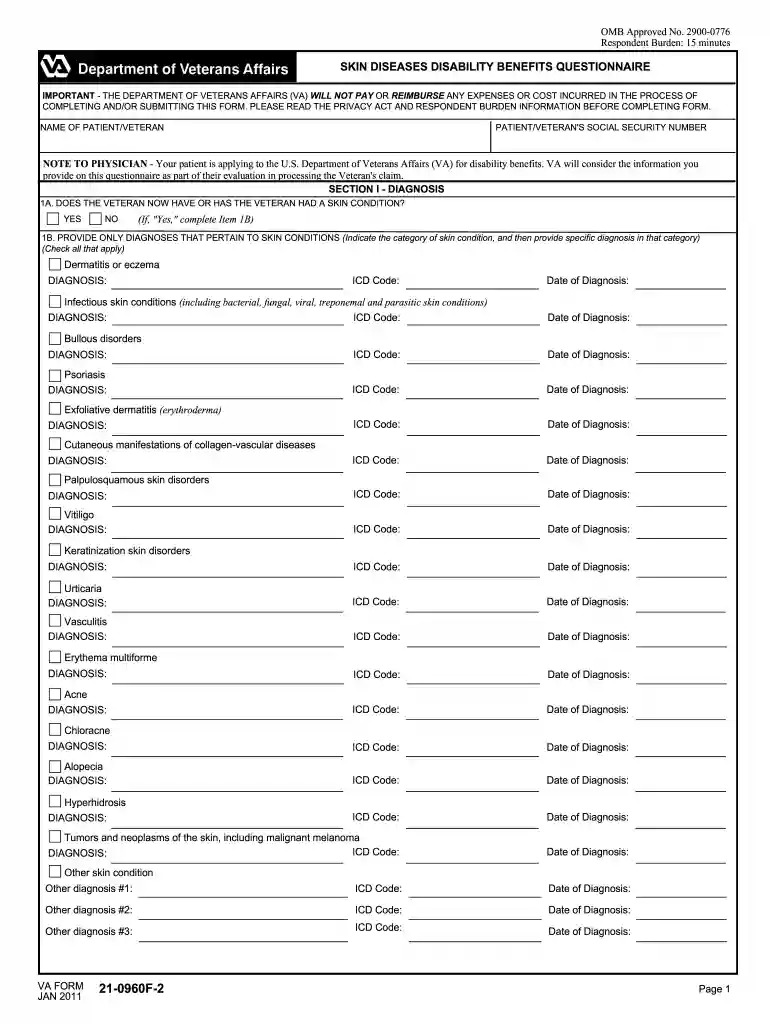
  3. In Section I, indicate whether the veteran currently has or has had a skin condition by selecting 'Yes' or 'No'. If 'Yes', provide specific diagnoses and corresponding ICD codes for each skin condition listed.
  4. Proceed to Section II to summarize the medical history of the veteran's skin conditions, including any scarring or disfigurement. Answer all relevant questions regarding treatments received in Section III.
  5. In Section IV, detail any debilitating or non-debilitating episodes experienced due to skin conditions over the past year. Provide descriptions and frequency of these episodes.
  6. Complete Sections V through VII by describing visible skin conditions, their impact on work ability, and any other pertinent findings. Ensure all sections are filled accurately before submission.

Start using our platform today for free to streamline your document editing and form completion!

See more Get versions

We've got more versions of the Get form. Select the right Get version from the list and start editing it straight away!

VersionsForm popularityFillable & printable
20184.8 Satisfied (61 Votes)
20124.5 Satisfied (67 Votes)
20114.4 Satisfied (68 Votes)

be ready to get more

Complete this form in 5 minutes or less

Security and compliance

At DocHub, your data security is our priority. We follow HIPAA, SOC2, GDPR, and other standards, so you can work on your documents with confidence.

Related links

GET

GET is a personalized web page with services and information tailored to you; it is available to Cal State LA applicants and continuing students.Read more

Learn more
Extract Subnet

Apr 14, 2025 Extract subnet over an active directory environment.

Learn more
General Excise Tax (GET) Information | Department of Taxation

FREQUENTLY ASKED QUESTIONS (FAQS). I am licensed to do business in Hawaii and want to prepare my General Excise Tax (GET) Returns. Is there a listRead more

Learn more
If you believe that this page should be taken down, please follow our DMCA take down process here