Nc vessel registration title application 2026

Get Form
vl 1 form Preview on Page 1

Here's how it works

01. Edit your vl 1 form online
Type text, add images, blackout confidential details, add comments, highlights and more.

02. Sign it in a few clicks
Draw your signature, type it, upload its image, or use your mobile device as a signature pad.

03. Share your form with others
Send it via email, link, or fax. You can also download it, export it or print it out.

How to use or fill out nc vessel registration title application with DocHub

Form edit decoration
9.5
Ease of Setup
DocHub User Ratings on G2
9.0
Ease of Use
DocHub User Ratings on G2
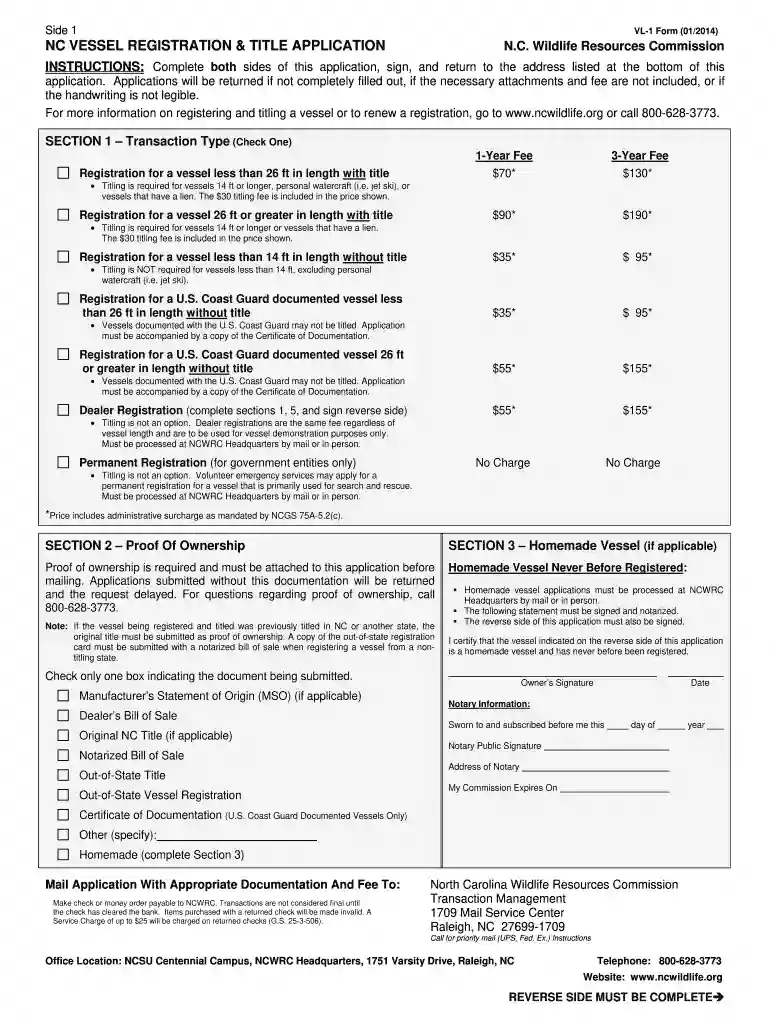
  1. Click ‘Get Form’ to open the NC Vessel Registration & Title Application in our editor.
  2. Begin with Section 1, where you will select the transaction type. Check the appropriate box for either a 1-Year or 3-Year fee based on your vessel's length and title requirements.
  3. In Section 2, provide proof of ownership by attaching necessary documents such as the original title or notarized bill of sale. Ensure all required documentation is included to avoid delays.
  4. Complete Section 5 with owner information. Fill in details for both primary and secondary owners, including names, addresses, and contact information.
  5. Proceed to Section 6 to enter vessel identification details such as year, make, model, and hull material. Be sure to specify the primary use and propulsion type.
  6. Finally, review all sections for accuracy before signing at the bottom of the form. Once completed, submit your application along with any fees to the address provided.

Start using our platform today to effortlessly complete your NC Vessel Registration & Title Application online for free!

See more nc vessel registration title application versions

We've got more versions of the nc vessel registration title application form. Select the right nc vessel registration title application version from the list and start editing it straight away!
Versions Form popularity Fillable & printable
2017 4.8 Satisfied (53 Votes)
2014 4.3 Satisfied (79 Votes)
2011 4 Satisfied (52 Votes)
be ready to get more

Complete this form in 5 minutes or less

Get form

Got questions?

We have answers to the most popular questions from our customers. If you can't find an answer to your question, please contact us.
Contact us
If the seller is an individual and the vessel is registered in North Carolina or another state, but not titled, a docHubd Bill Of Sale is proof-of-ownership. A Bill-Of-Sale can be typed or handwritten on plain paper. It must include the registration number, the hull ID number, and a vessel description.
New Vessel Purchased From Dealer or Manufacturer The original Manufacturers Statement of Origin (MSO) properly assigned and docHubd or a Dealers bill of sale. The submitted proof of ownership document must contain the vessels 12 digit hull identification number.
Check your states website to determine where you need to register the boat. Each state will have its own requirements about forms and fees, but, in general, you will be able to use your bill of sale as proof of purchase to obtain the title from the state.
Use eTags to Quickly Complete Your DMV Service. Renewals, Title Transfers and More, All Online! The following offers an in-depth FAQ that can help answer some your questions about this process. The North Carolina Department of Motor Vehicles (NC DMV) takes care of titling and registration issues throughout the state.
How to get a title for a boat without title? To get a title for your boat without one, you should draft a bill of sale to prove ownership, create a detailed invoice including all relevant information, document the state of the title, and pay any applicable fees.

Security and compliance

At DocHub, your data security is our priority. We follow HIPAA, SOC2, GDPR, and other standards, so you can work on your documents with confidence.

Learn more
ccpa2
pci-dss
gdpr-compliance
hipaa
soc-compliance