Type text, add images, blackout confidential details, add comments, highlights and more.
02. Sign it in a few clicks
Draw your signature, type it, upload its image, or use your mobile device as a signature pad.
03. Share your form with others
Send gpa adjustment form tmu via email, link, or fax. You can also download it, export it or print it out.
How to use or fill out GPA Adjustment Form Ryerson with DocHub
Ease of Setup
DocHub User Ratings on G2
Ease of Use
DocHub User Ratings on G2
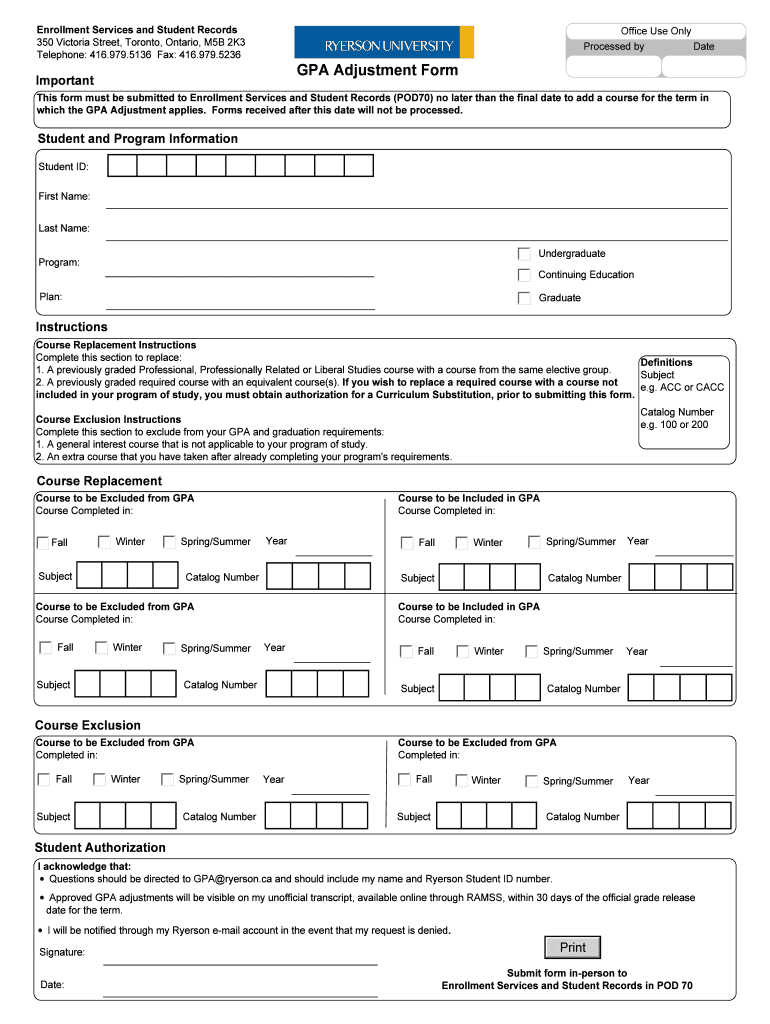
Click ‘Get Form’ to open the GPA Adjustment Form in our editor.
Begin by entering your Student ID, First Name, Last Name, and selecting your Program type (Undergraduate, Continuing Education, Graduate) in the 'Student and Program Information' section.
For Course Replacement, specify the course you wish to replace by filling in the Subject and Catalog Number. Ensure that you follow the definitions provided for eligible courses.
In the Course Exclusion section, list any general interest courses or extra courses you want excluded from your GPA. Fill in the Subject and Catalog Number for each course.
Review your entries carefully. Once completed, sign and date the form under 'Student Authorization'.
Finally, submit your form in person to Enrollment Services and Student Records at POD 70 before the deadline.
Start using our platform today to easily fill out your GPA Adjustment Form for free!
Fill out gpa adjustment form ryerson online It's free
by J Crandall 2022 Cited by 18 GPA eLearning pedagogical strategies include narrated, standardised slides with white board animations, video clips and tile-matching exercises that review coreRead more
If there is a change in officers you must submit a new registration form as soon as the change occurs to the Office of Student Engagement. OFFICE OF STUDENT.Read more
Cookie consent notice
This site uses cookies to enhance site navigation and personalize your experience.
By using this site you agree to our use of cookies as described in our Privacy Notice.
You can modify your selections by visiting our Cookie and Advertising Notice.