Type text, add images, blackout confidential details, add comments, highlights and more.

02. Sign it in a few clicks
Draw your signature, type it, upload its image, or use your mobile device as a signature pad.

03. Share your form with others
Send it via email, link, or fax. You can also download it, export it or print it out.

How to Use or Fill Out the Golf Day Booking Form Online
Ease of Setup
DocHub User Ratings on G2
Ease of Use
DocHub User Ratings on G2
Click ‘Get Form’ to open the Golf Day Booking Form in our editor.
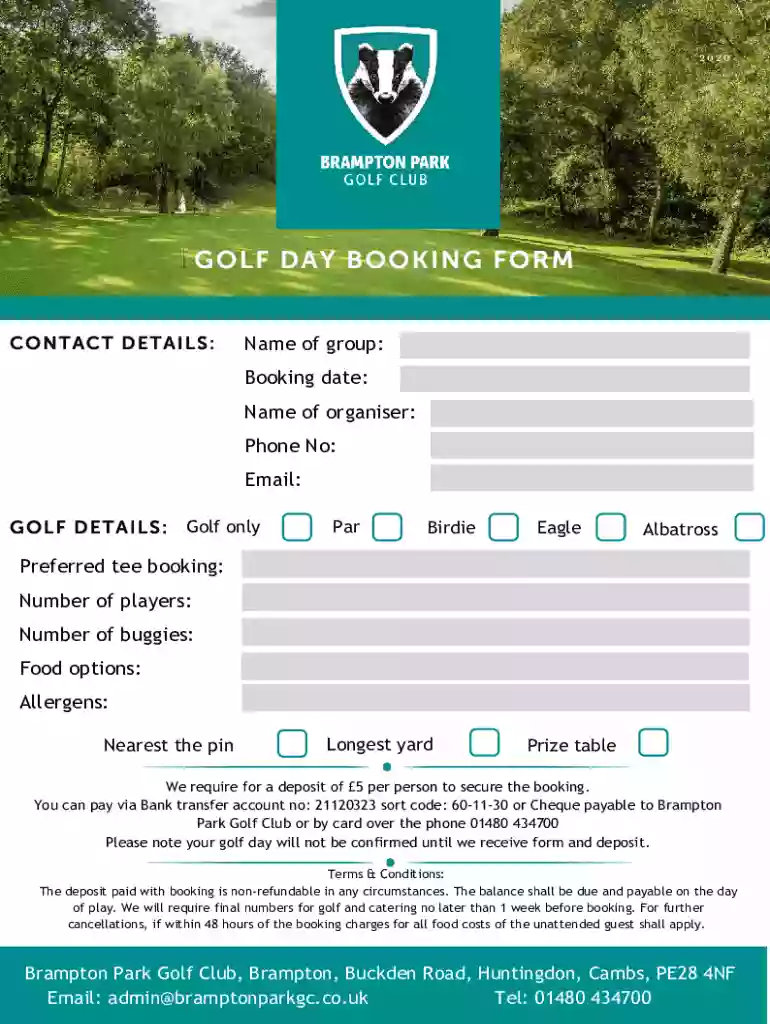
Begin by entering your contact details. Fill in the 'Name of group', 'Booking date', 'Name of organiser', 'Phone No', and 'Email' fields accurately to ensure smooth communication.
Next, move to the Golf Details section. Specify your preferences for golf options such as Par, Birdie, Eagle, or Albatross. Indicate your preferred tee booking, number of players, and number of buggies required.
Select food options and note any allergens to accommodate dietary needs. Don’t forget to fill in details for 'Nearest the pin' and 'Longest yard' if applicable.
Review all entries for accuracy before submitting. Remember that a deposit of £5 per person is required to secure your booking, which can be paid via bank transfer or card over the phone.
Start filling out your Golf Day Booking Form online for free today!
We've got more versions of the Golf Day Booking Form form. Select the right Golf Day Booking Form version from the list and start editing it straight away!
To convert a PDF to fillable online, upload your document to docHub. docHub online editor instantly converts any PDF document to a fillable format online. You can fill your PDF with our various tools and features. To fill the form with text, choose the Text button and start typing.
What is the online form?
An online form is an electronic application in which data is entered by the person filling it out for recording and further processing via predefined data fields. Such electronic forms can be found, for example, on websites or as attachments in e-mails.
Where can I fill out forms online for free?
Use docHub eSignature to fill out a PDF form and sign it Sign up for a free docHub account to fill and sign PDFs. Some PDF forms are fillable and some arent.
How to create an online request form?
How to Create a Request Form Define Your Use Case and Requirements. Start Building Your Form. Add and Customize Form Fields. Personalize the Form Design. Set Up Notifications and Approvals. Publish and Share Your Form. Test and Manage Submissions.
Related Searches
Golf day booking form templateGolf day booking form pdfFree golf day booking form
Security and compliance
At DocHub, your data security is our priority. We follow HIPAA, SOC2, GDPR, and other standards, so you can work on your documents with confidence.
Book a Tee Time - UGA Golf Course - University of Georgia
8 Days 2 Months In Advance. You can request a tee time up to 2 months in advance using our Advanced Booking Portal. Tee times are for 2 players minimum.Read more
Tee Time Reservations | Department of Enterprise Services
May book as early as 7 days in advance, starting at 6:30 a.m.. (NOTE: To make a reservation 7 days in advance, Golfers must use their Golf ID Number,Read more
Cookie consent notice
This site uses cookies to enhance site navigation and personalize your experience.
By using this site you agree to our use of cookies as described in our Privacy Notice.
You can modify your selections by visiting our Cookie and Advertising Notice.