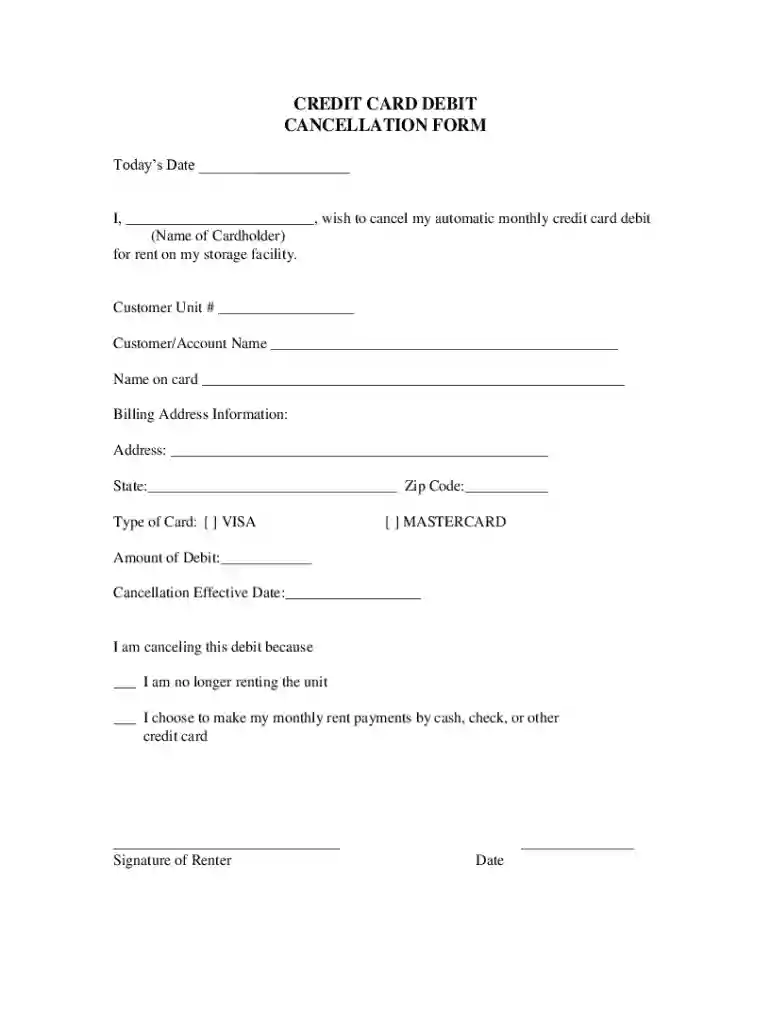
Credit Card Debit Cancellation Form 2026

Get Form
Credit Card Debit Cancellation Form Preview on Page 1

Here's how it works

01. Edit your form online
Type text, add images, blackout confidential details, add comments, highlights and more.

02. Sign it in a few clicks
Draw your signature, type it, upload its image, or use your mobile device as a signature pad.

03. Share your form with others
Send it via email, link, or fax. You can also download it, export it or print it out.

How to use or fill out Credit Card Debit Cancellation Form with DocHub

Form edit decoration
9.5
Ease of Setup
DocHub User Ratings on G2
9.0
Ease of Use
DocHub User Ratings on G2
  1. Click ‘Get Form’ to open the Credit Card Debit Cancellation Form in our editor.
  2. Begin by entering today’s date in the designated field at the top of the form.
  3. In the next section, provide your name as the cardholder to confirm your identity.
  4. Fill in your Customer Unit Number and Account Name to specify which account is being canceled.
  5. Enter the name on your credit card and complete your billing address, including state and zip code.
  6. Select the type of card you are using by checking either VISA or MASTERCARD.
  7. Indicate the amount of debit you wish to cancel and specify the cancellation effective date.
  8. Choose a reason for cancellation by marking one of the provided options.
  9. Finally, sign and date the form at the bottom to authorize your request.

Start using our platform today to easily fill out and manage your forms for free!

be ready to get more

Complete this form in 5 minutes or less

Get form

Got questions?

We have answers to the most popular questions from our customers. If you can't find an answer to your question, please contact us.
Contact us
To Whom It May Concern: [Company name] no longer has my permission to take automatic debit payments from my bank account. I have revoked the authorization that had enabled this company to debit my account via electronic funds transfer.
To withdraw consent, simply tell whoever issued your card (the bank, building society or credit card company) that you dont want the payment to be made. You can tell the card issuer by phone, email or letter. Your card issuer has no right to insist that you ask the company taking the payment first.
You can stop automatic payments coming out of your account by contacting the company or your bank, or by using a subscription cancellation service.
You can stop a pending debit card transaction by contacting the merchant and canceling the purchase. Or you can try contacting your bank if you dont recognize the transaction, you suspect fraud is involved, or the merchant is unresponsive.
You can tell the card issuer by phone, email or letter. Your card issuer has no right to insist that you ask the company taking the payment first. They have to stop the payments if you ask them to. If you ask to stop a payment, the card issuer should investigate each case on its own merit.

Security and compliance

At DocHub, your data security is our priority. We follow HIPAA, SOC2, GDPR, and other standards, so you can work on your documents with confidence.

Learn more
ccpa2
pci-dss
gdpr-compliance
hipaa
soc-compliance
be ready to get more

Complete this form in 5 minutes or less

Get form

People also ask

Yes, you can stop automatic payments through your bank. You can do so through net banking or by visiting the nearest branch of your bank and submit a request to stop automatic payment through the bank.
A recurring payment will have been set up from your credit card or debit card. If you set up a recurring payment, youll need to contact the merchant directly to cancel this type of payment.

Related links