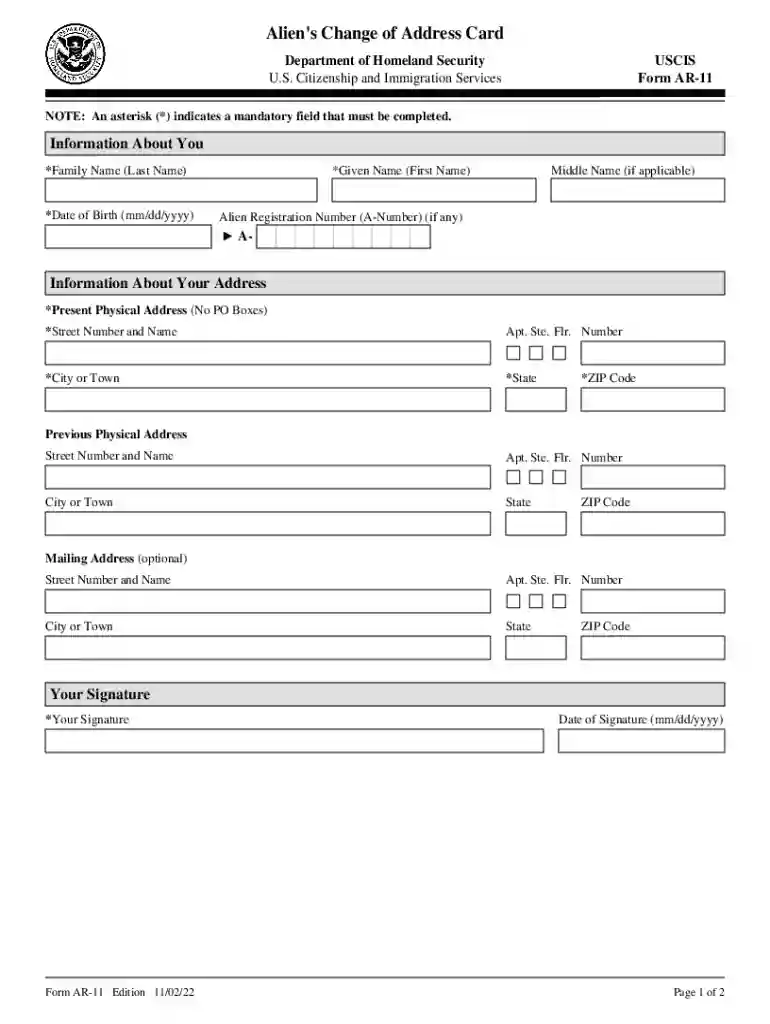
uscis gov address change Preview on Page 1

Form AR-11, Alien's Change of Address Card Form AR-11, Alien's Change of Address Card 2026

Here's how it works

  • 01. Edit your uscis gov address change online

    Type text, add images, blackout confidential details, add comments, highlights and more.

  • 02. Sign it in a few clicks

    Draw your signature, type it, upload its image, or use your mobile device as a signature pad.

  • 03. Share your form with others

    Send uscis change address form online via email, link, or fax. You can also download it, export it or print it out.

How to use or fill out Form AR-11, Alien's Change of Address Card with our platform

Form edit decoration
9.5
Ease of Setup
DocHub User Ratings on G2
9.0
Ease of Use
DocHub User Ratings on G2
  1. Click ‘Get Form’ to open it in the editor.
  2. Begin by filling out your personal information. Enter your family name, given name, and date of birth in the designated fields marked with an asterisk (*). If you have an Alien Registration Number (A-Number), include that as well.
  3. Next, provide your present physical address. Ensure you enter the street number and name, city or town, state, and ZIP code accurately. Remember, PO Boxes are not acceptable.
  4. If applicable, fill in your previous physical address details. This section is optional but can be helpful for record-keeping.
  5. You may also provide a mailing address if different from your present address. Complete this section only if necessary.
  6. Finally, sign and date the form at the bottom. Make sure all mandatory fields are completed before submitting.

Start using our platform today to easily complete and submit your Form AR-11 for free!

See more uscis gov address change versions

We've got more versions of the uscis gov address change form. Select the right uscis gov address change version from the list and start editing it straight away!

VersionsForm popularityFillable & printable
20224.1 Satisfied (32 Votes)
20214.8 Satisfied (146 Votes)
20194.7 Satisfied (55 Votes)
20084 Satisfied (56 Votes)

be ready to get more

Complete this form in 5 minutes or less

Got questions?

We have answers to the most popular questions from our customers. If you can't find an answer to your question, please contact us.

If you frequently work with documents kept in your Google Drive, DocHub is a perfect option for you to easily and quickly complete, modify, and sign them. This editor integrates properly with Google apps, so you can export your uscis change address form from your Google Drive to the editor without downloading and re-uploading it. Right-click on your file, select Open With → DocHub PDF Sign and Edit. In our editor, add and assign Signature Fields for all people involved, then click on the Menu option above → Send → choose how you want to share your form.

You need only an internet connection and a web browser to complete your ar 11 by using an iOS phone. Open the DocHub website and authenticate. Then, add your file or select it from the list in your dashboard. Then use our editing instruments to complete your form and preserve all your modifications. You can also send it to a dedicated recipient right away.

You should still update USCIS within 10 days of changing your address, even if you have an interview scheduled. That way, USCIS will know to send any further correspondence to your current address. What if I move out of the country? You should still let USCIS know within 10 days of moving.
Also make sure you click the change of address information link and read the USCIS instructions on change of address. Make sure you print out the verification page when you are done. This helps you prove you told USCIS about your new address. It can take USCIS 3-4 weeks to update your address in your file.
Key Takeaways: Updating your address ensures you receive important notices that can affect your immigration case, allowing you to respond promptly and avoid delays or denials.

Security and compliance

At DocHub, your data security is our priority. We follow HIPAA, SOC2, GDPR, and other standards, so you can work on your documents with confidence.

People also ask

What is an AR-11 form? Form AR-11, also known as the Aliens Change of Address form, is used to report a change of address with the USCIS. The form requests your name, date of birth, alien registration number, and address information. You must complete the form within 10 days of moving.
The Form I-485 Application for Adjustment of Status is the designation of an immigrant visa to the beneficiary. To adjudicate an I-485, USCIS examines the beneficiary as an individual to determine whether he or she is worthy of permanent status in the United States.
Through a USCIS online account, regardless of whether you filed your form online or by paper. This is the best method for near real-time processing of your change of address request; or. Filing Form AR-11, Aliens Change of Address Card, by paper (if you do not fall under one of the categories below).
Filing Form AR-11 online will update your address on all pending applications, petitions, or requests that you include on the form. You do not need to mail Form AR-11 if you use the change of address webpage.
If you have filed an immigration benefit request with USCIS, you must notify us of any changes of address as soon as possible to ensure you receive all correspondence and benefits without delay.

ar 11 form

AR-11, Aliens Change of Address Card A

This card is to be used by all aliens to report a change of address within ten days of such change. status claimed.

Learn more
AR-11, Aliens Change of Address Card

Jun 3, 2026 All aliens in the United States must report a change of address to USCIS within 10 days (except A and G visa holders and visa waiver

Learn more
If you believe that this page should be taken down, please follow our DMCA take down process here