Certificate of Adoption Register replacement record after adoption 2026

Get Form
Certificate of Adoption Register replacement record after adoption Preview on Page 1

Here's how it works

01. Edit your form online
Type text, add images, blackout confidential details, add comments, highlights and more.
02. Sign it in a few clicks
Draw your signature, type it, upload its image, or use your mobile device as a signature pad.
03. Share your form with others
Send it via email, link, or fax. You can also download it, export it or print it out.

How to use or fill out Certificate of Adoption Register replacement record after adoption

Form edit decoration
9.5
Ease of Setup
DocHub User Ratings on G2
9.0
Ease of Use
DocHub User Ratings on G2
  1. Click ‘Get Form’ to open it in the editor.
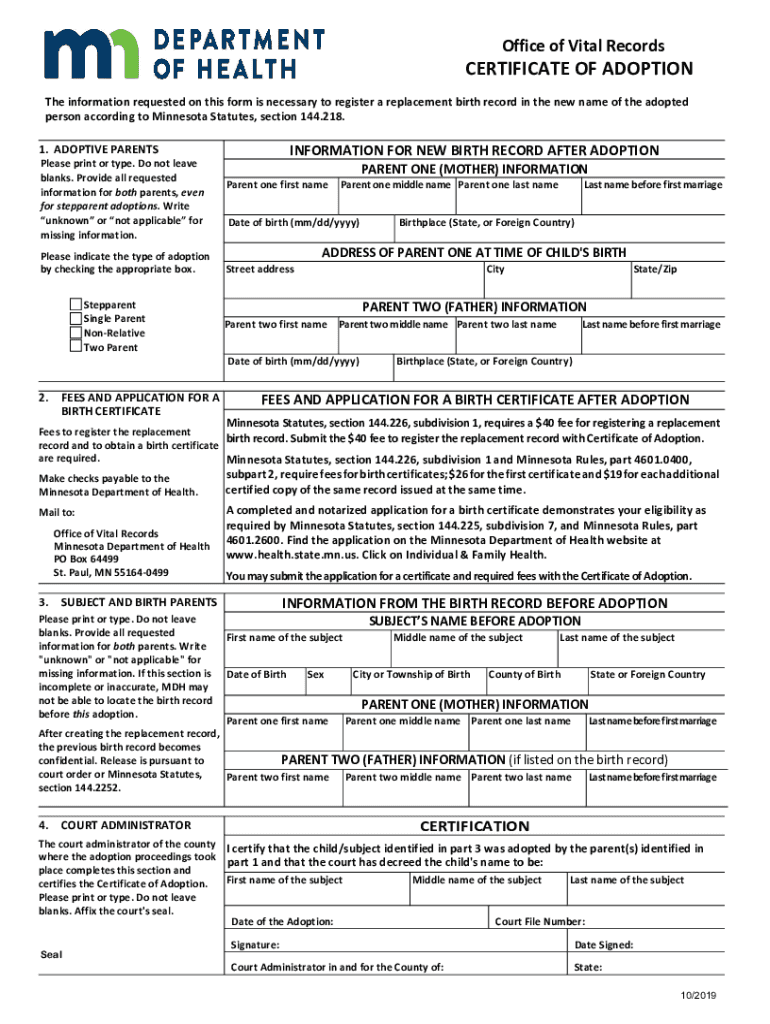
  2. Begin with the 'Adoptive Parents' section. Enter the required information for both parents, ensuring no blanks are left. If any information is missing, write 'unknown' or 'not applicable'. Select the type of adoption by checking the appropriate box.
  3. Proceed to fill out 'Parent One (Mother) Information'. Include first name, middle name, last name, date of birth, street address, last name before first marriage, and birthplace.
  4. Next, complete 'Parent Two (Father) Information' similarly to Parent One. Ensure all fields are filled accurately.
  5. In the 'Information from the Birth Record Before Adoption' section, provide details about the subject including their first name, date of birth, sex, and parent information. Again, avoid leaving any blanks.
  6. Finally, have the court administrator complete the certification section. This includes affixing the court's seal and signing off on the document.

Start using our platform today to easily fill out your Certificate of Adoption Register replacement record for free!

See more Certificate of Adoption Register replacement record after adoption versions

We've got more versions of the Certificate of Adoption Register replacement record after adoption form. Select the right Certificate of Adoption Register replacement record after adoption version from the list and start editing it straight away!
Versions Form popularity Fillable & printable
2021 4.8 Satisfied (96 Votes)
2019 4.5 Satisfied (58 Votes)
2017 4.4 Satisfied (215 Votes)
be ready to get more

Complete this form in 5 minutes or less

Get form

Got questions?

We have answers to the most popular questions from our customers. If you can't find an answer to your question, please contact us.
Contact us

Yes, you can use DocHub for signing any business and personal documentation, including your Certificate of Adoption Register replacement record after adoption. All eSignatures you create with our service are legally binding and court-admissible, as DocHub complies with criteria required by ESIGN and UETA. Save your completed paperwork with a detailed Audit Trail if necessary.

Apart from a comprehensive toolset for editing PDFs on mobile phones, DocHub allows you to sign your Certificate of Adoption Register replacement record after adoption along the way. Open our editor in your internet browser, make modifications using DocHub’s toolset, and finish your editing by eSigning the completed form.

You may be able to obtain a copy of the adoption record that is maintained by the superior court by filing a petition, under California Family Code 9200, in the clerks office of the county superior court where the adoption was finalized.
What happens to an adopted persons original birth certificate after a new amended birth certificate is issued? The original birth certificate is typically sealed and made unavailable to the public and, in many states, unavailable to the adopted person, even as an adult.
Unless you take the steps needed to unseal adoption records, theyll be sealed indefinitely to protect all parties involved. Nearly all states have laws in place that permit the release of identifying information, so its best to speak with an adoption attorney to learn more about the nuances in your state.

Security and compliance

At DocHub, your data security is our priority. We follow HIPAA, SOC2, GDPR, and other standards, so you can work on your documents with confidence.

Learn more
ccpa2
pci-dss
gdpr-compliance
hipaa
soc-compliance

People also ask

Search for adoption records in the Birth, Baptism Christening index. If you know the birth name and birthdate of the adopted child, start the search there. (or from any page on Ancestry, choose the Search tab Birth, Marriage Death Birth, Baptism Christening on the right.)

Related links