Type text, add images, blackout confidential details, add comments, highlights and more.
02. Sign it in a few clicks
Draw your signature, type it, upload its image, or use your mobile device as a signature pad.
03. Share your form with others
Send dcnr form 1300 fm via email, link, or fax. You can also download it, export it or print it out.
How to Use or Fill Out the Vessel Entrance or Clearance Statement Online
Ease of Setup
DocHub User Ratings on G2
Ease of Use
DocHub User Ratings on G2
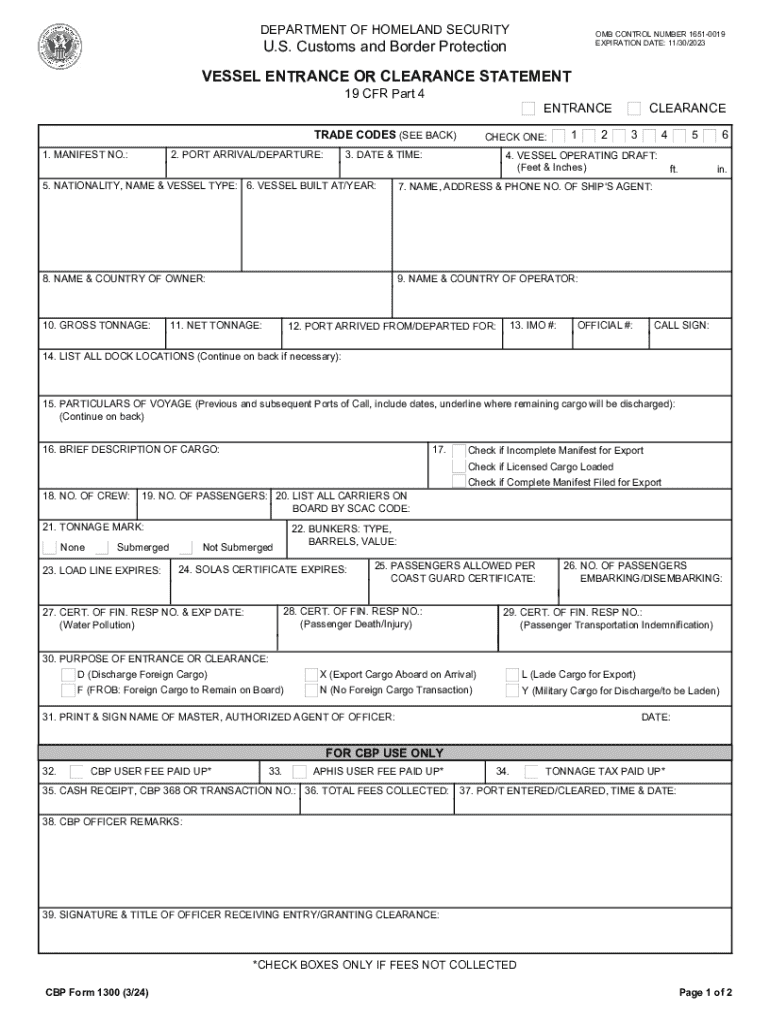
Click ‘Get Form’ to open the Vessel Entrance or Clearance Statement in our editor.
Begin by entering the Manifest Number and Port of Arrival/Departure in the designated fields. Ensure accuracy as this information is crucial for processing.
Select the appropriate checkbox for your vessel's status, then fill in the Date & Time of arrival or departure.
Provide details about the Vessel Operating Draft, including feet and inches, followed by the Nationality, Name, and Type of Vessel.
Complete sections regarding the vessel's construction year, agent's contact information, owner and operator details, and tonnage specifications.
Fill out additional voyage particulars and cargo descriptions as required. If necessary, continue on a separate page.
Finally, ensure all fields are completed accurately before printing and signing your name as the Master or Authorized Agent.
Start filling out your form online for free today with our platform!
Fill out CBP Form 1300 Vessel Entrance or Clearance Statement online It's free
See more CBP Form 1300 Vessel Entrance or Clearance Statement versions
We've got more versions of the CBP Form 1300 Vessel Entrance or Clearance Statement form. Select the right CBP Form 1300 Vessel Entrance or Clearance Statement version from the list and start editing it straight away!
Cbp form 1300 vessel entrance or clearance statement templateCbp form 1300 vessel entrance or clearance statement pdfCbp form 1300 vessel entrance or clearance statement onlineCbp form 1300 vessel entrance or clearance statement 2022Cbp form 1300 vessel entrance or clearance statement downloadCBP Form 1300 pdfCBP Form 1300 instructionsCBP Form 1303
Security and compliance
At DocHub, your data security is our priority. We follow HIPAA, SOC2, GDPR, and other standards, so you can work on your documents with confidence.
19 CFR 4.61 - Requirements for clearance. - Law.Cornell.Edu
A clearance application for a vessel intending to depart for a foreign port must be made by filing CBP Form 1300 (Vessel Entrance or Clearance Statement)Read more
Cookie consent notice
This site uses cookies to enhance site navigation and personalize your experience.
By using this site you agree to our use of cookies as described in our Privacy Notice.
You can modify your selections by visiting our Cookie and Advertising Notice.