Public-inspection federalregister 2022-147899111-14-P DEPARTMENT OF HOMELAND SECURITY travelers to t-2026

Get Form
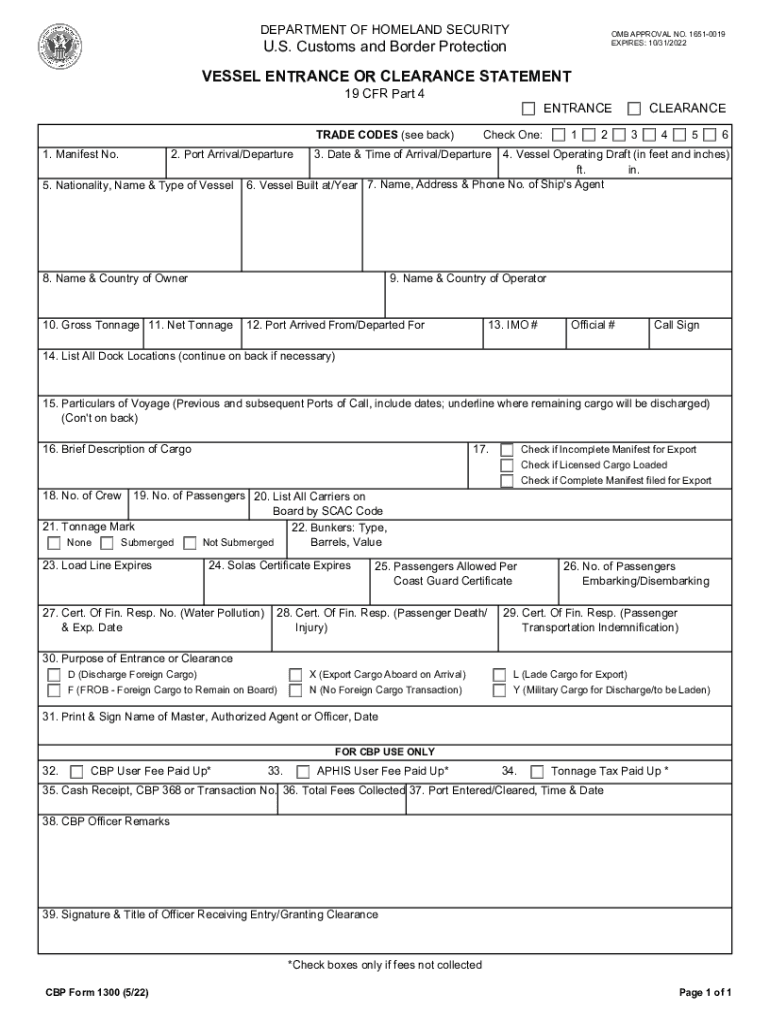
cbp form 1300 Preview on Page 1

Here's how it works

01. Edit your cbp form 1300 online
Type text, add images, blackout confidential details, add comments, highlights and more.
02. Sign it in a few clicks
Draw your signature, type it, upload its image, or use your mobile device as a signature pad.
03. Share your form with others
Send cbp entrance via email, link, or fax. You can also download it, export it or print it out.

How to use or fill out public-inspection federalregister 2022-147899111-14-P DEPARTMENT OF HOMELAND SECURITY travelers to t with our platform

Form edit decoration
9.5
Ease of Setup
DocHub User Ratings on G2
9.0
Ease of Use
DocHub User Ratings on G2
  1. Click ‘Get Form’ to open it in the editor.
  2. Begin by entering the Manifest Number and Port of Arrival/Departure in the designated fields. This information is crucial for tracking your vessel.
  3. In Block 5, select the Nationality, Name & Type of Vessel from the provided options. Ensure you check one box that accurately describes your vessel type.
  4. Fill in the Date & Time of Arrival/Departure in Block 3, followed by the Vessel Operating Draft in feet and inches in Block 4.
  5. Complete Blocks 6 through 30 with details about the vessel's ownership, tonnage, crew, passengers, and purpose of entrance or clearance. Be thorough to avoid delays.
  6. Finally, print and sign your name as Master or Authorized Agent in Block 31 before submitting your form for processing.

Start using our platform today to streamline your document editing and form completion for free!

See more public-inspection federalregister 2022-147899111-14-P DEPARTMENT OF HOMELAND SECURITY travelers to t versions

We've got more versions of the public-inspection federalregister 2022-147899111-14-P DEPARTMENT OF HOMELAND SECURITY travelers to t form. Select the right public-inspection federalregister 2022-147899111-14-P DEPARTMENT OF HOMELAND SECURITY travelers to t version from the list and start editing it straight away!
Versions Form popularity Fillable & printable
2024 4.6 Satisfied (47 Votes)
2022 4.7 Satisfied (48 Votes)
2020 4.8 Satisfied (41 Votes)
2018 4.4 Satisfied (180 Votes)
2009 4.4 Satisfied (160 Votes)
2002 4.3 Satisfied (73 Votes)
be ready to get more

Complete this form in 5 minutes or less

Get form

Got questions?

We have answers to the most popular questions from our customers. If you can't find an answer to your question, please contact us.
Contact us
The basic search box appears in the main navigation at the top every page. The Search pull-down tab in the main navigation shows various search options: Document Search: You can search by citation (for example, enter: 75 FR 12345 or 75 Fed. Reg.
Free sources The Federal Register has been available online since 1994. Federal depository libraries within the U.S. also receive copies of the text, either in paper or microfiche format.
All documents that will be printed in the Federal Register are made available to the public at least one day before they are published. This process is called Public Inspection.

Security and compliance

At DocHub, your data security is our priority. We follow HIPAA, SOC2, GDPR, and other standards, so you can work on your documents with confidence.

Learn more
ccpa2
pci-dss
gdpr-compliance
hipaa
soc-compliance
be ready to get more

Complete this form in 5 minutes or less

Get form