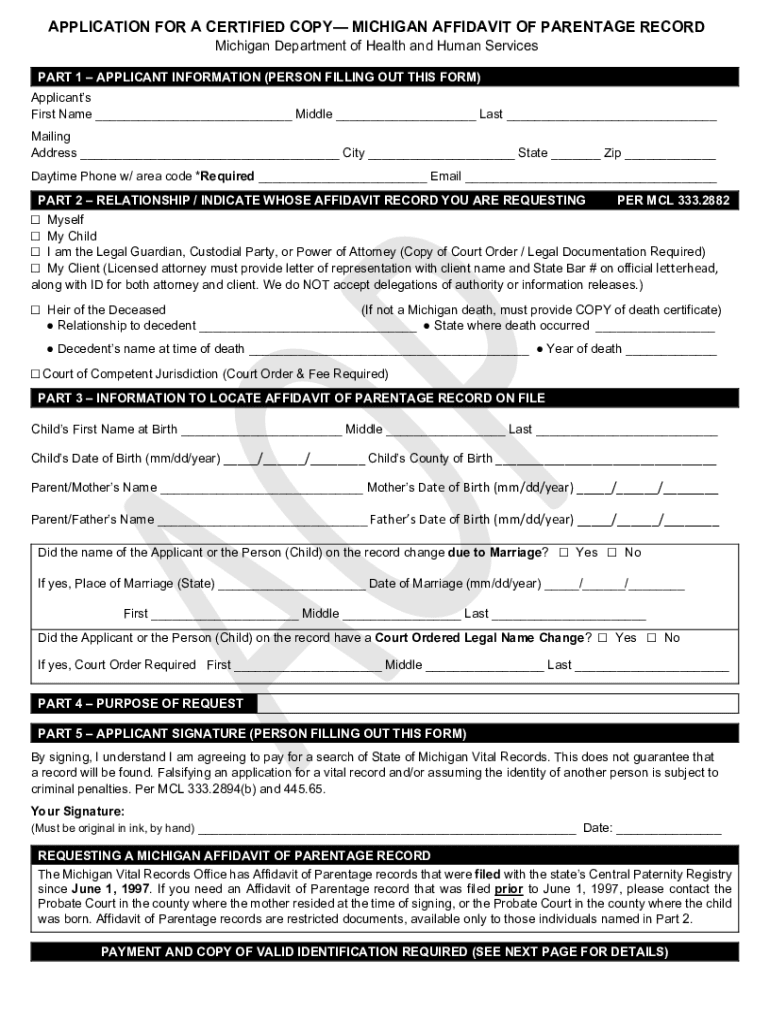
APPLICATION FOR A CERTIFIED COPY MICHIGAN AFFIDAVIT 2026

Get Form
APPLICATION FOR A CERTIFIED COPY MICHIGAN AFFIDAVIT Preview on Page 1

Here's how it works

01. Edit your form online
Type text, add images, blackout confidential details, add comments, highlights and more.
02. Sign it in a few clicks
Draw your signature, type it, upload its image, or use your mobile device as a signature pad.
03. Share your form with others
Send it via email, link, or fax. You can also download it, export it or print it out.

How to use or fill out APPLICATION FOR A CERTIFIED COPY MICHIGAN AFFIDAVIT

Form edit decoration
9.5
Ease of Setup
DocHub User Ratings on G2
9.0
Ease of Use
DocHub User Ratings on G2
  1. Click ‘Get Form’ to open it in the editor.
  2. Begin with Part 1, where you will enter your personal information. Fill in your first name, middle name, last name, mailing address, daytime phone number, and email address.
  3. Move to Part 2 to indicate whose affidavit record you are requesting. Select the appropriate option that describes your relationship to the individual named in the affidavit.
  4. In Part 3, provide detailed information to locate the Affidavit of Parentage record. This includes the child's name at birth, date of birth, county of birth, and parents' names along with their dates of birth.
  5. Complete Part 4 by stating the purpose of your request. Ensure all necessary details are filled accurately.
  6. Sign and date in Part 5. Remember that your signature must be original and in ink.
  7. Finally, review all sections for accuracy before submitting your application along with payment and required identification documents.

Start using our platform today for free to streamline your document editing and submission process!

See more APPLICATION FOR A CERTIFIED COPY MICHIGAN AFFIDAVIT versions

We've got more versions of the APPLICATION FOR A CERTIFIED COPY MICHIGAN AFFIDAVIT form. Select the right APPLICATION FOR A CERTIFIED COPY MICHIGAN AFFIDAVIT version from the list and start editing it straight away!
Versions Form popularity Fillable & printable
2023 4.6 Satisfied (44 Votes)
2018 4.2 Satisfied (51 Votes)
2015 4.4 Satisfied (47 Votes)
2014 4.3 Satisfied (46 Votes)
be ready to get more

Complete this form in 5 minutes or less

Get form

Got questions?

We have answers to the most popular questions from our customers. If you can't find an answer to your question, please contact us.
Contact us
A docHubd document is one that has been signed in the presence of a notary public, who confirms the signers identity and willingness to sign. On the other hand, a certified document is a duplicate that has been verified to match the original.
What to include in your affidavit. Title. This is either your name (Affidavit of Jane Doe) or the specific case information. Statement of identity. The next paragraph tells the court about yourself. Statement of truth. Statement of facts. Closing statement of truth. Sign and docHub.
Copies of documents can be certified by one of the following people: Accountants. Armed Forces Officer. Bank/Building Society Official. Commissioner of Oaths. Councillor (local or county) FCA regulated person. FCA regulated financial services intermediary (e.g. stockbroker or insurance broker)
A certified copy is a duplicated version of an original document that has been verified by an authorized individual. This verification process confirms that the copy is an accurate representation of the original, making it a legally acceptable substitute in various official and legal contexts.
This certification confirms that the copy is an accurate and complete representation of the original document. In the context of affidavits, a certified true copy serves as a legally valid substitute for the original document.

Security and compliance

At DocHub, your data security is our priority. We follow HIPAA, SOC2, GDPR, and other standards, so you can work on your documents with confidence.

Learn more
ccpa2
pci-dss
gdpr-compliance
hipaa
soc-compliance
be ready to get more

Complete this form in 5 minutes or less

Get form

People also ask

There are no endorsements, stamps or seals on a Plain Copy. A Certified Copy typically includes an additional page with a certification stamp and signature stating that the document(s) are true and complete copies as filed for record in that office.

Related links