




Here's how it works



How to use or fill out therapeutic phlebotomy order form with our platform

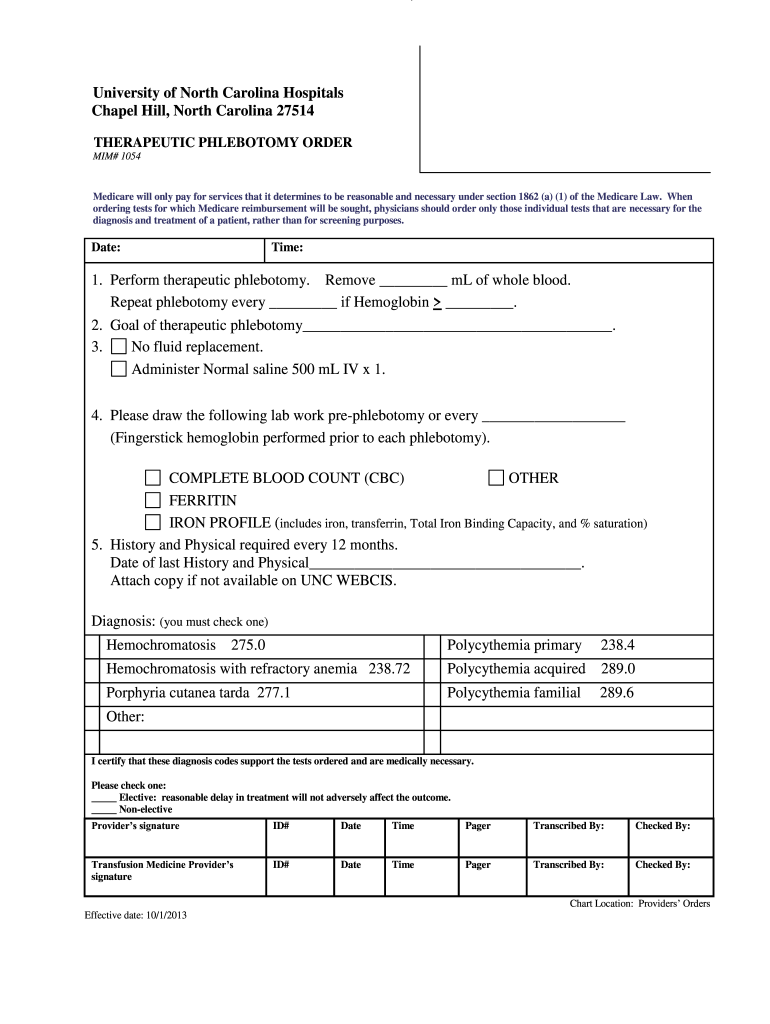
- Click ‘Get Form’ to open the therapeutic phlebotomy order form in the editor.
- Begin by entering the date and time at the top of the form. This is essential for record-keeping.
- In the first section, specify the volume of blood to be removed (in mL) and set a schedule for repeat phlebotomy based on hemoglobin levels.
- Clearly state the goal of therapeutic phlebotomy in the designated field to ensure clarity in treatment objectives.
- Indicate whether fluid replacement is necessary. If so, note that Normal saline 500 mL IV should be administered once.
- List any required lab work pre-phlebotomy, including a complete blood count (CBC) and other tests as needed.
- Document the date of the last History and Physical examination, ensuring compliance with requirements.
- Select a diagnosis from the provided options and certify that these codes support medical necessity by checking the appropriate box.
- Finally, ensure all signatures are completed by both providers before submission.
Start using our platform today to streamline your therapeutic phlebotomy order form process for free!
It's free
See more therapeutic phlebotomy order form versions
Got questions?
What is the simplest way to electronically sign my vitalant order form?
A lot of software applications are available on the market for document modifying and signing. DocHub is one of the most popular online solutions that comply with all data protection and compliance standards and guarantees your electronically signed documentation is legally enforceable. All you need to try it out is to register an account, add your vitalant order form, provide the required information, and click Sign. Generate your electronic signature by typing, drawing it, uploading its picture to your template, or scanning a unique QR code.
Do I need to set up software to edit my therapeutic phlebotomy?
When you edit your therapeutic phlebotomy with DocHub, you only require a stable web connection and virtually any browser installed on your device. No need to install any third-party applications or research guides. Simply open a tab with DocHub, drag and drop your file, and edit it on the spot.
How much blood do they take during therapeutic phlebotomy?
Is therapeutic phlebotomy a form of blood donation?
Is therapeutic phlebotomy a form of blood donation?
Security and compliance
At DocHub, your data security is our priority. We follow HIPAA, SOC2, GDPR, and other standards, so you can work on your documents with confidence.
Learn more




