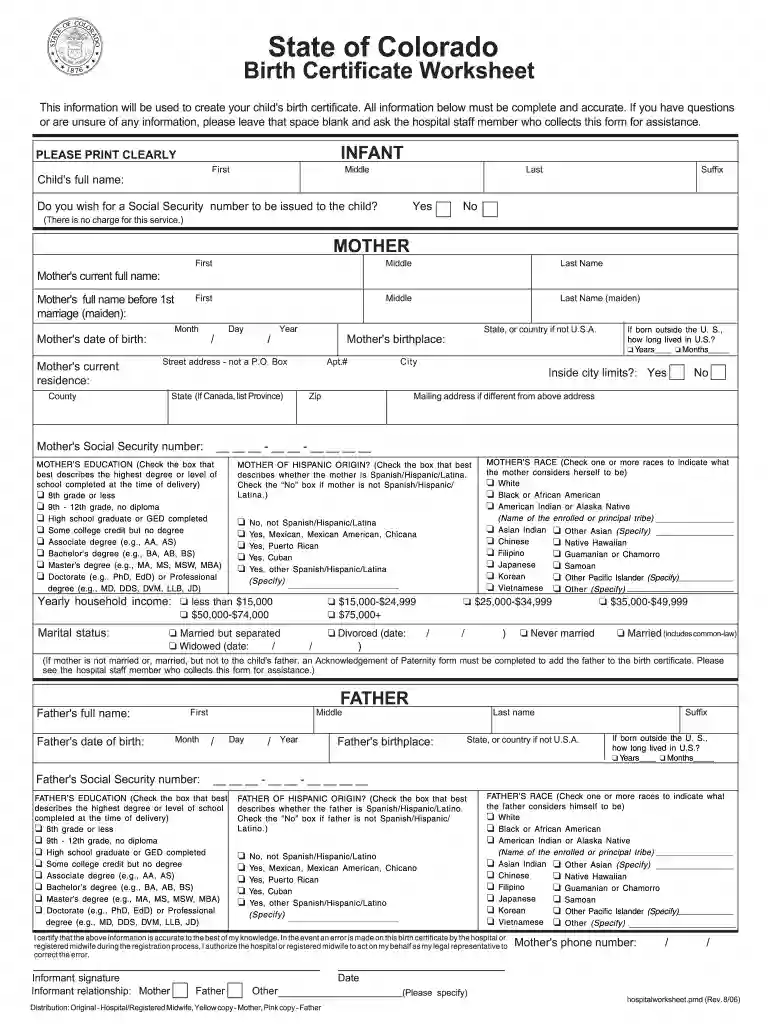
Birth certificate worksheet 2026

Get Form
birth certificate worksheet Preview on Page 1

Here's how it works

01. Edit your birth certificate worksheet online
Type text, add images, blackout confidential details, add comments, highlights and more.

02. Sign it in a few clicks
Draw your signature, type it, upload its image, or use your mobile device as a signature pad.

03. Share your form with others
Send birth worksheet via email, link, or fax. You can also download it, export it or print it out.

How to use or fill out birth certificate worksheet with our platform

Form edit decoration
9.5
Ease of Setup
DocHub User Ratings on G2
9.0
Ease of Use
DocHub User Ratings on G2
  1. Click ‘Get Form’ to open the birth certificate worksheet in the editor.
  2. Begin by filling out the 'INFANT' section. Clearly print the child's full name, including first, middle, last, and suffix. Indicate if you wish for a Social Security number to be issued.
  3. Next, move to the 'MOTHER' section. Enter the mother's current full name and maiden name. Provide her date of birth and current residence details, ensuring accuracy in street address and city.
  4. Complete the education level and race sections by checking the appropriate boxes that reflect the mother's background.
  5. Proceed to fill out the 'FATHER' section similarly, providing his full name, date of birth, and other required information.
  6. Finally, review all entries for accuracy before signing as the informant. Ensure that all necessary fields are completed.

Start using our platform today for free to complete your birth certificate worksheet effortlessly!

See more birth certificate worksheet versions

We've got more versions of the birth certificate worksheet form. Select the right birth certificate worksheet version from the list and start editing it straight away!
Versions Form popularity Fillable & printable
2007 4.8 Satisfied (301 Votes)
2006 4 Satisfied (48 Votes)
be ready to get more

Complete this form in 5 minutes or less

Get form

Got questions?

We have answers to the most popular questions from our customers. If you can't find an answer to your question, please contact us.
Contact us

Yes, you can use DocHub for signing any business and personal documentation, including your birth worksheet for child's birth certificate. All eSignatures you create with our service are legally binding and court-admissible, as DocHub complies with standards required by ESIGN and UETA. Save your accomplished document with a detailed Audit Trail if needed.

If you use Chrome, there are two straightforward methods to edit your birth certificate worksheet online. First, go to the DocHub site, add your document, and edit it using our toolbar. You can also set up our Chrome extension and edit any document by dragging and dropping it in your browser tab.

Birth records These will state the exact date and place of birth of the individual, the name and place of birth of the mother, and where applicable, her maiden name. If a father has been included on the entry, then his name and place of birth is also recorded.
Plurality. The number of fetuses delivered live or dead at any time in the pregnancy regardless of gestational age, or if the fetuses were delivered at different dates in the pregnancy.
Birth certificates can be requested online, by telephone, by mail, or in-person. When mailing in this application, include a copy of your photo ID with your payment to the Arkansas Department of Health and mail to the address listed in the payment section below. Please allow 7-14 days for processing by mail.
be ready to get more

Complete this form in 5 minutes or less

Get form

People also ask

Date format should be day/month/year i.e 12 - 05 - 1983 as this is the most common format.
Attach the following documents along with the application in the online process to get birth certificate UP online. Identity proof of the informer (Aadhar card, voter id, ration card etc.) Hospital birth proof (if a child born in a hospital) Proof of birth, i.e. letter from the informer if born outside the hospital.
Either woman can register the birth if all the following apply: one of the women had the child by donor insemination or fertility treatment. her spouse or civil partner is the childs legal parent. they were in a same-sex marriage or civil partnership at the time of fertility treatment.
How to fill out the Official Birth Certificate Template Download? Begin by entering the childs full name. Fill in the birth date and time accurately. Provide the names of both parents. Sign the document where indicated. Review the information for accuracy.

Related links