Application StatusWashington State Department of Health 2026

Get Form
doh online application portal Preview on Page 1

Here's how it works

01. Edit your doh online application portal online
Type text, add images, blackout confidential details, add comments, highlights and more.

02. Sign it in a few clicks
Draw your signature, type it, upload its image, or use your mobile device as a signature pad.

03. Share your form with others
Send doh application form via email, link, or fax. You can also download it, export it or print it out.

How to use or fill out Application Status Washington State Department of Health with our platform

Form edit decoration
9.5
Ease of Setup
DocHub User Ratings on G2
9.0
Ease of Use
DocHub User Ratings on G2
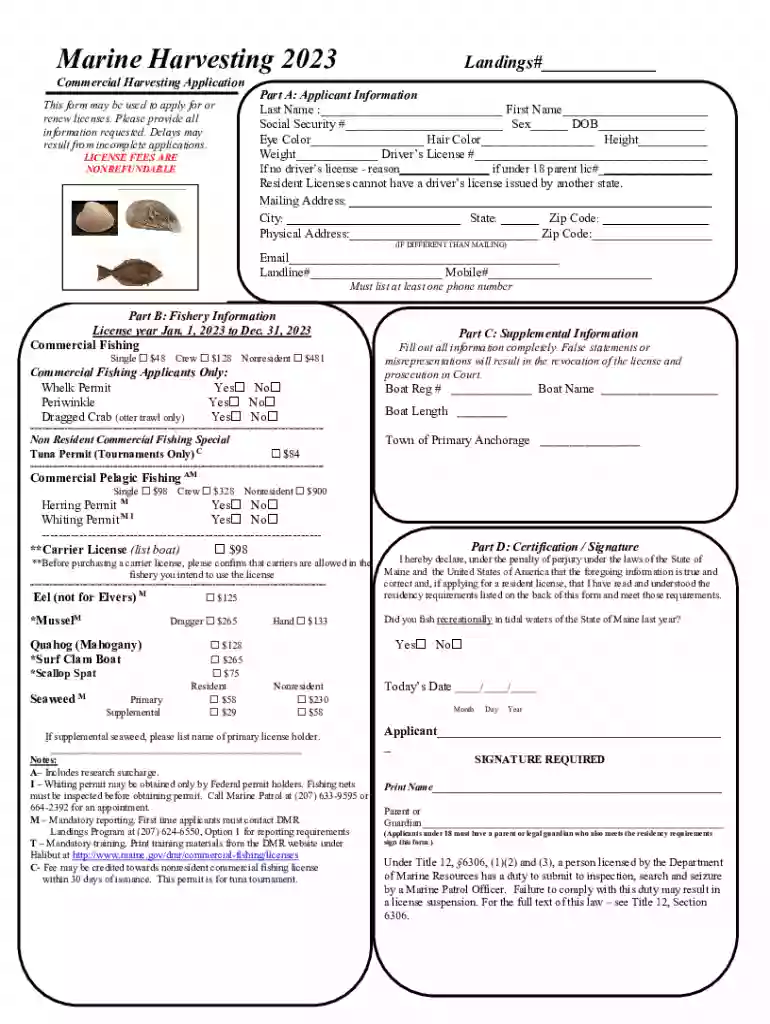
  1. Click ‘Get Form’ to open the Application Status form in the editor.
  2. Begin with Part A: Applicant Information. Fill in your last name, first name, social security number, sex, date of birth, eye color, hair color, height, weight, and driver's license number. If you do not have a driver's license, provide a reason and include your parent’s license number if under 18.
  3. Complete your mailing address and physical address if different. Ensure to include at least one phone number (landline or mobile) for contact purposes.
  4. Move to Part B: Fishery Information. Select the appropriate license type and indicate any permits required by checking 'Yes' or 'No' for each option listed.
  5. In Part C: Supplemental Information, provide details about your boat registration and primary anchorage town. Make sure all information is accurate to avoid delays.
  6. Finally, in Part D: Certification/Signature, read the declaration carefully before signing. If under 18, ensure a parent or guardian signs as well.

Start filling out your Application Status form online for free using our platform today!

See more Application StatusWashington State Department of Health versions

We've got more versions of the Application StatusWashington State Department of Health form. Select the right Application StatusWashington State Department of Health version from the list and start editing it straight away!
Versions Form popularity Fillable & printable
2023 4.7 Satisfied (52 Votes)
2022 4.8 Satisfied (49 Votes)
2021 4.4 Satisfied (153 Votes)
2020 4.4 Satisfied (173 Votes)
2019 4.4 Satisfied (98 Votes)
2015 4 Satisfied (33 Votes)
be ready to get more

Complete this form in 5 minutes or less

Get form

Got questions?

We have answers to the most popular questions from our customers. If you can't find an answer to your question, please contact us.
Contact us

With DocHub, you can rapidly approve your washington department of health online application portal or any other paperwork on iOS, even without installing additional programs. You can access your DocHub account from any web-connected browser and fill out and sign your form in any way you like with just a couple of clicks.

With DocHub, there are several convenient ways to edit your department of health online application portal online. You can drag and drop the form and modify it directly at the DocHub site or use our browser extension to fill out your form immediately. Additionally, you can modify your PDF on your smartphone, as DocHub works with all the accessible mobile platforms.

Once I apply, how long does it take to get a license? The average processing time for a license application is approximately up to 12 weeks.
You can now renew your health professional licenses online through the Health Enforcement and Licensing Management System (HELMS). To access HELMS, use your Secure Access Washington (SAW) account and add the Health Professional and Facility Licensing (HELMS) service.
If youre reading this and your license has already expired, dont stress. In Washington, the majority of healthcare professionals can renew their credentials if theyre within 90 days of their expiration date. In fact, unless your license has expired more than a year ago, youll be able to reactivate it online.

Security and compliance

At DocHub, your data security is our priority. We follow HIPAA, SOC2, GDPR, and other standards, so you can work on your documents with confidence.

Learn more
ccpa2
pci-dss
gdpr-compliance
hipaa
soc-compliance