New Client Form - Sugar Creek Animal Hospital 2026

Get Form
New Client Form - Sugar Creek Animal Hospital Preview on Page 1

Here's how it works

01. Edit your form online
Type text, add images, blackout confidential details, add comments, highlights and more.

02. Sign it in a few clicks
Draw your signature, type it, upload its image, or use your mobile device as a signature pad.

03. Share your form with others
Send it via email, link, or fax. You can also download it, export it or print it out.

How to use or fill out New Client Form - Sugar Creek Animal Hospital with DocHub

Form edit decoration
9.5
Ease of Setup
DocHub User Ratings on G2
9.0
Ease of Use
DocHub User Ratings on G2
  1. Click ‘Get Form’ to open it in the editor.
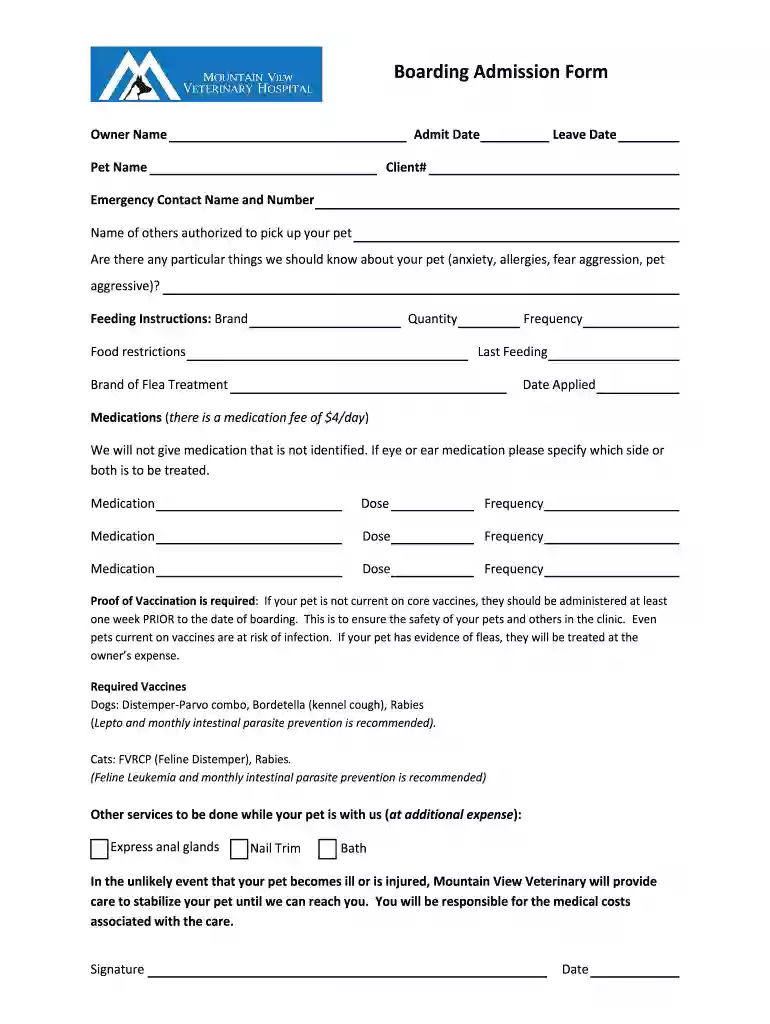
  2. Begin by entering your Owner Name and Client# at the top of the form. This information is essential for identifying your account.
  3. Fill in the Admit Date and Leave Date for your pet's stay. Accurate dates help ensure proper scheduling.
  4. Provide your Pet Name, along with any Emergency Contact Name and Number. This ensures we can reach someone if needed.
  5. List any specific concerns about your pet, such as anxiety or allergies, in the designated section to inform our staff.
  6. Complete the Feeding Instructions section, detailing the brand, quantity, food restrictions, and frequency of feeding.
  7. Document any medications your pet requires, including dosage and frequency. Remember that there is a medication fee of $4/day.
  8. Indicate proof of vaccination requirements by checking off the necessary vaccines for dogs or cats as applicable.
  9. Select any additional services you would like while your pet is boarding, such as nail trims or baths.
  10. Finally, sign and date the form to confirm all information is accurate before submitting it through our platform.

Start filling out your New Client Form today for free using our editor!

See more New Client Form - Sugar Creek Animal Hospital versions

We've got more versions of the New Client Form - Sugar Creek Animal Hospital form. Select the right New Client Form - Sugar Creek Animal Hospital version from the list and start editing it straight away!
Versions Form popularity Fillable & printable
2019 4.2 Satisfied (26 Votes)
2016 4.7 Satisfied (60 Votes)
be ready to get more

Complete this form in 5 minutes or less

Get form

Got questions?

We have answers to the most popular questions from our customers. If you can't find an answer to your question, please contact us.
Contact us

Sign in to your DocHub account and add your New Client Form - Sugar Creek Animal Hospital to our editor using one of its upload options - from your device, cloud storage, secure URL, or your DocHub folders if you have already processed your document before. Open our editor, click the Sign key in the upper toolbar, and choose your signing method. You can use an image of your handwritten signature, draw it, enter your name, or utilize a QR code instead.

Document editing with DocHub is equally convenient on desktop and mobile devices. You just need an internet browser to modify your New Client Form - Sugar Creek Animal Hospital on Android. Open our website and sign in to access the tools you need. Add your file and introduce your intended changes. Next, you can keep your form in your file storage or send it out right away.

Security and compliance

At DocHub, your data security is our priority. We follow HIPAA, SOC2, GDPR, and other standards, so you can work on your documents with confidence.

Learn more
ccpa2
pci-dss
gdpr-compliance
hipaa
soc-compliance