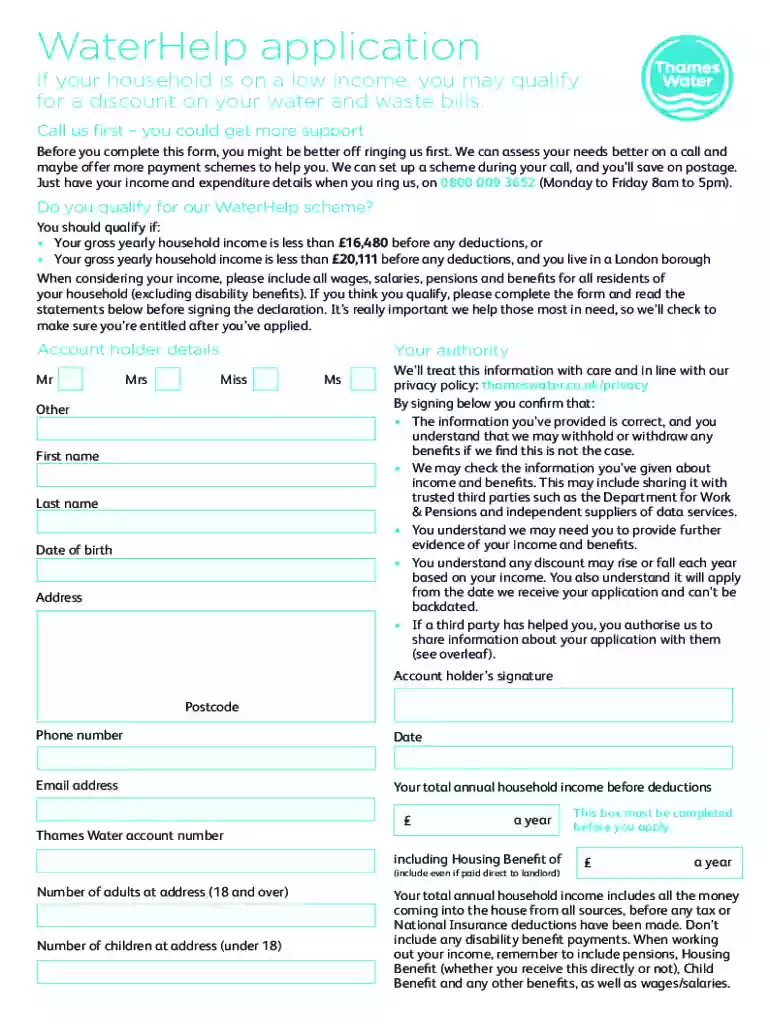
01. Edit your thames water waterhelp application online
Type text, add images, blackout confidential details, add comments, highlights and more.

02. Sign it in a few clicks
Draw your signature, type it, upload its image, or use your mobile device as a signature pad.

03. Share your form with others
Send waterhelp application form via email, link, or fax. You can also download it, export it or print it out.

How to use or fill out watersure scheme with our platform
Ease of Setup
DocHub User Ratings on G2
Ease of Use
DocHub User Ratings on G2
Click ‘Get Form’ to open the watersure scheme application in the editor.
Begin by entering your account holder details. Select your title (Mr, Mrs, Miss, Ms, Other) and fill in your first name, last name, date of birth, address, postcode, phone number, and email address.
Provide your total annual household income before deductions. Include all sources of income such as salaries, pensions, and benefits (excluding disability benefits).
Indicate the number of adults (18 and over) and children (under 18) living at your address.
Review the declaration statements carefully. By signing below, you confirm that the information provided is accurate and understand the implications of any discrepancies.
Once completed, send the form back to Thames Water at the specified address. Expect a decision within four weeks regarding your application.
Start filling out your watersure scheme application today for free using our platform!
The Relationship between Co-speech Gesture Production and
by S Akbıyık 2018 Cited by 30 Examples: Oh, poor thing, he done fell in the water! or down into a ravine thats filled with water sure thats gotta hurt.
Cookie consent notice
This site uses cookies to enhance site navigation and personalize your experience.
By using this site you agree to our use of cookies as described in our Privacy Notice.
You can modify your selections by visiting our Cookie and Advertising Notice.