United kingdom new supplier 2026

Get Form
united kingdom new supplier Preview on Page 1

Here's how it works

01. Edit your united kingdom new supplier online
Type text, add images, blackout confidential details, add comments, highlights and more.
02. Sign it in a few clicks
Draw your signature, type it, upload its image, or use your mobile device as a signature pad.
03. Share your form with others
Send united kingdom new supplier via email, link, or fax. You can also download it, export it or print it out.

How to use or fill out united kingdom new supplier with our platform

Form edit decoration
9.5
Ease of Setup
DocHub User Ratings on G2
9.0
Ease of Use
DocHub User Ratings on G2
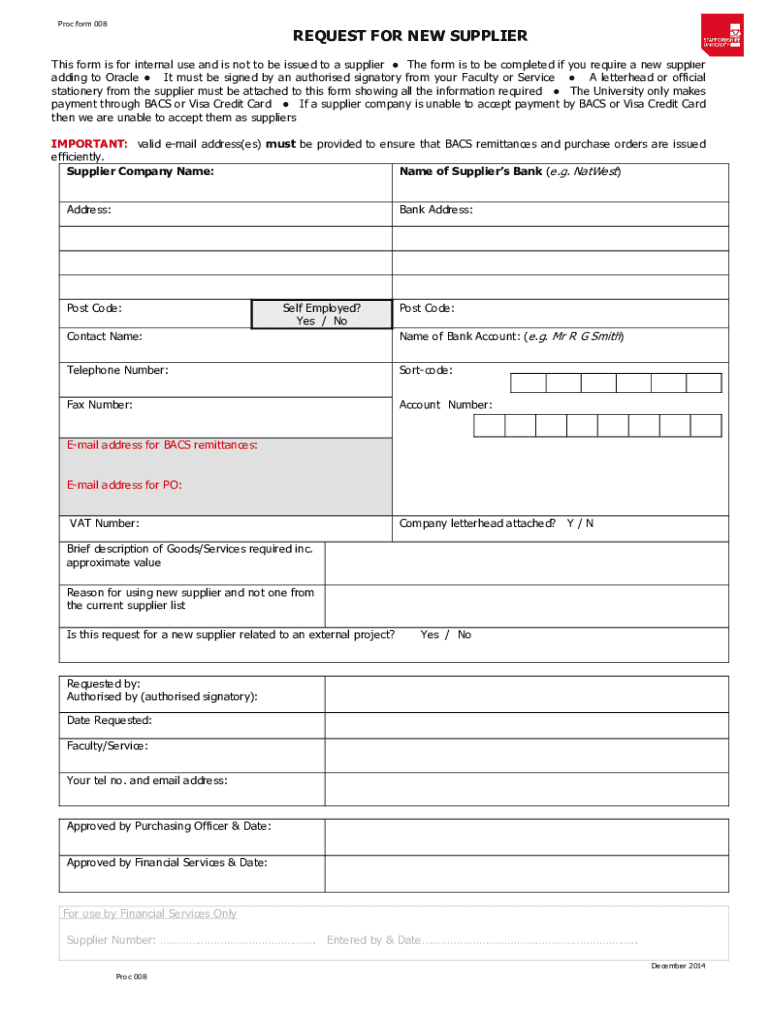
  1. Click ‘Get Form’ to open the united kingdom new supplier form in the editor.
  2. Begin by entering the Supplier Company Name in the designated field. Ensure accuracy as this is crucial for processing.
  3. Fill in the Name of Supplier’s Bank and its Address, including the Post Code. This information is essential for payment processing.
  4. Indicate whether you are Self Employed by selecting 'Yes' or 'No'.
  5. Provide Contact Name, Telephone Number, Sort-code, and Account Number for the supplier's bank account.
  6. Enter valid e-mail addresses for BACS remittances and purchase orders to ensure efficient communication.
  7. Attach a letterhead or official stationery from the supplier showing all required information.
  8. Complete sections regarding Goods/Services required, reason for using a new supplier, and any relation to external projects.
  9. Finally, ensure that all fields are filled out accurately before submitting for approval by an authorized signatory.

Start using our platform today to streamline your document editing and submission process for free!

See more united kingdom new supplier versions

We've got more versions of the united kingdom new supplier form. Select the right united kingdom new supplier version from the list and start editing it straight away!
Versions Form popularity Fillable & printable
2014 4.8 Satisfied (130 Votes)
2010 4 Satisfied (24 Votes)
be ready to get more

Complete this form in 5 minutes or less

Get form

Got questions?

We have answers to the most popular questions from our customers. If you can't find an answer to your question, please contact us.
Contact us

According to eSignature regulations, forms approved electronically have the same validity as traditionally approved ones. You can electronically sign almost any business and private documentation. Four types of paperwork still require wet signatures only - wills and testamentary trusts, court orders and other court forms, state statutes governing divorce, adoption, or other family law, and notice of cancellation of utility services. If you follow the rules and use a trustworthy and compliant software solution, like DocHub, you can eSign your united kingdom new supplier without printing it.

You may complete and sign your united kingdom new supplier online, even on a tight deadline. All you need to access high quality editing tools on any device is a DocHub account, which you can register in a couple of moments. After you register, upload your file or find what you are looking for in our catalog, complete it utilizing the editing tools you need, and place your electronic signature on it at the end.

A new era begins for public procurement as the Procurement Act 2023 and the Procurement Regulations came into force on 24 February 2025. The new regime applies to all public sector organisations and will speed up and simplify procurement processes - where approx.
Contracts Finder lets you search for information about contracts worth over 12,000 (including VAT) with the government and its agencies. You can use Contracts Finder to: search for contract opportunities in different sectors. find out whats coming up in the future.
How to become a subcontractor in construction Gain experience on construction sites. Qualify in your specialist area. Apply for licences and certifications. Register as a construction industry scheme (CIS) subcontractor. Find appropriate insurance. Make connections with construction contractors.

Security and compliance

At DocHub, your data security is our priority. We follow HIPAA, SOC2, GDPR, and other standards, so you can work on your documents with confidence.

Learn more
ccpa2
pci-dss
gdpr-compliance
hipaa
soc-compliance

People also ask

You will need to be registered on the eSourcing tool to participate in CCS tender opportunities. To register you will need to provide information including: full legal name of your organisation. your DUNS number - a unique nine-digit number provided to organisations free of charge by Dun Bradstreet.
How do I find suppliers? Trade directories. Looking through business-to-business trade directories is an obvious way to find suppliers. Trade shows and exhibitions. Trade shows and exhibitions offer opportunities to identify suppliers. Social networks. Trade association. Recommendations. Utilities.
Setting up a UK limited company is a simple and affordable procedure, even if you are a non-UK resident. The application process and legal requirements are exactly the same for everyone, regardless of where they live. Below, we will walk you through the important steps to forming a UK company online.

Related links