Fsis usda sites defaultFSIS 9060-6 APPLICATION FOR EXPORT CERTIFICATE-2026

Get Form
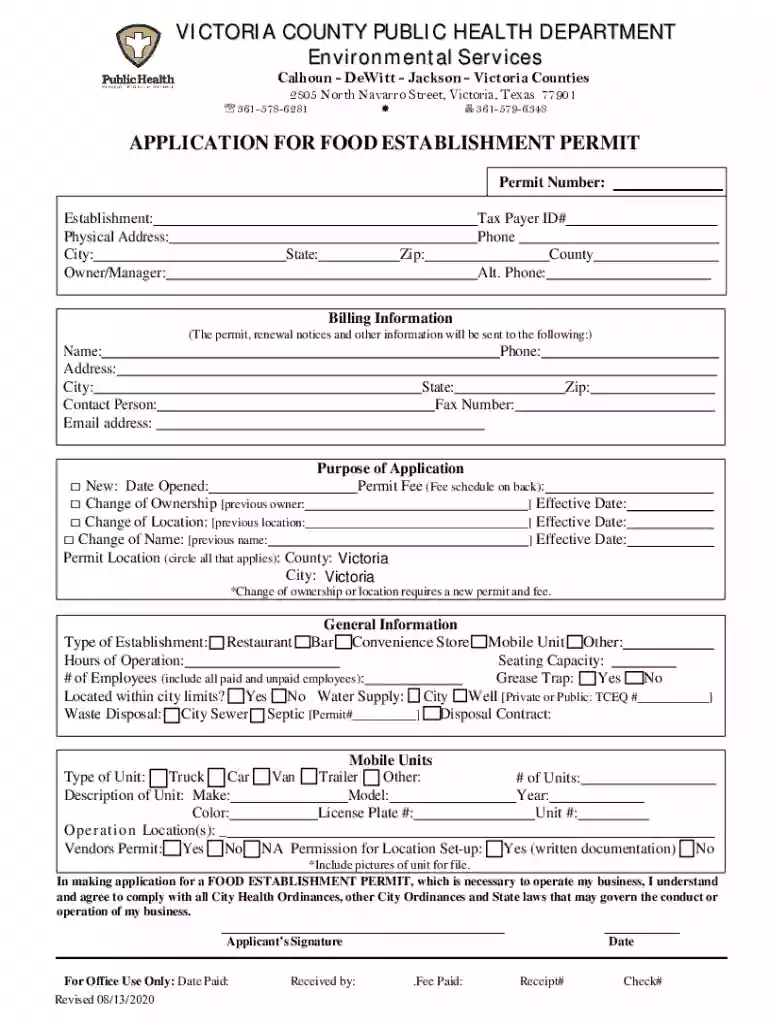
fsis usda sites defaultFSIS 9060-6 APPLICATION FOR EXPORT CERTIFICATE Preview on Page 1

Here's how it works

01. Edit your form online
Type text, add images, blackout confidential details, add comments, highlights and more.

02. Sign it in a few clicks
Draw your signature, type it, upload its image, or use your mobile device as a signature pad.

03. Share your form with others
Send it via email, link, or fax. You can also download it, export it or print it out.

How to use or fill out fsis usda sites defaultFSIS 9060-6 APPLICATION FOR EXPORT CERTIFICATE with our platform

Form edit decoration
9.5
Ease of Setup
DocHub User Ratings on G2
9.0
Ease of Use
DocHub User Ratings on G2
  1. Click ‘Get Form’ to open the fsis usda sites defaultFSIS 9060-6 APPLICATION FOR EXPORT CERTIFICATE in the editor.
  2. Begin by filling in the 'Permit Number' and 'Establishment' fields at the top of the form. Ensure that all information is accurate to avoid processing delays.
  3. Complete the 'Physical Address', 'City', 'State', and 'Zip' fields. This information is crucial for identifying your business location.
  4. In the 'Owner/Manager' section, provide the name of the individual responsible for the establishment, along with their contact details including phone numbers.
  5. Select the purpose of your application by checking one of the boxes provided (New, Change of Ownership, Change of Location, or Change of Name) and fill in any relevant dates.
  6. Fill out general information about your establishment type, seating capacity, hours of operation, and employee count. This data helps assess your permit needs.
  7. For mobile units, specify details such as type, description, and operational locations. Attach any required documentation or images as needed.
  8. Finally, review all entries for accuracy before signing at the bottom. Your signature confirms compliance with health ordinances.

Start using our platform today to streamline your application process for free!

See more fsis usda sites defaultFSIS 9060-6 APPLICATION FOR EXPORT CERTIFICATE versions

We've got more versions of the fsis usda sites defaultFSIS 9060-6 APPLICATION FOR EXPORT CERTIFICATE form. Select the right fsis usda sites defaultFSIS 9060-6 APPLICATION FOR EXPORT CERTIFICATE version from the list and start editing it straight away!
Versions Form popularity Fillable & printable
2020 4.8 Satisfied (34 Votes)
2016 3.8 Satisfied (41 Votes)
be ready to get more

Complete this form in 5 minutes or less

Get form

Got questions?

We have answers to the most popular questions from our customers. If you can't find an answer to your question, please contact us.
Contact us
Export certificate is a document issued by the customs authority to grant VAT exemption on sales (export) of goods to a third country. The sender presents the tax office with the export certificate as proof of export.
Only 5 percent of U.S. exports require an export license. Whether you need one depends on your product, the buyer, and the destination.
FDAs export certification provides the agencys official attestation concerning a products regulatory or marketing status, based on available information at the time FDA issues the certificate (including, as appropriate, attestations provided by the person seeking the certificate).
For more information please call the SARS call centre on 0860-121 218. To download the import and export forms refer to the following SARS link: .sars.gov.za. Applicants must submit the relevant completed forms to their nearest SARS customs and excise branch office.
Export requirements need an export permit (regardless of their value) are goods where duty drawback is being claimed. are dutiable or excisable goods where the duty or excise duty is unpaid.

Security and compliance

At DocHub, your data security is our priority. We follow HIPAA, SOC2, GDPR, and other standards, so you can work on your documents with confidence.

Learn more
ccpa2
pci-dss
gdpr-compliance
hipaa
soc-compliance
be ready to get more

Complete this form in 5 minutes or less

Get form