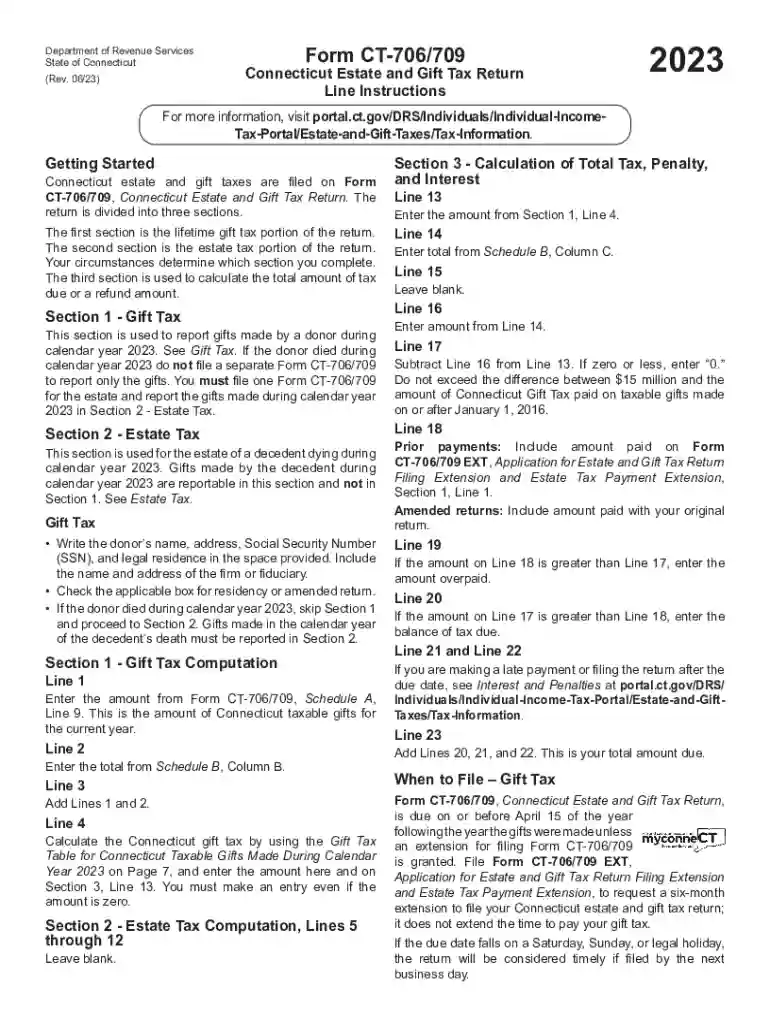
Connecticut Estate and Gift Tax Return Preview on Page 1

Connecticut Estate and Gift Tax Return 2026

Here's how it works

  • 01. Edit your form online

    Type text, add images, blackout confidential details, add comments, highlights and more.

  • 02. Sign it in a few clicks

    Draw your signature, type it, upload its image, or use your mobile device as a signature pad.

  • 03. Share your form with others

    Send it via email, link, or fax. You can also download it, export it or print it out.

How to use or fill out form online with DocHub

Form edit decoration
9.5
Ease of Setup
DocHub User Ratings on G2
9.0
Ease of Use
DocHub User Ratings on G2
  1. Click ‘Get Form’ to open the Connecticut Estate and Gift Tax Return (Form CT-706/709) in our editor.
  2. Begin with Section 1 for Gift Tax. Enter the donor’s name, address, Social Security Number (SSN), and legal residence. Ensure you check the applicable box for residency or amended return.
  3. If the donor passed away in 2023, skip Section 1 and proceed to Section 2 for Estate Tax. Here, report gifts made by the decedent during the year.
  4. In Section 3, calculate total tax due. Start by entering amounts from previous sections as instructed, ensuring accuracy in your calculations.
  5. Review all entries for completeness and correctness before submitting your form electronically through our platform or preparing it for mailing.

Start filling out your form online today for free using our platform!

See more Connecticut Estate and Gift Tax Return versions

We've got more versions of the Connecticut Estate and Gift Tax Return form. Select the right Connecticut Estate and Gift Tax Return version from the list and start editing it straight away!

VersionsForm popularityFillable & printable
20254.4 Satisfied (51 Votes)
20244.1 Satisfied (55 Votes)
20234.3 Satisfied (30 Votes)
20214.9 Satisfied (52 Votes)
20204.4 Satisfied (64 Votes)
20194.4 Satisfied (219 Votes)
20184.3 Satisfied (196 Votes)
20004.4 Satisfied (289 Votes)

be ready to get more

Complete this form in 5 minutes or less

Got questions?

We have answers to the most popular questions from our customers. If you can't find an answer to your question, please contact us.

How to Create a Request Form Define Your Use Case and Requirements. Start Building Your Form. Add and Customize Form Fields. Personalize the Form Design. Set Up Notifications and Approvals. Publish and Share Your Form. Test and Manage Submissions.
To convert a PDF to fillable online, upload your document to docHub. docHub online editor instantly converts any PDF document to a fillable format online. You can fill your PDF with our various tools and features. To fill the form with text, choose the Text button and start typing.
Use docHub eSignature to fill out a PDF form and sign it Sign up for a free docHub account to fill and sign PDFs. Some PDF forms are fillable and some arent.
An online form is an electronic application in which data is entered by the person filling it out for recording and further processing via predefined data fields. Such electronic forms can be found, for example, on websites or as attachments in e-mails.

Security and compliance

At DocHub, your data security is our priority. We follow HIPAA, SOC2, GDPR, and other standards, so you can work on your documents with confidence.

Related links

Estate, Inheritance, and Gift Taxes - The GC Wealth Project

2021 Form CT-706 NT Instructions: Connecticut Estate Tax Return (for Nontaxable Estates link 2020 Connecticut Estate and Gift Tax Return Instructions.Read more

Learn more
Gift and Estate Tax Forms

Gift and Estate Tax Forms. Estate and Gift Tax - (CT-706/709). Current Year Prior Years (2005 to current); Prior Years (1997 to 2004)Read more

Learn more
2017 General Instructions for Forms W-2 and W-3

May 2, 2017 Do not use these forms to report wages subject to U.S. income tax withholding. Instead, use Form W-2 to show U.S. income tax withheld. TreatmentRead more

Learn more
If you believe that this page should be taken down, please follow our DMCA take down process here