Pediatric Specialist Request - Vidant Health 2026

Get Form
2019 vidant 15 vh 293 request Preview on Page 1

Here's how it works

01. Edit your 2019 vidant 15 vh 293 request online
Type text, add images, blackout confidential details, add comments, highlights and more.

02. Sign it in a few clicks
Draw your signature, type it, upload its image, or use your mobile device as a signature pad.

03. Share your form with others
Send it via email, link, or fax. You can also download it, export it or print it out.

How to use or fill out Pediatric Specialist Request - Vidant Health

Form edit decoration
9.5
Ease of Setup
DocHub User Ratings on G2
9.0
Ease of Use
DocHub User Ratings on G2
  1. Click ‘Get Form’ to open it in the editor.
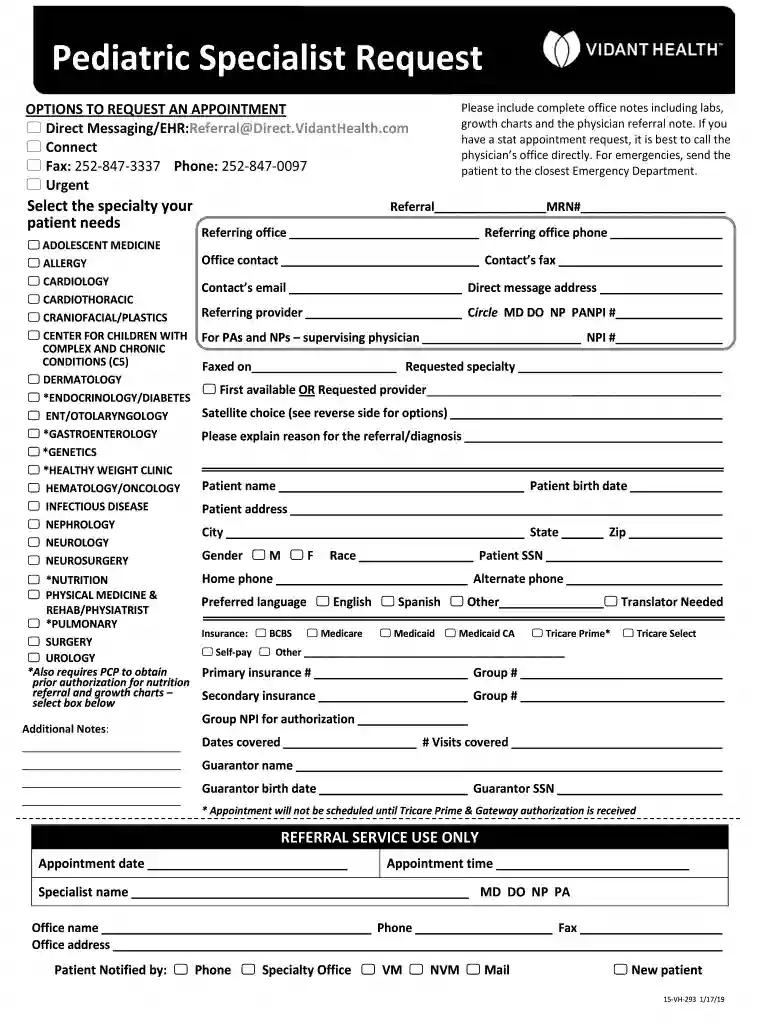
  2. Begin by selecting the specialty your patient needs from the provided options. This is crucial for directing the referral appropriately.
  3. Fill in the referring office details, including office name, phone number, and contact information. Ensure accuracy for seamless communication.
  4. Complete the patient information section with details such as name, birth date, address, and insurance information. This data is essential for processing the referral.
  5. In the 'Reason for Referral/Diagnosis' section, provide a clear explanation of why the referral is necessary. Include any relevant medical history or notes.
  6. Review all entered information for completeness and accuracy before submitting. This helps avoid delays in scheduling appointments.

Start using our platform today to streamline your Pediatric Specialist Request process effortlessly!

See more Pediatric Specialist Request - Vidant Health versions

We've got more versions of the Pediatric Specialist Request - Vidant Health form. Select the right Pediatric Specialist Request - Vidant Health version from the list and start editing it straight away!
Versions Form popularity Fillable & printable
2020 4.8 Satisfied (154 Votes)
2019 4.3 Satisfied (41 Votes)
2019 4.2 Satisfied (61 Votes)
be ready to get more

Complete this form in 5 minutes or less

Get form

Got questions?

We have answers to the most popular questions from our customers. If you can't find an answer to your question, please contact us.
Contact us

You should use only trusted software solutions with strong security compliance to approve your documents electronically. DocHub is just the type of software you need! It stores data on Amazon Web Servers and complies with all essential security criteria and eSignature laws, so it’s a trustworthy way to eSign your Pediatric Specialist Request - Vidant Health or other paperwork with this tool.

In addition to an extensive toolset for editing PDFs on mobile devices, DocHub allows you to sign your Pediatric Specialist Request - Vidant Health along the way. Open our editor in your internet browser, make changes using DocHub’s toolset, and complete your editing by eSigning the completed form.

students who are not enrolled in the summer session but who were enrolled the previous academic semester and have enrolled for the following academic semester ($35.00 per visit or $100.00 per summer session) students seeking services during intersession when there are no classes ($35.00 per visit)
Waive out of SHIP To waive out, students must provide current policy information through a secure online system. Once insurance has been verified, the SHIP charge will be waived on the students tuition account. The verification process can take up to 2 weeks. Once registered for classes, students can submit a waiver.
We have the backing of a state-of-the-art data center and a common IT platform including our electronic health record (EHR) that uses EPICs suite of applications.

Security and compliance

At DocHub, your data security is our priority. We follow HIPAA, SOC2, GDPR, and other standards, so you can work on your documents with confidence.

Learn more
ccpa2
pci-dss
gdpr-compliance
hipaa
soc-compliance

People also ask

The average Resident Physician base salary at ECU Health is US$57K per year.
With MyChart, you can: Communicate directly with your doctors office. View test results, immunization records and physician notes. View past and upcoming appointments. See health information, treatment plans and discharge instructions.
You can use ECU HealthNow to connect with a provider 24/7 by phone or online. If you are enrolled in the Medical Savings Plan, there is a $55 fee for service until your deductible has been met.
ECU Health Company typePrivate not-for-profit Founded 1997 Headquarters Greenville, North Carolina , United States Number of locations Nine hospitals Area served Eastern North Carolina8 more rows

Related links