




Here's how it works



How to use or fill out Pediatric Center Forms with our platform

- Click ‘Get Form’ to open the Pediatric Center Forms in the editor.
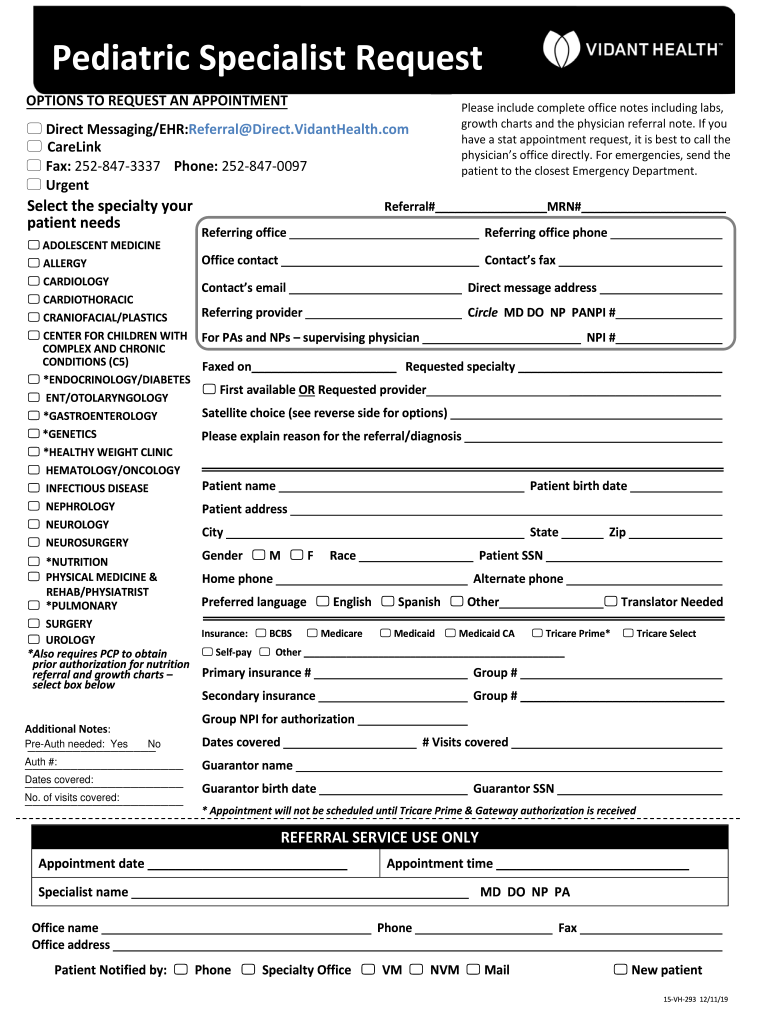
- Begin by selecting the specialty your patient needs from the provided options, such as ADOLESCENT MEDICINE or CARDIOLOGY.
- Fill in the referral details including Referral#, MRN#, and contact information for the referring office. Ensure all fields are completed accurately.
- Provide patient information, including name, birth date, address, gender, and insurance details. Make sure to check if prior authorization is needed for specific services.
- In the 'Reason for Referral/Diagnosis' section, clearly explain why the referral is being made. This helps streamline the appointment process.
- Review all entered information for accuracy before submitting. Use our platform’s features to save or share the form as needed.
Start filling out your Pediatric Center Forms today for free using our platform!
It's free
See more Pediatric Center Forms versions
Got questions?
How can I sign my Pediatric Center Forms on iOS?
With DocHub, you can quickly sign your Pediatric Center Forms or any other document on iOS, even without setting up extra applications. You can access your DocHub account from any internet-connected browser and fill out and sign your form in any way you like with just a couple of clicks.
How do you modify Pediatric Center Forms from Google Drive?
If you store your paperwork in Google Drive, there is no need to download your Pediatric Center Forms on the computer and upload it back to our editor. A significantly easier way is to install a browser extension developed by DocHub to simplify this flow. The extension allows editing PDFs in your web browser. Alternatively, you may integrate your DocHub and Gmail accounts for more efficient editing.
Security and compliance
At DocHub, your data security is our priority. We follow HIPAA, SOC2, GDPR, and other standards, so you can work on your documents with confidence.
Learn more




