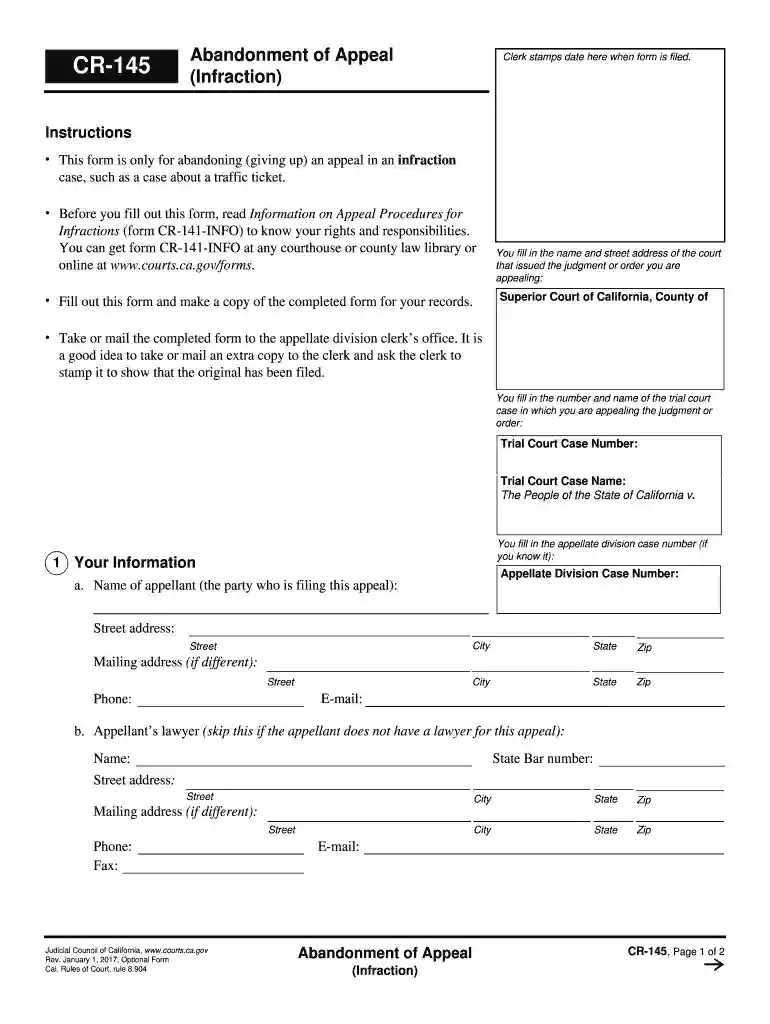
cr145 Preview on Page 1

Appeal infraction 2026

Here's how it works

  • 01. Edit your cr145 online

    Type text, add images, blackout confidential details, add comments, highlights and more.

  • 02. Sign it in a few clicks

    Draw your signature, type it, upload its image, or use your mobile device as a signature pad.

  • 03. Share your form with others

    Send it via email, link, or fax. You can also download it, export it or print it out.

How to use or fill out appeal infraction with our platform

Form edit decoration
9.5
Ease of Setup
DocHub User Ratings on G2
9.0
Ease of Use
DocHub User Ratings on G2
  1. Click ‘Get Form’ to open the appeal infraction document in the editor.
  2. Begin by entering the name and street address of the court that issued the judgment you are appealing. This is crucial for identifying your case.
  3. Next, fill in the trial court case number and name. This information helps link your appeal to the original case.
  4. If applicable, enter your appellate division case number. This step is optional but can streamline processing.
  5. In section 1, provide your personal information including your name, street address, city, state, zip code, email, and phone number. If you have a lawyer, include their details as well.
  6. On page 2, indicate the date you filed a notice of appeal in the trial court. This establishes a timeline for your abandonment.
  7. Finally, sign and date the form to officially abandon your appeal. Ensure all fields are completed before saving or printing.

Start using our platform today to easily complete your appeal infraction form online for free!

See more cr145 versions

We've got more versions of the cr145 form. Select the right cr145 version from the list and start editing it straight away!

VersionsForm popularityFillable & printable
20174.8 Satisfied (72 Votes)
20094.3 Satisfied (295 Votes)

be ready to get more

Complete this form in 5 minutes or less

Security and compliance

At DocHub, your data security is our priority. We follow HIPAA, SOC2, GDPR, and other standards, so you can work on your documents with confidence.

Related links

Appeals and Fines

To schedule an appeal, contact The Transportation Office at: Email: TMOAppeals@seattlecolleges.edu Fines WAC 132F-116-045 - Ticketing and enforcement ofRead more

Learn more
Appeal your Punishment | ManaCube Official Wiki

Please keep in mind that you may only appeal punishments that are longer than 24 hours. Punishments that are exactly 24 hours and less will be closed. AppealsRead more

Learn more
CR-141-INFO - Amador Superior Court

This information sheet tells you about appeals in infraction cases. It is only meant to give you a general idea of the appeal process, so it does not cover.Read more

Learn more
If you believe that this page should be taken down, please follow our DMCA take down process here